
How do you leave group texts in iOS 9.1?
I can't find the option on how to leave a group text since upgrading to iOS 9.1. How do you do it?
iPhone 6s, iOS 9.1
I can't find the option on how to leave a group text since upgrading to iOS 9.1. How do you do it?
iPhone 6s, iOS 9.1
From this support document. Send a group message on your iPhone, iPad, or iPod touch - Apple Support
Leave a group conversation
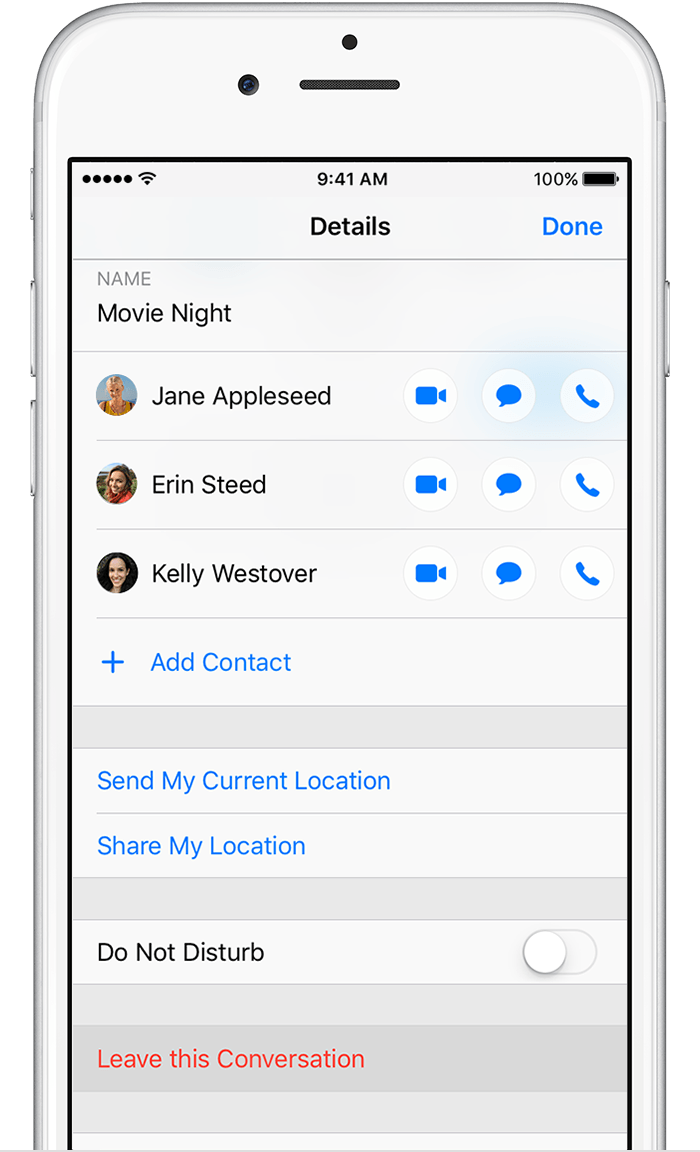
To leave a conversation, tap Details, then tap Leave this Conversation. You can only leave group iMessages that have at least three other people.
Go to settings > messages > uncheck group messaging until the group is through for the day.
nvm86 wrote:
You wait to the end of your long rambling story then don't even tell us how to mute the convo?
Open the conversation. Tap the "I" in the upper right corner. Enable Do Not Disturb.
Hopefully, my answer will not meet with the same disdain at the one to which you were replying.
Leave a group. Tap Details, then tap Leave this Conversation.
The only option I see is to Mute Conversation!! I would Love to have to option to leave a group message.
Check to see if all the people who are in the group message have iMessage. If there's even ONE person who does not have an iPhone or does not have iMessage enabled, the option to leave the conversation is automatically turned off.
The reason for this is because leaving group messages on an iDevice is directed solely at an iDevice. The option to leave the conversation does not appear on the device that is not running iOS, and therefore is incapable of actually leaving the conversation. So even if you COULD leave the conversation despite someone not having an Apple device, the person who does NOT have an Apple device would still receive texts from the group, and would still send messages BACK to the group... Meaning his/her messages would be sent back to you as well because his/her phone does not recognize that you have "left" the conversation. So you would be getting annoying one sided texts... Kind of like when you hear your mother speaking on the phone but cannot hear the other end of the conversation. It would get super annoying. If it were me, I'd rather be able to see the full conversation rather than just see random replies that make no sense whatsoever.
So, back to answering your question: There is no way to leave a conversation if someone does not have an iMessage device. The best you can do is mute the conversation and just open your Messages app every once in a while to make the 200+ messages go away.
There is no option in iOS version 9.2.1 to leave a conversation / Group message. Why would Apple take this from us? Booo... hisss...booo
mikMike wrote:
There is no option in iOS version 9.2.1 to leave a conversation / Group message. Why would Apple take this from us? Booo... hisss...booo
If you're not seeing the option, it means that someone in the group is not using iMessage. The option is still there if everyone in the group is using iMessage
Thanks for the informative answer to recurring question. Now, the bigger question is what is Apple going to do about it?!! A multi-billion-dollar corporation that claims it wants to make things simple and intuitive should crush this challenge. Does Apple not understand the effect this problem has on us? I'm a HUGE Apple consumer and a stockholder as well. I'm not a whiner and, in spite of this issue, I will continue to be a fan. My point is that many of the generational "new features" of iPhones are never used by the average owner. But, THIS problem is a real quality of life issue. It's annoying to be locked into a group text without an exit. Ok, sure I can mute it....but I don't want to SEE it either! I don't want to repeatedly delete the messages. I shouldn't be so inconvenienced but the most convenient device since the dawn of mankind. As it stands, I'm TRAPPED in four different group messages. I actually only know (sort of) one or two people in each group. Seriously, all group texts combined, I am subjected to the ridiculous ramblings of 23 people that I don't even know.....all day.....and night. I see it as an invasion of privacy and solitude. At 1:00 AM, some drunk co-worker decides to create a group text to arbitrarily share his not-so-witty observations about the world around him and I am FORCED to allow him to do so. Ah, so three other pseudo-associations brilliantly realize that they too can get their fix for attention by wedging their meaningless drivel into my life as well. Because I must go to work everyday but I ALWAYS have my iPhone with me, these annoying lifehackers would have less time with me if they had squatted in my home instead. There MUST be a solution and Apple needs to understand that it is a big deal.
No one here would know what Apple plans to do about this. And, Apple isn't reading your little treatise here. Use the feedback page for anything you want Apple to know about:
Meanwhile, you might try blocking the people who annoy you.
Best of luck.
In addition to what Meg has provided, you must remember that a group message that contains non-iOS users is an MMS, controlled by the carrier, like SMS is. In those cases, the creator of the message is the one that retains control of the members. They would have to be the ones that remove you from the group, or as Meg has suggested, you block these individuals. I checked a group that I have with some relatives, and you still have the option to set the Do Not Disturb switch on those conversations, which should keep you from being notified. When you open the conversation, go to Details in the upper right corner, and then select Do Not Disturb.
Whoa! A bit snippy there, Meg. Such a dismissive and demeaning response was unwarranted. My "little treatise" was not directed at helpful folks "here" - yourself included. It's what folks with similar frustrations call "co-miserating" or "venting." Real people do this kinda thing in real-life relationships beyond a screen. My purpose was to motivate others to do exactly as you suggest: make our shared frustration known outside this thread and inside the purview of Apple - a company we all love. We agree on this problem, why be snotty toward me? Let Apple know it's a bigger issue to be prioritized. If I'm the only one who bothers to write a "little treatise," not much will be done. Rather than just wax omniscient, maybe you could've forwarded or cut & pasted my "treatise" where it would matter more - you know, on behalf of all the folks you purport to be helping on this thread. To get a grasp of this issue, I recommend publicizing your personal cell number, perhaps a few cyber cretins would enjoy your reluctant attention in some group texts. They'd certainly give you ample cause for snippy responses rather than misplacing them here. In the meantime, fresh air away from a keyboard might do you wonders. Godspeed.
We agree on this problem, why be snotty toward me? Let Apple know it's a bigger issue to be prioritized.
No, I don't have a problem with this. And, once again, if you want Apple to know how you feel , this is the wrong venue. Submit your feedback using the feedback link if it's important enough for you to want it changed.
I Thought it was just me. It probably sounds crazy to most of you, but I don't have unlimited texting. I've never needed it. Today I'm $34 in the hole because Star Trek had an anniversary and I turned off my volume at work because it wouldn't stop buzzing. Last month I missed my shuttle bus at the airport because after turning my phone back on 30 jokes came thru while I was trying to call the bus. Tonight I told them to stop. Now I'm a buzz kill (pun intended). I couldn't get myself out of the group because on android user got the ball rolling.
It's crazy that there's no option to leave from group text it's very annoying! Why apple didn't pay attention please do something!
How do you leave group texts in iOS 9.1?





