how to set a default color font for messages in OS X Mail

Hi i have been trying to set my outgoing emails from mac-mail (trough mail preferences - font & colors) to a blue writing font color and it never work!

Could someone give a me a hint on what is going on? Why these ''settings'' are existing (like any other mail provider) but aren't working on mac in 2015?!


Thanks in advance,

Posted on Nov 1, 2015 11:03 AM

Reply
18 replies

Nov 2, 2015 7:21 AM in response to Grant Bennet-Alder

Hi Grant Bennet - Alder,


Thank you for your response, however i have no clue on how to proceed to 'set the font color' (permanently) with your answer.


Could you please explain step by step how i should do the MAC - support/ programming team's job in order to make this setting please. I would really appreciate that you give me a complete answer to help in this topic. Mostly that i saw in the discussion forum that many peoples are facing the same ''issue''.


Thank you


Personal note regarding mac operating systems; Also i must extend my comment as i found so absurd that all these ''settings' are present in the Mail preferences but ... obviously completely useless.


Also i did have spent already over an hour to get this working, while on any other 'Mail-box' it takes like 9 sec?


I think that is very strange for such a brand which is claiming to be so 'in advance' and 'reliable' (quite costly too).. I never suspected to encounter so much absurdity in this operating system.

I was working on Windows platform before and bought a Mac book pro - retina display and i have already, in a year, be facing so much ''issues'' which doesn't exist with Windows OS.

Nov 2, 2015 7:56 AM in response to Luis Sequeira1

from Mail Help:


Format text in messages

There are a variety of ways to enter or work with text, characters, and symbols in the messages you write.

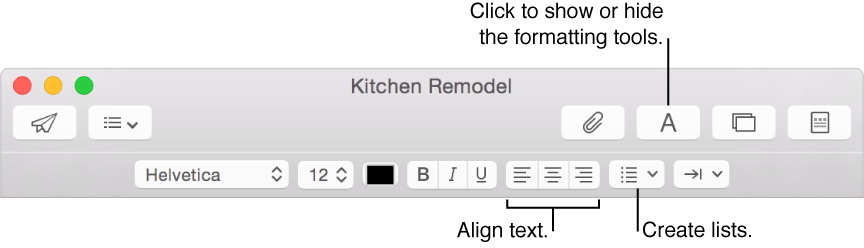
To quickly change fonts and styles in your message, click the Format button User uploaded file in the toolbar of a message window.

User uploaded file


.. and that black rectangle to the right of Helvetica 12 is the text color. Click on it to get a text color selector. Very nice.


.

Nov 2, 2015 10:58 AM in response to Tom Gewecke

Tom Gewecke wrote:


Luis Sequeira1 wrote:


Tom Gewecke wrote:


Mail can't do what you want (set default color, font, etc).


Sorry, not true. You can set the default font and size,


So that the recipient will see what you have set? Last time I checked, you still have to do that for each outgoing in the new message pane, the preference settings only affect what you see.


I stand corrected. You are right. I believe what happens is that a message is only sent as rich text (and not plain text) if the user explicitly makes a font/size/color decision in the message itself. Otherwise it is simply sent as plain text, thus the default font has not effect for the receiver.

Nov 2, 2015 6:19 PM in response to Luis Sequeira1

Hi Luis, Hi Tom, everyone,


First, YES i do used 'rich text', i mean i have been trying and wasting time with all the combination settings you can actually do, to try and get the font COLOR i want. As MY writing/mark and not only ''what i can see'' but ''is changing on the way when sending emails out (how stupid).

That's the purpose of this enquiry, that's the solution i am desperately looking for ..and spent like few hours so far into it.


Thank you for your concern and active participation in this 'Mail formatting issue'' if i may call it like that.


Sorry to say but i found very absurd that MAC OS systems (self proclaimed N1) aren't including such settings (while all the settings buttons are present in the menus & sub menus)? It's like one guy is making his job right and the programmer or whatever else is not linking the buttons to anything.. lol


Also i have been looking about the HTML CODE proposed by Grant Bennet - Alder and well, it looks like i need to get some Programming & Engineering lessons in order to go trough this way..


Finally, I found incredibly astonishing that we, ''the customers'' using MAC operating systems, have to waste so much time (i mean over 2 min is already unacceptable for such a ''setting -issue'') just to get a ''setting'' or else ''issue solving'' (god knows if they are frequent with Macintosh O.S) while this 'company' is selling is products at such high prices...

It's like they can't afford the ''Software Programming Team'' within this brand and that's just amazing! ..Or maybe all these ''issue-resolving Forums'' are there to show to the world how much they don't care about their Customers?


I do hope that this kind of ''message'' - or ''constructive observation'' will rise up into the ranks of Mac OS Programming Manager's somehow in order to really do the improvements necessary at some ''basic - functioning - levels.


I mean i have my Gmail 'deep blue writing' color set since before 2005!

This thread has been closed by the system or the community team. You may vote for any posts you find helpful, or search the Community for additional answers.

how to set a default color font for messages in OS X Mail

Welcome to Apple Support Community
A forum where Apple customers help each other with their products. Get started with your Apple Account.