Why can't I upload from Photos to Flickr

I recently tried to upload or share my Photos on my Flickr page. I've added the Yahoo account to my Internet Accounts, but when I try to proceed with the upload to Flickr, the message I get is No Account is Configured and Add Account, which I have done. What's the deal?

iMac, OS X El Capitan (10.11), 3.4 GHz Core i7 16GB RAM

Posted on Dec 4, 2015 8:31 AM

Reply
14 replies

Feb 10, 2017 4:49 PM in response to DJMc

This is an issue I've been dealing with for awhile. I thought it had to do with the number of photos I'm attempting to upload, but then I realized it's probably a Keychain issue.


What worked for me:


  1. Go to Internet Accounts in System Preferences
  2. Delete Flickr Entry
  3. When prompted to Turn Off on this Mac or Delete from All Devices (if you're using iCloud Keychain), choose Delete from All Devices
  4. Restart Mac
  5. Go back to Internet Accounts
  6. Choose Flickr and enter your Yahoo credentials
  7. Make sure it shows the account as enabled
  8. Go to Photos and try to upload to Flickr
  9. Be patient--sometimes it can take 30 seconds or more for Flickr to respond to Photos
  10. Let me know if this solved your problem


I hope this works for you!

Jul 28, 2017 11:12 AM in response to AppleJoe

Upload from Photos to Flickr does not work.

Photo's version 2.0 on OS 10.12.5.


The change from "iPhotos" to "Photos", the "direct to Flickr" sharing was broken, another feature lost from iPhoto.


I've seen some people say that all you need to do is add Flickr under Internet Accounts, and I can confirm that under 10.12.5, there is still a Flickr account, which I added. But that doesn't change anything under Photos (2.0). Selecting an album and using File -> Share, on the popup, I still only see: "iCloud Photo Sharing", "Mail", "AirDrop", "Notes", and "More...". Selecting "More..." pulls up an "Extensions" menu, with a checkbox to "Use Apple and third-party extensions to customize your Mac." Under "Select extensions for sharing with others" I see "Flickr" (after I added it to Internet Accounts), and it's CHECKED. But there is nothing in this pop-up that lets you actually upload/sync the album to Flickr like you used to be able to do. (Note that the little "share" up-arrow in the upper-right corner of "Photos" is functionally equivalent to "File -> Share".


Nov 28, 2017 12:40 PM in response to AppleJoe

hi

im wondering if you can help - i have done all the above about choosing flickr account in the internet accounts but when i go to the share button in photos its not showing as an option and when i click more it takes me to system preferences > extensions


flickr is checked there

as it is in internet accounts


what am i doing wrong - this is driving me nuts - as i now cant get my pics out of photos even on to my mac!!!

anyone any bright ideas ??

Dec 6, 2015 9:20 AM in response to DJMc

Greetings DJMc,


Thanks for using the Apple Support Communities!


I understand that you are trying to share photos from Photos to Flickr but are continually prompted to add your account. To share to Flickr from Photos, you will first need to sign into that account as described below.


Sign in to your Facebook, Flickr, or Twitter account

  1. Choose Apple menu > System Preferences, then click Internet Accounts.

  2. Click Facebook, Flickr, or Twitter.

  3. Type your user name and password, then click Next.


Once signed in, the next set of instructions outline how to publish your photos to Flickr.


Publish your photos to Flickr

You can share your photos online by publishing them directly from Photos to Flickr.

  1. Select the photos you want to publish.

  2. Click the Share button User uploaded file in the toolbar and choose Flickr.

  3. If Photos asks you to sign in to your Flickr account, type your account ID and password, then click Sign In.

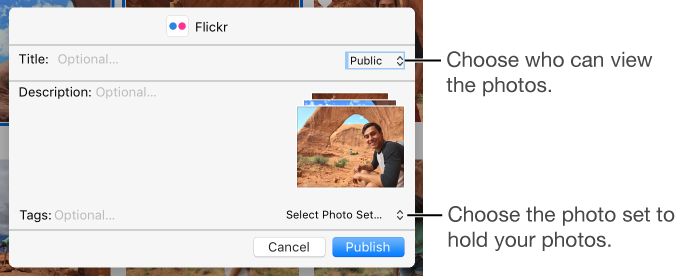
  4. In the Flickr dialog, choose options for the photos.

    User uploaded file

    • Choose where to add the photos: Click the Select Photo Set pop-up menu and choose a photo set (what Flickr calls an album). To add your photos to your Flickr Photostream, choose Photostream.

    • Choose who can see the photos: Click the pop-up menu at the top right.

    • Add a title, description, and tags: Type text in the fields.

  5. Click Publish.


Both sets of instructions come from the following link.


Post photos to Facebook, Flickr, and Twitter - Photos Help


Have a great day!

Dec 6, 2015 9:23 AM in response to AppleJoe

joe_7399

Thanks for the helpful info. All is working as it should. My problem was that when I had tried to add the internet account, I didn't notice I had to scroll down and the last item I saw was to add a YAHOO account and since Flickr is owned by Yahoo, that is what I was trying to use. Thanks again for setting things straight for me

May 31, 2016 4:39 PM in response to DJMc

I can select all pictures and click flickr, it counts the photos from 1 to 56, then nothing happens. It doesn't load, there are no other options. Help?


Also I go directly into Flicker, Click Upload, find the pictures on my computer, highlight and click next. it thinks it is in edit mode, brings in every one on the screen and I click publish. nothing happens. i have done this three times and still they are not there. HELP. It's like its in a cycle and I can't get to the next step.

This thread has been closed by the system or the community team. You may vote for any posts you find helpful, or search the Community for additional answers.

Why can't I upload from Photos to Flickr

Welcome to Apple Support Community
A forum where Apple customers help each other with their products. Get started with your Apple Account.