how do i fix my ipod
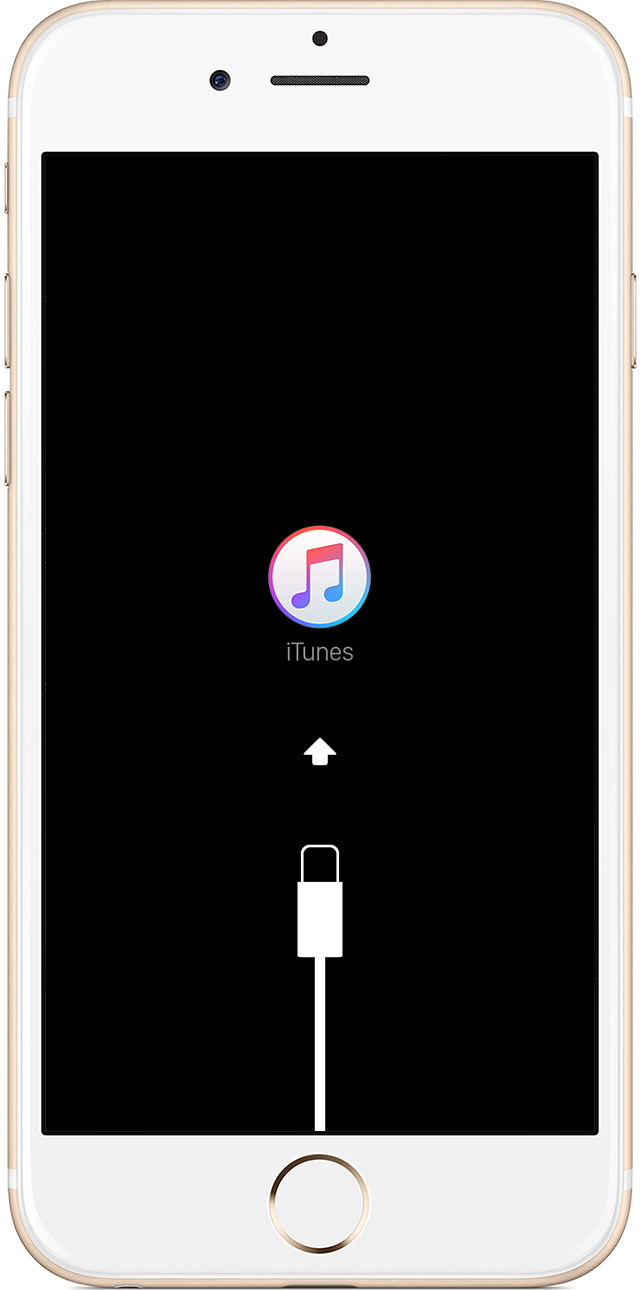
my ipod wont turn on after i got the 9.2 update it keeps on showing a charger with an arrow pointing to the itunes app how do i fix it
iPod touch, iOS 9.2
my ipod wont turn on after i got the 9.2 update it keeps on showing a charger with an arrow pointing to the itunes app how do i fix it
iPod touch, iOS 9.2
Hello sfhhfds,
Thanks for using Apple Support Communities.
From your post I understand that your iPod touch is displaying an iTunes logo with charger. This indicates the iPod is in recovery mode, and will need to be restored by following the directions below.
Put your device in recovery mode and set it up again
- Connect your device to your computer and open iTunes. If you don't have a computer, borrow one from a friend or go to an Apple Retail Store or Apple Authorized Service Provider for help.
- While your device is connected, force restart it: Press and hold both the Sleep/Wake and Home button for at least 10 seconds, and don't release when you see the Apple logo. Keep holding until you see the recovery mode screen.
- When you see the option to Restore or Update, choose Update. iTunes will try to reinstall iOS without erasing your data. Wait while iTunes downloads the software for your device.
If the download takes more than 15 minutes and your device exits recovery mode, you'll need to repeat these steps and choose Restore instead of Update when you get back to this step.
- After the Update or Restore completes, set up your device. If you previously backed up your device with iTunes or iCloud and had to restore your device in step 3, you might be able to restore from your backup during setup.
Get more help
Contact Apple Support if you can’t update or restore your device with recovery mode, or you can't use recovery mode because of broken or stuck buttons.
If you can‘t update or restore your iPhone, iPad, or iPod touch
Take care.
how do i fix my ipod