GPU is not working on EL Capitan - Premiere Pro CS6 lagging

Graphic driver on EL Capitan is not as powerful as previous OS Yosemite. Premiere Pro CS6 used to work flawless on Yosemite. It hangs up and creates a delay in user action in Premiere Pro under EL Capitan. When scrolling in the timeline, the timeline bar keeps running in random direction and is not precise to where the mouse is. Kindly release respective updates for fixing this bug.

iMac, OS X El Capitan (10.11.2), Adobe Premiere Pro CS6

Posted on Dec 11, 2015 5:20 AM

Reply
3 replies

Dec 11, 2015 6:39 AM in response to Neesh

Neesh wrote:


Graphic driver on EL Capitan is not as powerful as previous OS Yosemite. Premiere Pro CS6 used to work flawless on Yosemite. It hangs up and creates a delay in user action in Premiere Pro under EL Capitan. When scrolling in the timeline, the timeline bar keeps running in random direction and is not precise to where the mouse is. Kindly release respective updates for fixing this bug.

This is a user forum, you are talking to other users like yourself, not to Apple or the maker of your GPU - which is, by the way, you neglected to specify in your post.

When posting you should give specific information - in this case, the model of your mac, and particularly which GPU it uses.

Some macs have discrete GPU by NVIDIA or AMD, some have only the integrated GPU by Intel.


If your GPU is by NVIDIA you may want to go to their site and update the CUDA driver. That may help, since, AFAIK, Premiere would take advantage of CUDA.


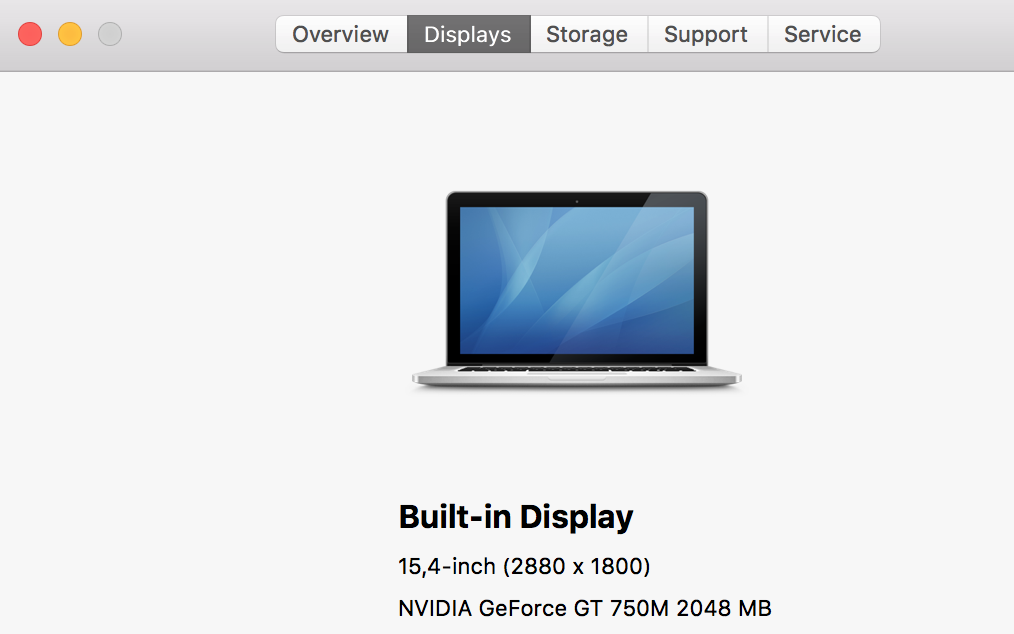
You can find out which GPU your mac uses by going to the Apple menu, choosing About this Mac, and then clicking on "Displays".

Here is what it shows in my mac:

User uploaded file

Dec 11, 2015 7:13 AM in response to Neesh

Open GL tools for mac have been under fire by a handful of graphic developers for being incomplete. Apple had responded to one developer with "we're working on it."

secondly CS6 is NOT supported in OS 10.11, if this is an issue with incompatibility between Adobe's code and Apples OS please see Apples EULA as to their responsibility to you when you update to OS 10.11

http://images.apple.com/legal/sla/docs/OSX1011.pdf

but I can save you a trip and highlight the pertinent part.


O. Third Party Software. Apple has provided as part of the Apple Software package, and may provide as an upgrade, update or supplement to the Apple Software, access to certain third party software or services as a convenience. To the extent that the Apple Software contains or provides access to any third party software or services, Apple has no express or implied obligation to provide any technical or other support for such software or services. Please contact the appropriate software vendor, manufacturer or service provider directly for technical support and customer service related to its software, service and/or products.


This thread has been closed by the system or the community team. You may vote for any posts you find helpful, or search the Community for additional answers.

GPU is not working on EL Capitan - Premiere Pro CS6 lagging

Welcome to Apple Support Community
A forum where Apple customers help each other with their products. Get started with your Apple Account.


