MFI Hearing aid - unlinking

I had Resound Linx hearing aids, but no longer (1 year +). Resound app deleted. However these aids still show up under the settings/accessibility/hearing aids - Device list (as the pair) and seems as if IOS is still "looking"for them.


How do I unlink this pairing?

iPhone 6 Plus, iOS 9.2

Posted on Dec 24, 2015 1:50 AM

Reply
12 replies

Dec 25, 2015 12:57 PM in response to NormanS

Hello there, NormanS.


It sounds like you are still seeing a profile listed for the Resound Linx hearing aids that you no longer have or use. From what I can gather from the online iPhone User Guide and the following Knowledge Base arcticle, the iPhone links to the hearing aid just like it would with any Bluetooth device. Using the information that follows, just select "Forget this Device" option in the Hearing Aid's profile:


Use Made for iPhone hearing aids


Use Settings

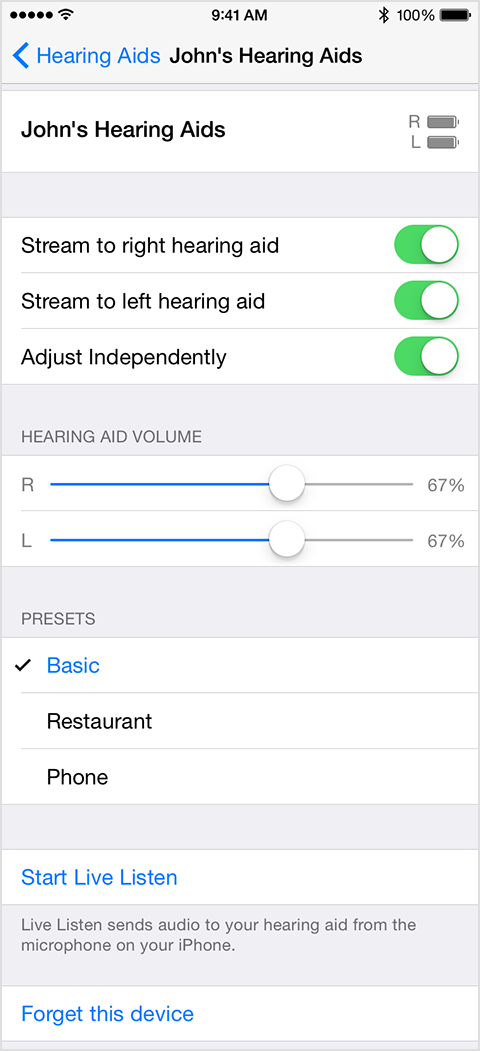
Tap Settings > General > Accessibility > Hearing Aids. Then tap your hearing aid's name.

User uploaded file

Here's what you can do in Settings:

  • View battery life
  • Adjust volume levels for either or both hearing aids
  • Choose an audio preset
  • Turn on Live Listen
  • Unpair your hearing aid


For some additional information in regards to hearing aids and iPhone, I've also included the link from the online iPhone User Guide:


Hearing aids - iPhone User Guide


Thanks for reaching out to us on the Apple Support Communities.


Happy Holidays!

Dec 25, 2015 2:40 PM in response to pedro d

Thanks Pedro. This is indeed what I would have expected, but tapping on the the linked aids does absolutely nothing! I used to get the screen as you suggest and went there to make adjustments and on occasion "forget" the aid in order to start again after issues, but now this options screen in not available. The screen appears thus:


User uploaded file

Tapping on the hearing aid under devices takes me.... nowhere! So I cant get to the screen to forget it.


Norman

Dec 26, 2015 1:10 PM in response to NormanS

Hello again, NormanS.


Thank you so much for the follow up and the additional screen shot. As one additional step, might your hearing aid be showing up under Bluetooth Devices? Is it possible to remove it from there?


Bluetooth devices - iPhone User Guide

Unpair a device. Go to Settings > Bluetooth, tap User uploaded file next to the device, then tap Forget this Device. If you don’t see the Devices list, make sure Bluetooth is on.


If it does not show up there, or behaves in a similar manner as you mentioned above, one last step you might try is Resetting your Network Settings as outlined in Step 6 of the following article:


If your iPhone, iPad, or iPod touch won’t connect to a Wi-Fi network


Reset your Network Settings. Tap Settings > General > Reset > Reset Network Settings. This also resets Wi-Fi networks and passwords, cellular settings, and VPN and APN settings that you’ve used before.


Keep in mind, this will erase all Network type settings, including Wi-Fi passwords and bluetooth devices and the like. These will just need to be setup again after the reset.


Let us know how that works for you.


Kind Regards.

Dec 26, 2015 10:03 PM in response to pedro d

Pedro,


much appreciated.. So where have I got to?


RE: Bluetooth settings: I have looked there (and rechecked) there is nothing under Bluetooth settings regarding the MFI hearing Aid . Expected really since these AIDS don't use "conventional" Bluetooth.


RE:Network Reset. Considered but not yet tried. Network reset is a PITA especially as our local telephony service doesn't configure automatically. Also have lots of saved hotspot logins. I have done (I think, not 100% certain) a full reset with restoration from backup since discontinuing with these MFI AIDS, so would have to propose the saved profile restored the settings in question.


I Will summon up the energy to do a network reset And report back!


and fundamentally regarding this retained setting; so what? Am I just being pedantic or is my subliminal concern that it might be a background resources drain justified? And finally is this my unique issue or does Apple need to fix a bug (The entire MFI process was a bug ridden dogs dinner which is why I abandoned it in the first place)


Norman

Dec 28, 2015 7:27 AM in response to OldGnome

OldGnome, thanks for your advice.


I have tried your suggestions, but to no avail. In all cases, bar a "reset of all settings" which I have yet to try, the LiNX aid settings (or at least the name) remain irremovable and any profile inaccessible (i.e. does not respond to tap).


By 2. "restart", I assume you mean power cycle. I have also tried rebooting which likewise makes no difference.

By 3 "Click on settings" I assume you mean to enable Bluetooth from within the Accessibility/Hearing Aids tab, which whilst as expected then shows up the LiNX profile, the profile is "greyed out"and non responsive to tap.


You have suggested a phone reset. I have tried Reset Network Settings but this does not remove or allow access to the LiNX profile. I am loathe to "Reset All Settings" which would be a PITA to reinstate, especially as I don't know if the persistence of the LiNX profile (or perhaps its just a residual name without any profile behind it) is in anyway detrimental to performance/function.


Indeed it may be that all that is persisting is the old profile name and the spinning wheel implying it is searching for any MFI aid (as is the case on a MFI virgin IPhone). If I went down the MFI hearing route again and it did not pick up the new aid, then I guess I would have to consider a nuclear option.


BTW, You are correct in your restore supposition. My old IPad was also linked to this LiNX, That IPad has been replace recently with a new IPad which was restored and..... has the irremovable LiNX profile name on it.


Norman

Dec 29, 2015 7:44 AM in response to OldGnome

OldGnome, thanks for your assistance. Unfortunately, no proper Apple stores here (Israel), only a full franchise holder who in my experience know less about IPhones/IOS then I do. And like wise with the LiNX agent here which is why I abandoned these MFI aids in the first place. Will have to wait till I am next in London or USA.

This thread has been closed by the system or the community team. You may vote for any posts you find helpful, or search the Community for additional answers.

MFI Hearing aid - unlinking

Welcome to Apple Support Community
A forum where Apple customers help each other with their products. Get started with your Apple Account.