Produce Random numbers from a list with exceptions

Hi,


I have a list of numbers (integers) at A column (not sequential list) and I want to produce in B column 10 different random numbers from the A list.

Is that possible? And what can I do if I want to exclude some numbers from A column?


Thanks.


Manos

iMac, OS X El Capitan (10.11.2)

Posted on Dec 27, 2015 2:20 AM

Reply
61 replies

Dec 27, 2015 6:20 AM in response to Germanos

And if you don't mind using scripts to save having to set up formulas, the one below will generate a list you can just paste into column C with command-c:


User uploaded file


  1. Copy-paste into Script Editor (in your Applications > Utilities folder).
  2. Click anywhere in the Numbers table.
  3. Click the triangle 'run' button in Script Editor.
  4. Click once in cell C2 (or wherever you want the new list).
  5. Command-v or Edit > Paste and Match style to paste the values.


Sort by column D and follow 2-5 again to generate a new list of 10 random numbers.


SG


tell application "Numbers"

tell front document to tell active sheet

tell (first table whose selection range's class is range)

set origList to column "A"'s cells's value

set excludeList to column "B"'s cells's value

end tell

end tell

end tell

set newList to {}

repeat with i from 2 to countorigList-- the 2 assumes 1 Header Row

tell origList'sitemi

if it is not in newList and it is not in excludeList then copy it to newList's end

end tell

end repeat

set pasteStr to ""

repeat with i from 1 to 10

set pasteStr to pasteStr & newList'sitemi & return

end repeat

set the clipboard topasteStr

Dec 29, 2015 5:41 PM in response to Barry

Here's an update on my earlier example.


Changes:


  1. Original pairs set reduced to the 28 distinct combinations possible using eight numbers plus two repeated pairs (in the blue cells at the bottom of Pairs::column A) to match the number of days. Pairs table shortened to fit the new list.
  2. Removed IF part of the formula in C2, which limited calculations to the number of rows entered in the column header. The table now has the same number of rows as there are available pairs. Renamed the column "Pairs."
  3. Deleted the Copy column on Choice. It was there only to check that excluded pairs contained the lesson that was to be excluded on that day.
  4. Deleted the Extras table (redundent).
  5. Revised the formula in "1st" lesson column to randomly choose the first or second number in the pair chosen for that row.
  6. Revised the formula in "2nd" lesson column to use the number in the pair not chosen for the first column.
  7. Rearranged the three tables to place the Display table on the left, with the 'back room' working tables to the right.

User uploaded file

Choices:

A, B: Entered data.

C Pairs retrieved.

C2: =OFFSET(Pairs :: $A$1,MATCH(SMALL(Pairs :: $J,ROW()-1),Pairs :: $J,0)-1,B2)


D, E: Individual lesson numbers taken from the pair in column C.


D2: =IF($C2=" ","??",IF(Pairs :: J2<0.5,LEFT($C2,1),RIGHT($C2,1)))

First IF places "??" in D2 if the selected pair has been blocked in column C.

Second IF chooses either the left or right digit from the pair in C2, depending on the value of the random number in Pairs::J2. (Note: this is a different number from the one that determined the position of this pair in the list.)


E2: =SUBSTITUTE(C2,D2,"",)

Retrieves the two digit pair from C2, then removes the digit placed in D2, leaving the other digit in E2.


All formulas are filled down to the last row on the table.


Pairs: This table contains a list of the 28 distinct pairs possible when randomly pulling two numbers from a set of eight, plus two repeated pairs to make up the 30 needed for the reading list. Because all pairs are used, each lesson will be scheduled for reading seven times over the 30 days, and the four lessons chosen for the extra pairs will be scheduled for reading 8 times. There's no need for the Count Table (as it will always be the same when all red cells are removed from the Choices table), nor is there a need to specify a minimum number (5) of scheduled readings.


A: The list of all available pairs. The repeated pairs are in the last two cells.

B-I Exclusions removed lists.

J: Random numbers used to order the selection of pairs in Choices::C and to determine which column (E or F) gets the first digit of the pair.


B2: =IF(ISERROR(FIND(RIGHT(B$1,1),$A2,)),$A2," ")

Unchanged from previous post. Details available there.

Fill Right and Down to I31

J2: =RAND()

Fill down to end of column.

Count: The table counts the number of times each lesson number appears in the reading list. This is useful if one is choosing from a larger set, as some selections may result in one or more lessons appearing fewer than a specified minimum number of times. But with the original set having exactly as many choices as there are spaces, the count will always be the same when all pairs are placed: numbers appearing only in the 28 possible pair set will be on the list seven times; those that are in the two 'extra' pairs needed to fill the set will be on the list 8 times.

For those who want to see them, formulas for the count table are in my previous post.

Recalculate: Clicking the checkbox forces a recalculation of the tables. Use it when you want a re-ordered reading list or when your first selection results in red cells due to lesson numbers being assigned to days when they are not to be read.

Regards,

Barry

Dec 27, 2015 5:47 AM in response to Germanos

You could do something like this:


User uploaded file


The original list of numbers is in column A.


The list of numbers you want to exclude is in column B.


The formula in C2, copied down the column:


=IF(COUNTIF(B,A2),"",A2)


This copies the value in A unless that value is in B, in which case it sets that cell's value to nothing.


The formula in D2, copied down the column:


=IF(COUNTIF(C$1:C2,C2)<>1,"",MAX(D$1:D1)+1)


This increments a counter each time it finds a value in C.


The formula in E2, copied down the column:

=RAND()


The formula in A2 of the second table ('10 Random Numbers'):


=INDEX(Table 1::A,MATCH(ROW()−1,Table 1::D,0))


This retrieves values associated with the 'Counter' column.


To generate a new list of 10 random numbers, with no one number repeated in the new list, make any change somewhere in the document and sort by column E.


SG

Dec 27, 2015 5:38 PM in response to Germanos

Here's an example with a fuller dataset that may be a better illustration:


User uploaded file


The formula in B2, filled down:


=IF(COUNTIF(Exclude::A,A2),"",A2)


Exclude here is the name of the table containing the values to exclude.


The formula in C2, filled down:


=IF(COUNTIF(B$1:B2,B2)<>1,"",MAX(C$1:C1)+1)


The formula in D2, filled down:


=RAND()


The formula in A2 of the 'Results' table, filled down:


=INDEX(Table 1::A,MATCH(ROW()−1,Table 1::C,0))


The 'Recalc' table simply contains a checkbox. Whenever you click the checkbox on or off, the random values in column D are recalculated. Then sort on column D to get a new set of 10 random numbers in the 'Results' table.


Listing the original values in column A, the excluded values in column B, and just running the script and pasting the values at C2 may be easier, though.


SG

Dec 27, 2015 9:35 PM in response to Germanos

Hello


You might try something like this.


E.g.,


User uploaded file


Table 1 (excerpt) A1 integers A2 =RANDBETWEEN(0,50) A3 =RANDBETWEEN(0,50) A4 =RANDBETWEEN(0,50) A5 =RANDBETWEEN(0,50) A6 =RANDBETWEEN(0,50) A7 =RANDBETWEEN(0,50) A8 =RANDBETWEEN(0,50) A9 =RANDBETWEEN(0,50) A10 =RANDBETWEEN(0,50) A11 =RANDBETWEEN(0,50) B1 exclusion B2 0 B3 1 B4 2 B5 3 B6 4 B7 5 B8 6 B9 7 B10 8 B11 9 C1 10 integers C2 =IF(LARGE(D,ROW()-1)<0,"n/a",INDEX(A,MATCH(LARGE(D,ROW()-1),D))) C3 =IF(LARGE(D,ROW()-1)<0,"n/a",INDEX(A,MATCH(LARGE(D,ROW()-1),D))) C4 =IF(LARGE(D,ROW()-1)<0,"n/a",INDEX(A,MATCH(LARGE(D,ROW()-1),D))) C5 =IF(LARGE(D,ROW()-1)<0,"n/a",INDEX(A,MATCH(LARGE(D,ROW()-1),D))) C6 =IF(LARGE(D,ROW()-1)<0,"n/a",INDEX(A,MATCH(LARGE(D,ROW()-1),D))) C7 =IF(LARGE(D,ROW()-1)<0,"n/a",INDEX(A,MATCH(LARGE(D,ROW()-1),D))) C8 =IF(LARGE(D,ROW()-1)<0,"n/a",INDEX(A,MATCH(LARGE(D,ROW()-1),D))) C9 =IF(LARGE(D,ROW()-1)<0,"n/a",INDEX(A,MATCH(LARGE(D,ROW()-1),D))) C10 =IF(LARGE(D,ROW()-1)<0,"n/a",INDEX(A,MATCH(LARGE(D,ROW()-1),D))) C11 =IF(LARGE(D,ROW()-1)<0,"n/a",INDEX(A,MATCH(LARGE(D,ROW()-1),D))) D1 =ISERROR(MODE(D)) D2 =IF(COUNTIF(B,A2)>0,RAND()-1,RAND()) D3 =IF(COUNTIF(B,A3)>0,RAND()-1,RAND()) D4 =IF(COUNTIF(B,A4)>0,RAND()-1,RAND()) D5 =IF(COUNTIF(B,A5)>0,RAND()-1,RAND()) D6 =IF(COUNTIF(B,A6)>0,RAND()-1,RAND()) D7 =IF(COUNTIF(B,A7)>0,RAND()-1,RAND()) D8 =IF(COUNTIF(B,A8)>0,RAND()-1,RAND()) D9 =IF(COUNTIF(B,A9)>0,RAND()-1,RAND()) D10 =IF(COUNTIF(B,A10)>0,RAND()-1,RAND()) D11 =IF(COUNTIF(B,A11)>0,RAND()-1,RAND())


Notes.


Column D is used for random indices.


D1 is to verify that there's no duplicates in D, which is a necessary condition of this method.


Table is built with Numbers v2.


Regards,

H

Dec 28, 2015 12:45 AM in response to Germanos

But the real problem is far from this: I want to issue 8 numbers randomly (each one represents a lesson in my university) in 30 days (of a month).

Each lesson must be read a number of times (e.g. 5) in a month but maybe some of them must not be read (exclude the day) certain days of this month.

Each day I want to read 2 (exactly 2) lessons, but not the same of course. Here is the Numbers sheet for that:


User uploaded file

The green area must be filled up randomly under the conditions I mentioned before.

Can you help me to produce an automated read program ?


Thanks a lot.

Dec 28, 2015 12:54 PM in response to SGIII

Hello Germanos,


Going back to your original request, here is a variation on SG's proposed solution that does not require that sorting to reorder the original list to place 10 random items from the list in the first ten positions. It also uses a larger data set, and lists the original data set in a fixed (and easily read) order.

User uploaded file

Columns A, B and C of the Source table contain the same formulas as in SG's table.

Column D contains the formula below, entered in D2 and filled down to the bottom of the column.

D2: =IF(C2="",99,RAND())

If the corresponding cell in column C has been marked (with a null string) for exclusion, insert 99 in this cell, otherwise generate and insert a random number between 0.0 and 1.0.


The Choice table requires entry of the number of items to choose (in Cell A1).


The formula below is entered in Choice::A2 and filled down to the end of the column.

Choice::A2: =IF((ROW()-1)>$A$1,"",LOOKUP(SMALL(Source :: $D,ROW()-1),Source :: $D,Source :: $C))


LOOKUP looks for the nth smallest value in Column D of Source, and returns the matching item from column A of Source. The IF part limits n to the number entered in A1.


I am aware that while this solves your problem as initially described, it does NOT solve the quite different problem that has now been stated. More to come.


Regards,

Barry

Dec 29, 2015 12:02 AM in response to Germanos

A progress report.


If the order of reading the two lessons on a particular day is not taken into consideration ( '4 and 3' is the same as '3 and4' ) there are 28 distinct pairs of lessons that can be made—not enough to evenly fill 30 days. Distributing the lessons on that basis and reducing the 'month' to 28 days would ensure that each lesson was scheduled for the same number of readings.

If the order is taken into consideration ( '3 then 4' is different from '4 then 3' ) the number of possible pairs doubles. A random choice of thirty pairs from 56 pairs will result more often than not in at least one lesson being scheduled for fewer than 5 readings during the month.

The prohibition of specific lessons on specific days will be a tougher nut to crack. One suggestion (you'll note I didn't say 'solution') is to manually replace pairs generated for those days with a pair that will both fit the specific day, and move to meet the minimum readings rule, or to balance the number of readings. See the notes beow the tables for more on this.

Example:

User uploaded file

Source: This in modified from the table in my earlier post.

Column A: Entered data.

This contains the 56 distinct ordered pairs of lessons that can be made with a set of eight, beginning with 12, ending with 87, and omitting any pairs where both lessons are the same (eg. 44).

Columns B-I

These contain the same list, filtered to remove any pair that contains the lesson number noted at the top of each column. The filtering is done with the formula below, entered in B2, then filled right to I2, then down to I57 (eye-57).

Source::B2: =IF(ISERROR(FIND(RIGHT(B$1,1),$A2,)),$A2," ")

Note: FIND will throw an error if it does not find the digit being searched. ISERROR will return TRUE, and IF will copy the number in A2 to the cell containing the formula. If FIND finds the digit, it returns a number showing its location in the two character string in A. ISERROR determines that this is NOT an error, and returns FALSE to IF, and IF places a single space character ( " " ) in the cell containing the formula. The space is later used to produce the conditional formatting shown in the CHOICES table.

Column J:

J2: =RAND()

Fill down.

This generates the list of random numbers shown. The numbers are used to tell Numbers the order (smallest to largest) to select rows from which to take pairs from the list in the columns to the left.

Choice table:

Column A:

Entered data. The list of 30 days.

Column B: Entered data. The exclusion list showing which lesson is not to be read on specific days.

Columns C and D: Calculated data. Column C shows the filtered list of lesson pairs for each day. Where the randomizing process has chosen a pair containing a lesson on a date where it is excluded from being read, the formula places a space in the cell, and a conditional format rule fills the cell with red.

Column D contains the LOOKUP formula from my earlier post, without the filtering. NOT useful in the final version, but included in the 'working copy' as a check of what is being filtered out.


Choice::D2: =IF((ROW()-1)>$C$1,"",LOOKUP(SMALL(Source :: $J,ROW()-1),Source :: $J,Source::$A))

Choice::C2: =IF((ROW()-1)>$C$1,"",OFFSET(Source :: $A$1,MATCH(SMALL(Source :: $J,ROW()-1),Source :: $J,0)-1,B2))

Both filled down their respective columns.


The IF part is a cutoff switch that stops retrieving pairs after it has returned as many as stated in C1. The C! reference could be replaced with a fixed number if desired.

The LOOKUP part is from my earlier post, and described there.


SMALL returns the nth smallest number in column J of Source, with n determined by ROW()-1. MATCH searches for the returned value in column J of Source, and returns its position in the list to OFFSET. OFFSET uses that number to determine the number of rows below Source::A1, and the value in column B of Choices to determine the number of columns to the right of Source::A1 to get to the cell containing the value to be returned to the cell containing the formula. The value will be either a number pair (eg. 12) or a space if that number pair has been filtered out of the column indicated.


Columns E and F: (These are the green filled columns on your table.)

Formulas here extract the left and right characters of the lesson pairs in column C. If C contains a space, the formulas insert "??" in the cell to alert you that no lesson pair has been inserted for this day.


Choice::E2: =IF($C2=" ","??",LEFT($C2,1))

Choice::F2: =IF($C2=" ","??",RIGHT($C2,1))

Both filled down their respective columns.


Count table:


This table provides a count of how many times each lesson is listed in columns E and F of Choice. If a count is less than five, a conditional format rule fills the cell with orange.


Column A contains entered data (numbers of each lesson).

Column B contains the formula below.


Count::B2: =COUNTIF(Choice :: $E,A2)+COUNTIF(Choice :: $F,A2)

Fill down to end of column.


Recalculate table:


This two cell table contains a checkbox. Clicking the checkbox toggles its value between TRUE and FALSE. The change triggers a recalculation of all formulas.


Extras table:

This is an extension of the Choice table. The two active columns (E and F) contain the formula found in the corresponding columns of Choice, with the ROW() adjustment revised so that they pick up the next ten items not included in the cells above. Although I included it as a possible source of extra pairs not included in the rows above that could be used to manually replace pairs that did not fit the exclusion rules for those days on which a specific lesson is not to be read, I do NOT recommend trying that method. Numbers spreadsheets recalculate whenever a change is made to the content of any cell. Copying a pair from this table and pasting it into another cell would trigger a recalculation, and change most or all of the two scheduled reading columns.


Usage notes:

The easiest means of getting rid of the red and orange fill in cells not meeting the requirements is to repeatedly click the Recalculate checkbox. Eventually (my current record is 18 clicks, or about 20 seconds) you'll get a list and a count with only white filled cells.


I would suggest that you use this set of tables ONLY for creating the lists in columns E and F of Choice. Once created, Select and Copy the two columns, then got to your table, which should be in a separate document.

Select columns G and H (not including Row 1 in the selection), then go Edit (menu) > Paste Values (Numbers '09) or Paste Formula Results (Numbers 3).

The result will be a stable list, not susceptible to disruption by simply changing any value in the table.


NOTE to SG, Hiroto, et al: Numbers's automatic recalculation feature provides a strong argument for using a script to drop the paired values into a table, rather than to depend on formulas involving RAND() to create them, then leave a stable list as the result. Over to you, Script Guy III; may the Force be with you! 😉


Regards,

Barry


Dec 29, 2015 3:11 AM in response to Germanos

Hello


Here's some tables you might explore.


You can change values in SCHED::C and SCHED::E:G, which are to be reflected to resuls in SCHED::I:J. Actual number of days assinged per lesson is reported in SCHED::D, which normally equates with given number in SCHED::C but may be less in case of assingment failure that can logically happen.


LUT and RAND tables are for calculations. Extend the height (number of rows) of LUT table as is needed.


Tables are not very fast partially due to the use of OFFSET() function in RAND table in order to handle variable number of days per lession.


Note that if there's only one lesson in a day it is assigned to the 1st column and if there're two lessons in a day the lesson number in the 1st column is always less than that in the 2nd column. These limitations could have been lifted at the cost of simplicity but I chose not because it is already complicated. If you really want to, you may randomly exchange the numbers in the 1st and 2nd columns for any given day without breaking the conditions.


User uploaded file


SCHED (excerpt) A1 TRUE A2 =SUM(C$2:C2) A3 =SUM(C$2:C3) B1 Lessons B2 1 B3 2 C1 Number of days C2 5 C3 5 D1 actual results D2 =COUNTIF(I$2:J$31,B2) D3 =COUNTIF(I$2:J$31,B3) E1 Days excluded 1st E2 5 E3 1 F1 Days excluded 2nd F2 10 F3 3 G1 Days excluded 3rd G2 G3 H1 Days of month H2 1 H3 2 I1 Lessons per day 1st I2 =IFERROR(INDEX(LUT::A,MATCH($H2*2-1,LUT::C,0)),"") I3 =IFERROR(INDEX(LUT::A,MATCH($H3*2-1,LUT::C,0)),"") J1 Lessons per day 2nd J2 =IFERROR(INDEX(LUT::A,MATCH($H2*2,LUT::C,0)),"") J3 =IFERROR(INDEX(LUT::A,MATCH($H3*2,LUT::C,0)),"")


LUT (excerpt) A1 lesson A2 =INDEX(SCHED::B,MATCH(ROW()-1,SCHED::A,-1)) A3 =INDEX(SCHED::B,MATCH(ROW()-1,SCHED::A,-1)) B1 days B2 =IF(LARGE(CHOOSE(A2,RAND::B,RAND::C,RAND::D,RAND::E,RAND::F,RAND::G,RAND::H,RAND::I),D2)<0,0, INDEX(RAND::$A,MATCH(LARGE(CHOOSE(A2,RAND::B,RAND::C,RAND::D,RAND::E,RAND::F,RAND::G,RAND::H,RAND::I),D2), CHOOSE(A2,RAND::B,RAND::C,RAND::D,RAND::E,RAND::F,RAND::G,RAND::H,RAND::I),0))) B3 =IF(LARGE(CHOOSE(A3,RAND::B,RAND::C,RAND::D,RAND::E,RAND::F,RAND::G,RAND::H,RAND::I),D3)<0,0, INDEX(RAND::$A,MATCH(LARGE(CHOOSE(A3,RAND::B,RAND::C,RAND::D,RAND::E,RAND::F,RAND::G,RAND::H,RAND::I),D3), CHOOSE(A3,RAND::B,RAND::C,RAND::D,RAND::E,RAND::F,RAND::G,RAND::H,RAND::I),0))) C1 index C2 =B2*2-2+COUNTIF(B$2:B2,B2) C3 =B3*2-2+COUNTIF(B$2:B3,B3) D1 D2 =COUNTIF(A$2:A2,A2) D3 =COUNTIF(A$2:A3,A3)


RAND (excerpt) A1 1 A2 2 A3 3 B1 =IF(COUNTIF(SCHED::$E$2:$G$2,$A1)>0,-1,RAND()) B2 =IF(COUNTIF(SCHED::$E$2:$G$2,$A2)>0,-1,RAND()) B3 =IF(COUNTIF(SCHED::$E$2:$G$2,$A3)>0,-1,RAND()) C1 =IF(OR(COUNTIF(SCHED::$E$3:$G$3,$A1)>0,COUNTIF(OFFSET(LUT::$B$2,0,0,COUNTIF(LUT::$A,"<"&(COLUMN()-1)),1),$A1)>1),-1,RAND()) C2 =IF(OR(COUNTIF(SCHED::$E$3:$G$3,$A2)>0,COUNTIF(OFFSET(LUT::$B$2,0,0,COUNTIF(LUT::$A,"<"&(COLUMN()-1)),1),$A2)>1),-1,RAND()) C3 =IF(OR(COUNTIF(SCHED::$E$3:$G$3,$A3)>0,COUNTIF(OFFSET(LUT::$B$2,0,0,COUNTIF(LUT::$A,"<"&(COLUMN()-1)),1),$A3)>1),-1,RAND()) D1 =IF(OR(COUNTIF(SCHED::$E$4:$G$4,$A1)>0,COUNTIF(OFFSET(LUT::$B$2,0,0,COUNTIF(LUT::$A,"<"&(COLUMN()-1)),1),$A1)>1),-1,RAND()) D2 =IF(OR(COUNTIF(SCHED::$E$4:$G$4,$A2)>0,COUNTIF(OFFSET(LUT::$B$2,0,0,COUNTIF(LUT::$A,"<"&(COLUMN()-1)),1),$A2)>1),-1,RAND()) D3 =IF(OR(COUNTIF(SCHED::$E$4:$G$4,$A3)>0,COUNTIF(OFFSET(LUT::$B$2,0,0,COUNTIF(LUT::$A,"<"&(COLUMN()-1)),1),$A3)>1),-1,RAND()) E1 =IF(OR(COUNTIF(SCHED::$E$5:$G$5,$A1)>0,COUNTIF(OFFSET(LUT::$B$2,0,0,COUNTIF(LUT::$A,"<"&(COLUMN()-1)),1),$A1)>1),-1,RAND()) E2 =IF(OR(COUNTIF(SCHED::$E$5:$G$5,$A2)>0,COUNTIF(OFFSET(LUT::$B$2,0,0,COUNTIF(LUT::$A,"<"&(COLUMN()-1)),1),$A2)>1),-1,RAND()) E3 =IF(OR(COUNTIF(SCHED::$E$5:$G$5,$A3)>0,COUNTIF(OFFSET(LUT::$B$2,0,0,COUNTIF(LUT::$A,"<"&(COLUMN()-1)),1),$A3)>1),-1,RAND()) F1 =IF(OR(COUNTIF(SCHED::$E$6:$G$6,$A1)>0,COUNTIF(OFFSET(LUT::$B$2,0,0,COUNTIF(LUT::$A,"<"&(COLUMN()-1)),1),$A1)>1),-1,RAND()) F2 =IF(OR(COUNTIF(SCHED::$E$6:$G$6,$A2)>0,COUNTIF(OFFSET(LUT::$B$2,0,0,COUNTIF(LUT::$A,"<"&(COLUMN()-1)),1),$A2)>1),-1,RAND()) F3 =IF(OR(COUNTIF(SCHED::$E$6:$G$6,$A3)>0,COUNTIF(OFFSET(LUT::$B$2,0,0,COUNTIF(LUT::$A,"<"&(COLUMN()-1)),1),$A3)>1),-1,RAND()) G1 =IF(OR(COUNTIF(SCHED::$E$7:$G$7,$A1)>0,COUNTIF(OFFSET(LUT::$B$2,0,0,COUNTIF(LUT::$A,"<"&(COLUMN()-1)),1),$A1)>1),-1,RAND()) G2 =IF(OR(COUNTIF(SCHED::$E$7:$G$7,$A2)>0,COUNTIF(OFFSET(LUT::$B$2,0,0,COUNTIF(LUT::$A,"<"&(COLUMN()-1)),1),$A2)>1),-1,RAND()) G3 =IF(OR(COUNTIF(SCHED::$E$7:$G$7,$A3)>0,COUNTIF(OFFSET(LUT::$B$2,0,0,COUNTIF(LUT::$A,"<"&(COLUMN()-1)),1),$A3)>1),-1,RAND()) H1 =IF(OR(COUNTIF(SCHED::$E$8:$G$8,$A1)>0,COUNTIF(OFFSET(LUT::$B$2,0,0,COUNTIF(LUT::$A,"<"&(COLUMN()-1)),1),$A1)>1),-1,RAND()) H2 =IF(OR(COUNTIF(SCHED::$E$8:$G$8,$A2)>0,COUNTIF(OFFSET(LUT::$B$2,0,0,COUNTIF(LUT::$A,"<"&(COLUMN()-1)),1),$A2)>1),-1,RAND()) H3 =IF(OR(COUNTIF(SCHED::$E$8:$G$8,$A3)>0,COUNTIF(OFFSET(LUT::$B$2,0,0,COUNTIF(LUT::$A,"<"&(COLUMN()-1)),1),$A3)>1),-1,RAND()) I1 =IF(OR(COUNTIF(SCHED::$E$9:$G$9,$A1)>0,COUNTIF(OFFSET(LUT::$B$2,0,0,COUNTIF(LUT::$A,"<"&(COLUMN()-1)),1),$A1)>1),-1,RAND()) I2 =IF(OR(COUNTIF(SCHED::$E$9:$G$9,$A2)>0,COUNTIF(OFFSET(LUT::$B$2,0,0,COUNTIF(LUT::$A,"<"&(COLUMN()-1)),1),$A2)>1),-1,RAND()) I3 =IF(OR(COUNTIF(SCHED::$E$9:$G$9,$A3)>0,COUNTIF(OFFSET(LUT::$B$2,0,0,COUNTIF(LUT::$A,"<"&(COLUMN()-1)),1),$A3)>1),-1,RAND())


Notes.


Formulae in SCHED::A2, SCHED::D2, SCHED::I2 and SCHED::J2 can be filled down.


Formulae in LUT::A2:D2 can be filled down.


Formulae in RAND::B2:I2 can be filled down.


Tables are built with Numbers v2.


Good luck,

H


PS. Oops. I forgot you always want 2 lessons in a day. I'll look into it later.


EDIT: added PS.

Dec 29, 2015 9:06 AM in response to Germanos

Here's revised draft tables to schedule two lessons per day.


Number of days of each lesson is fixed to be 5 for brevity. In brief, it chooses random 20 days out of 30 and then assign each lesson to one of the available slots in 20 days.


As you will notice, this may fail to assign some of lesson 8 in which case you need to retry by recalculating tables.
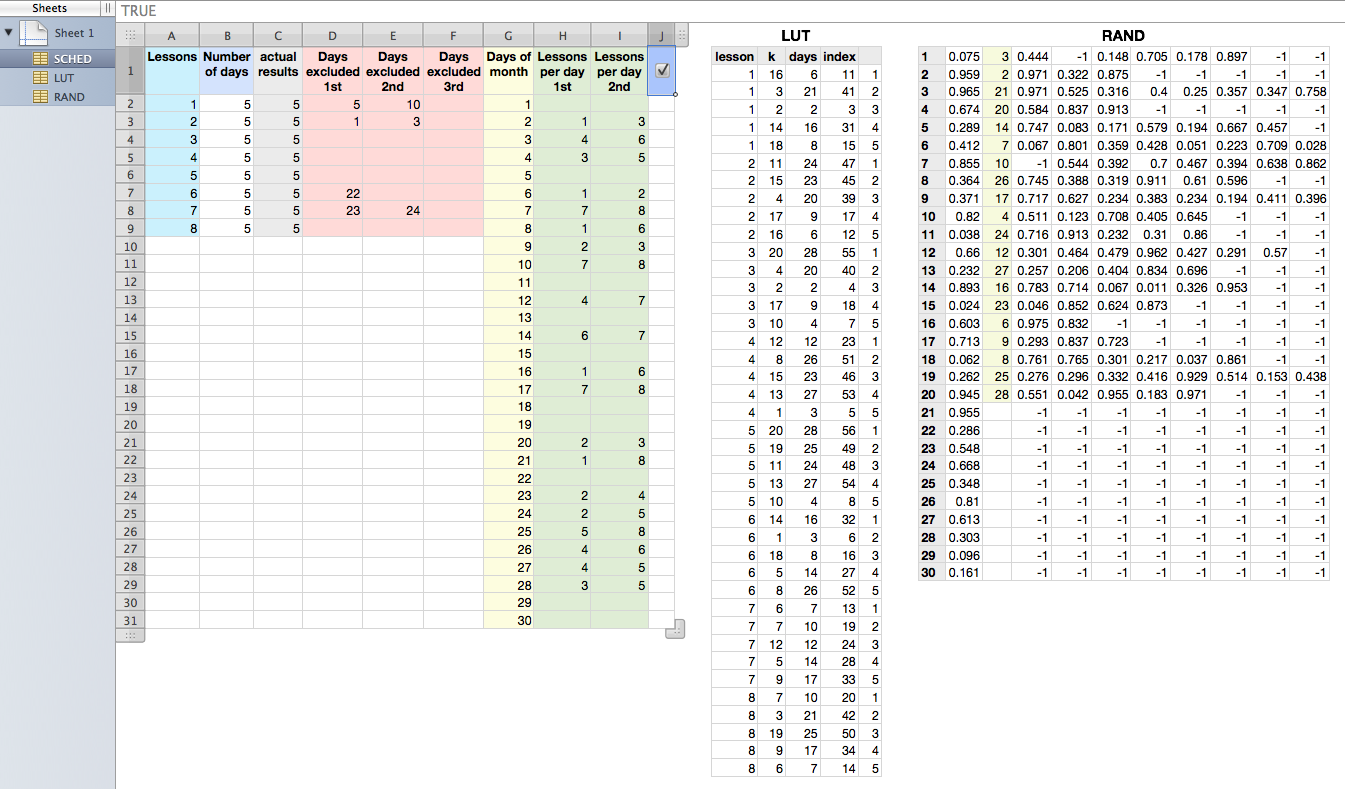


User uploaded file


SCHED (excerpt) A1 Lessons A2 1 A3 2 B1 Number of days B2 5 B3 5 C1 actual results C2 =COUNTIF(H$2:I$31,A2) C3 =COUNTIF(H$2:I$31,A3) D1 Days excluded 1st D2 5 D3 1 E1 Days excluded 2nd E2 10 E3 3 F1 Days excluded 3rd F2 F3 G1 Days of month G2 1 G3 2 H1 Lessons per day 1st H2 =IFERROR(INDEX(LUT::A,MATCH($G2*2-1,LUT::$D,0)),"") H3 =IFERROR(INDEX(LUT::A,MATCH($G3*2-1,LUT::$D,0)),"") I1 Lessons per day 2nd I2 =IFERROR(INDEX(LUT::A,MATCH($G2*2,LUT::$D,0)),"") I3 =IFERROR(INDEX(LUT::A,MATCH($G3*2,LUT::$D,0)),"") J1 TRUE J2 J3


LUT (excerpt) A1 lesson A2 1 A3 1 A4 1 A5 1 A6 1 B1 k B2 =IF(LARGE(CHOOSE(A2,RAND::D,RAND::E,RAND::F,RAND::G,RAND::H,RAND::I,RAND::J,RAND::K),E2)<0,0, MATCH(LARGE(CHOOSE(A2,RAND::D,RAND::E,RAND::F,RAND::G,RAND::H,RAND::I,RAND::J,RAND::K),E2), CHOOSE(A2,RAND::D,RAND::E,RAND::F,RAND::G,RAND::H,RAND::I,RAND::J,RAND::K),0)) B3 =IF(LARGE(CHOOSE(A3,RAND::D,RAND::E,RAND::F,RAND::G,RAND::H,RAND::I,RAND::J,RAND::K),E3)<0,0, MATCH(LARGE(CHOOSE(A3,RAND::D,RAND::E,RAND::F,RAND::G,RAND::H,RAND::I,RAND::J,RAND::K),E3), CHOOSE(A3,RAND::D,RAND::E,RAND::F,RAND::G,RAND::H,RAND::I,RAND::J,RAND::K),0)) B4 =IF(LARGE(CHOOSE(A4,RAND::D,RAND::E,RAND::F,RAND::G,RAND::H,RAND::I,RAND::J,RAND::K),E4)<0,0, MATCH(LARGE(CHOOSE(A4,RAND::D,RAND::E,RAND::F,RAND::G,RAND::H,RAND::I,RAND::J,RAND::K),E4), CHOOSE(A4,RAND::D,RAND::E,RAND::F,RAND::G,RAND::H,RAND::I,RAND::J,RAND::K),0)) B5 =IF(LARGE(CHOOSE(A5,RAND::D,RAND::E,RAND::F,RAND::G,RAND::H,RAND::I,RAND::J,RAND::K),E5)<0,0, MATCH(LARGE(CHOOSE(A5,RAND::D,RAND::E,RAND::F,RAND::G,RAND::H,RAND::I,RAND::J,RAND::K),E5), CHOOSE(A5,RAND::D,RAND::E,RAND::F,RAND::G,RAND::H,RAND::I,RAND::J,RAND::K),0)) B6 =IF(LARGE(CHOOSE(A6,RAND::D,RAND::E,RAND::F,RAND::G,RAND::H,RAND::I,RAND::J,RAND::K),E6)<0,0, MATCH(LARGE(CHOOSE(A6,RAND::D,RAND::E,RAND::F,RAND::G,RAND::H,RAND::I,RAND::J,RAND::K),E6), CHOOSE(A6,RAND::D,RAND::E,RAND::F,RAND::G,RAND::H,RAND::I,RAND::J,RAND::K),0)) C1 days C2 =IF(B2=0,"",INDEX(RAND::C,B2)) C3 =IF(B3=0,"",INDEX(RAND::C,B3)) C4 =IF(B4=0,"",INDEX(RAND::C,B4)) C5 =IF(B5=0,"",INDEX(RAND::C,B5)) C6 =IF(B6=0,"",INDEX(RAND::C,B6)) D1 index D2 =C2*2-2+COUNTIF(C$2:C2,C2) D3 =C3*2-2+COUNTIF(C$2:C3,C3) D4 =C4*2-2+COUNTIF(C$2:C4,C4) D5 =C5*2-2+COUNTIF(C$2:C5,C5) D6 =C6*2-2+COUNTIF(C$2:C6,C6) E1 E2 1 E3 2 E4 3 E5 4 E6 5


RAND (excerpt) A1 1 A2 2 A3 3 B1 =RAND() B2 =RAND() B3 =RAND() C1 =IF(LARGE(B,A1)<0,0,MATCH(LARGE(B,A1),B,0)) C2 =IF(LARGE(B,A2)<0,0,MATCH(LARGE(B,A2),B,0)) C3 =IF(LARGE(B,A3)<0,0,MATCH(LARGE(B,A3),B,0)) D1 =IF(COUNTIF(SCHED::$D$2:$F$2,$C1)>0,-1,RAND()) D2 =IF(COUNTIF(SCHED::$D$2:$F$2,$C2)>0,-1,RAND()) D3 =IF(COUNTIF(SCHED::$D$2:$F$2,$C3)>0,-1,RAND()) E1 =IF(OR(COUNTIF(SCHED::$D$3:$F$3,$C1)>0,COUNTIF(LUT::$B$2:$B$6,$A1)>1),-1,RAND()) E2 =IF(OR(COUNTIF(SCHED::$D$3:$F$3,$C2)>0,COUNTIF(LUT::$B$2:$B$6,$A2)>1),-1,RAND()) E3 =IF(OR(COUNTIF(SCHED::$D$3:$F$3,$C3)>0,COUNTIF(LUT::$B$2:$B$6,$A3)>1),-1,RAND()) F1 =IF(OR(COUNTIF(SCHED::$D$4:$F$4,$C1)>0,COUNTIF(LUT::$B$2:$B$11,$A1)>1),-1,RAND()) F2 =IF(OR(COUNTIF(SCHED::$D$4:$F$4,$C2)>0,COUNTIF(LUT::$B$2:$B$11,$A2)>1),-1,RAND()) F3 =IF(OR(COUNTIF(SCHED::$D$4:$F$4,$C3)>0,COUNTIF(LUT::$B$2:$B$11,$A3)>1),-1,RAND()) G1 =IF(OR(COUNTIF(SCHED::$D$5:$F$5,$C1)>0,COUNTIF(LUT::$B$2:$B$16,$A1)>1),-1,RAND()) G2 =IF(OR(COUNTIF(SCHED::$D$5:$F$5,$C2)>0,COUNTIF(LUT::$B$2:$B$16,$A2)>1),-1,RAND()) G3 =IF(OR(COUNTIF(SCHED::$D$5:$F$5,$C3)>0,COUNTIF(LUT::$B$2:$B$16,$A3)>1),-1,RAND()) H1 =IF(OR(COUNTIF(SCHED::$D$6:$F$6,$C1)>0,COUNTIF(LUT::$B$2:$B$21,$A1)>1),-1,RAND()) H2 =IF(OR(COUNTIF(SCHED::$D$6:$F$6,$C2)>0,COUNTIF(LUT::$B$2:$B$21,$A2)>1),-1,RAND()) H3 =IF(OR(COUNTIF(SCHED::$D$6:$F$6,$C3)>0,COUNTIF(LUT::$B$2:$B$21,$A3)>1),-1,RAND()) I1 =IF(OR(COUNTIF(SCHED::$D$7:$F$7,$C1)>0,COUNTIF(LUT::$B$2:$B$26,$A1)>1),-1,RAND()) I2 =IF(OR(COUNTIF(SCHED::$D$7:$F$7,$C2)>0,COUNTIF(LUT::$B$2:$B$26,$A2)>1),-1,RAND()) I3 =IF(OR(COUNTIF(SCHED::$D$7:$F$7,$C3)>0,COUNTIF(LUT::$B$2:$B$26,$A3)>1),-1,RAND()) J1 =IF(OR(COUNTIF(SCHED::$D$8:$F$8,$C1)>0,COUNTIF(LUT::$B$2:$B$31,$A1)>1),-1,RAND()) J2 =IF(OR(COUNTIF(SCHED::$D$8:$F$8,$C2)>0,COUNTIF(LUT::$B$2:$B$31,$A2)>1),-1,RAND()) J3 =IF(OR(COUNTIF(SCHED::$D$8:$F$8,$C3)>0,COUNTIF(LUT::$B$2:$B$31,$A3)>1),-1,RAND()) K1 =IF(OR(COUNTIF(SCHED::$D$9:$F$9,$C1)>0,COUNTIF(LUT::$B$2:$B$36,$A1)>1),-1,RAND()) K2 =IF(OR(COUNTIF(SCHED::$D$9:$F$9,$C2)>0,COUNTIF(LUT::$B$2:$B$36,$A2)>1),-1,RAND()) K3 =IF(OR(COUNTIF(SCHED::$D$9:$F$9,$C3)>0,COUNTIF(LUT::$B$2:$B$36,$A3)>1),-1,RAND())


Notes.


Formulae in SCHED::C2, SCHED::H2:I2 can be filled down.


Formulae in LUT::B2:D2 can be filled down.


LUT::A and LUT::E hold constant values as shown in screenshot.


Formula in RAND::B1 can be filled down across B1:B30.


Formulae in RAND::C1:K1 can be filled down across C1::K20.


RAND::D21:K30 hold constant value -1.


RAND::C21:C30 are blank.


Tables are built with Numbers v2.


Regards,

H

Dec 29, 2015 2:52 PM in response to Germanos

Intimidated by complex formulas but refusing to accept defeat I'm having success with a less high-tech approach that uses simple formulas. It looks like this, similar to your original table but "cleaned up" to eliminate merged cells (merged cells are a bad idea!) and split things Numbers-style into separate tables for different purposes.


User uploaded file


The 'Pairs' table is simply a listing of possible pairs, following Barry's idea. No formulas. I have 64 rows containing 63 pairs.


The 'Exclude' table lists the days for which particular lessons are not to be read. It contains the same information as before, but it's in a "vertical" format more convenient for access by some formulas. No formulas in this table.


In Πίνακας 1 (Table 1):


Column A: Manually entered values. 1-30


Cell B3, filled down: =INDEX(Pairs::A,$D)


Cell C3 filled down: =INDEX(Pairs::B,$D)


Cell D3, filled down: =RANDBETWEEN(2,64)

The parameters match with rows 2 through 64 of the 'Pairs' table. Change if additions/subtractions from 'Pairs'.


Cell E3, filled down: =COUNTIFS(Exclude::$A,B,Exclude::$B,$A)

Returns 1 if 1st lesson should be excluded on that day.


Cell F3, filled down: =COUNTIFS(Exclude::$A,C,Exclude::$B,$A)

Returns 1 if 2nd lesson should be excluded on that day.


In 'Minimum Readings Check':


Column A and B entered manually.


Cell C2, filled down: =COUNTIF(Πίνακας 1::B:C,A2)


Cell D2, filled down: =IF(C2<B2,"not ok","ok")


In 'Exclude Check':


Cell B2, filled down: =SUM(Πίνακας 1::E)


That's it for formulas. Then one just keeps clicking the checkbox in 'Recalc' until the entire column D in 'Minimum Readings Check' is 'ok' and there are all zeros in column B of 'Exclude Check'. This is similar to the way Solver might approach the problem in Excel. Sometimes a dozen or so clicks are needed, sometimes far fewer. It's the luck of the draw.


Conditional highlighting aids in spotting a "good" random selection from 'Pairs'.


The document is at this link (Dropbox download) for "peer review." It includes a version with an extra table that allows copying and then using Paste & Match Style to "freeze" the values as Barry recommends.


SG

Dec 31, 2015 7:06 AM in response to Germanos

Hello


Here's scripting solution you might explore. The following ruby script will generate 5 schedules at once based upon given parameters. To use it, first copy source range in Numbers where lessons, number of days and excluded days are defined to the clipboard, run the script and it will put the TSV text representing generated schedules in the clipboard which you may paste into destination range in Numbers.


You may specify SCHEDULES = 1 in script to generate single schedule. Currently SCHEDULES = 5. Please read the comments in script for more details.


E.g.,


User uploaded file


* source range is selected


#!/bin/bash export LC_ALL=en_GB.UTF-8 /usr/bin/ruby -w <<'EOF' - <(pbpaste) | pbcopy # # ARGF : TSV file of fields A B C1 [C2 ...] # A : lesson # B : number of days of lesson # C* : excluded day of lesson # # output : TSV text representing generated schedule D[i,j,k] where # D[i,j,k] denotes lesson assigned to slot j of day i in schedule k; # TSV fields represent tupple (k,j) and TSV record i represents D[i,j,k] # # * schedule is built to minimize the number of days with lessons assigned # * if it fails to generate k'th schedule, D[*,*,k] is left blank # # e.g., # Given input: # DAYS = (1..7), # SLOTS = 2, # SCHEDULES = 5, # TSV = # A B C1 C2 # ------------- # 1 3 5 7 # 2 3 1 3 # 3 3 4 # # output (e.g.): # TSV = # k=1 1 2 2 3 3 4 4 5 5 # j=1 2 1 2 1 2 1 2 1 2 # ------------------------------------- # 1 3 3 3 # 1 2 2 1 3 2 2 3 # 3 1 3 1 3 1 3 1 3 # 1 2 1 2 1 2 2 1 # 2 3 2 3 # 2 3 2 1 1 3 1 2 2 1 # 2 3 # DAYS = (1..30) # days for schedule SLOTS = 2 # number of slots per day SCHEDULES = 5 # number of schedules to generate MAXRETRY = 16 # max number of retries for each schedule DEBUG = true # debug flag: true to print debug information to $stderr, false otherwise. def array2text(aa, opts = {}) # array aa : 2d array # hash opts : {:fs => fs, :rs => rs} # string fs : field separator # string rs : record separator fs, rs = {:fs => %[\t], :rs => %[\n]}.merge(opts).values_at(:fs, :rs) return aa.map {|a| a.join(fs) }.join(rs) + rs end def text2array(t, opts = {}) # string t : text representation of 2d array # hash opts : {:fs => fs, :rs => rs} # string fs : field separator # string rs : record separator fs, rs = {:fs => %[\t], :rs => %[\n]}.merge(opts).values_at(:fs, :rs) return t.split(rs).map {|a| a.split(fs, -1)} end def schedule(pp) # array pp : array of [lesson, number of days of lesson, [excluded days of lesson]] # return hash dd : scheduled table { day => [slots] } aa, bb, cc = pp.shuffle!.transpose b_total = bb.inject { |s, b| s + b } b_threshold = b_total / SLOTS rk = 0 while (rk += 1) <= MAXRETRY do dd = DAYS.inject({}) { |h, i| h[i] = []; h } b_assigned = 0 na = catch :not_assigned do while b_total > b_assigned do pp.each do |p| a, b, c = p b.times do ii = dd.keys.select { |d| dd[d].length > 0 } # assinged jj = ii.select { |d| dd[d].length < SLOTS } # assinged and with slot available if ii.length < b_threshold || jj.length == 0 kk = dd.keys.select { |d| ! c.include?(d) && dd[d].length < SLOTS && ! dd[d].include?(a) } else kk = jj.select { |d| ! c.include?(d) && ! dd[d].include?(a) } end throw :not_assigned, a if kk == [] dd[kk[rand(kk.length)]] << a b_assigned += 1 end end end nil end break unless na end if DEBUG $stderr.puts "tries => %d, na => %s\n" % [rk, na.inspect] if na $stderr.puts dd.inspect $stderr.puts array2text(dd.keys.sort.inject([]) { |r, d| r << dd[d].map { |e| '%s*' % e } }) end end dd = DAYS.inject({}) { |h, i| h[i] = []; h } if na dd end aa, bb, *cc = text2array(ARGF.read).transpose bb.map! { |i| i.to_i } cc = cc.transpose.map { |c| c.map { |e| e == "" ? nil : e.to_i }.compact } qq = [] SCHEDULES.times { qq << schedule([aa, bb, cc].transpose) } rr = qq.inject([]) do |q, dd| q << dd.keys.sort.inject([]) { |r, d| r << (e = dd[d]).fill('', e.size..SLOTS - 1) } end print array2text(rr.transpose) EOF


And in case you're not familiar with shell scripting, here's an AppleScript wrapper which you can run directly in Script Editor.app or via Script menu or via Run AppleScript action in Automator workflow.


do shell script "/bin/bash -s <<'HUM' - export LC_ALL=en_GB.UTF-8 /usr/bin/ruby -w <<'EOF' - <(pbpaste) | pbcopy # # ARGF : TSV file of fields A B C1 [C2 ...] # A : lesson # B : number of days of lesson # C* : excluded day of lesson # # output : TSV text representing generated schedule D[i,j,k] where # D[i,j,k] denotes lesson assigned to slot j of day i in schedule k; # TSV fields represent tupple (k,j) and TSV record i represents D[i,j,k] # # * schedule is built to minimize the number of days with lessons assigned # * if it fails to generate k'th schedule, D[*,*,k] is left blank # # e.g., # Given input: # DAYS = (1..7), # SLOTS = 2, # SCHEDULES = 5, # TSV = # A B C1 C2 # ------------- # 1 3 5 7 # 2 3 1 3 # 3 3 4 # # output (e.g.): # TSV = # k=1 1 2 2 3 3 4 4 5 5 # j=1 2 1 2 1 2 1 2 1 2 # ------------------------------------- # 1 3 3 3 # 1 2 2 1 3 2 2 3 # 3 1 3 1 3 1 3 1 3 # 1 2 1 2 1 2 2 1 # 2 3 2 3 # 2 3 2 1 1 3 1 2 2 1 # 2 3 # DAYS = (1..30) # days for schedule SLOTS = 2 # number of slots per day SCHEDULES = 5 # number of schedules to generate MAXRETRY = 16 # max number of retries for each schedule DEBUG = true # debug flag: true to print debug information to $stderr, false otherwise. def array2text(aa, opts = {}) # array aa : 2d array # hash opts : {:fs => fs, :rs => rs} # string fs : field separator # string rs : record separator fs, rs = {:fs => %[\\t], :rs => %[\\n]}.merge(opts).values_at(:fs, :rs) return aa.map {|a| a.join(fs) }.join(rs) + rs end def text2array(t, opts = {}) # string t : text representation of 2d array # hash opts : {:fs => fs, :rs => rs} # string fs : field separator # string rs : record separator fs, rs = {:fs => %[\\t], :rs => %[\\n]}.merge(opts).values_at(:fs, :rs) return t.split(rs).map {|a| a.split(fs, -1)} end def schedule(pp) # array pp : array of [lesson, number of days of lesson, [excluded days of lesson]] # return hash dd : scheduled table { day => [slots] } aa, bb, cc = pp.shuffle!.transpose b_total = bb.inject { |s, b| s + b } b_threshold = b_total / SLOTS rk = 0 while (rk += 1) <= MAXRETRY do dd = DAYS.inject({}) { |h, i| h[i] = []; h } b_assigned = 0 na = catch :not_assigned do while b_total > b_assigned do pp.each do |p| a, b, c = p b.times do ii = dd.keys.select { |d| dd[d].length > 0 } # assinged jj = ii.select { |d| dd[d].length < SLOTS } # assinged and with slot available if ii.length < b_threshold || jj.length == 0 kk = dd.keys.select { |d| ! c.include?(d) && dd[d].length < SLOTS && ! dd[d].include?(a) } else kk = jj.select { |d| ! c.include?(d) && ! dd[d].include?(a) } end throw :not_assigned, a if kk == [] dd[kk[rand(kk.length)]] << a b_assigned += 1 end end end nil end break unless na end if DEBUG $stderr.puts \"tries => %d, na => %s\\n\" % [rk, na.inspect] if na $stderr.puts dd.inspect $stderr.puts array2text(dd.keys.sort.inject([]) { |r, d| r << dd[d].map { |e| '%s*' % e } }) end end dd = DAYS.inject({}) { |h, i| h[i] = []; h } if na dd end aa, bb, *cc = text2array(ARGF.read).transpose bb.map! { |i| i.to_i } cc = cc.transpose.map { |c| c.map { |e| e == \"\" ? nil : e.to_i }.compact } qq = [] SCHEDULES.times { qq << schedule([aa, bb, cc].transpose) } rr = qq.inject([]) do |q, dd| q << dd.keys.sort.inject([]) { |r, d| r << (e = dd[d]).fill('', e.size..SLOTS - 1) } end print array2text(rr.transpose) EOF HUM"


Briefly tested under OS X 10.6.8.


Good luck,

H

Jan 5, 2016 12:08 AM in response to Germanos

Have you really tried my scripting solution? It will address all of your requirements including the new.


E.g., it will generaate something like the following schedules seen in destination range (I2:R31) based upon the parameters given in the source range (A2:G9).


User uploaded file


You select the source range and copy it to the clipboard, run the script and it will put the result in the clipboard which you paste into destination range. Done.


H


PS. Or even like this.


User uploaded file


/H

Jan 6, 2016 6:50 PM in response to Barry

Barry wrote:


Hi Hiroto,


Based on results, now that I've followed the instructions, I'd say you've achieved a full solution with this script. Congratulations!


Hi Barry,


Well, now I sort of understand how Miss Colombia must have felt!


Not sure a "full solution" is at hand quite yet. I succeeded in running Hiroto's script–which "silently fails" if you don't follow directions and "silently succeeds" if you do the right thing–and got these results:


User uploaded file


In red I marked the repeated combinations (sorry, I mean permutations...I think) that I could spot manually. There are quite a few that are repeated, some even on consecutive days. So my testing seems to suggest that Hiroto needs to further apply his scripting wizardry. Or does that problem simply disappear after adding the heroic assumption that "the total of the specified repetitions of each lesson is equal to the number of slots to fill"? Certainly that assumption greatly simplifies matters.

SG

Jan 4, 2016 7:09 AM in response to SGIII

SGIII,

I believe that you are the Winner my friend! Your solution (and the thought to use all the available combinations) is the nearest one!


But, I have some questions:

  1. the correct sheet is the 1st one, right?
  2. Can the "exclude list" be bigger? I need only to add more rows in "Exclude" table?
  3. How can I know that this program will generate a solution for sure?


Thanks a lot 🙂

This thread has been closed by the system or the community team. You may vote for any posts you find helpful, or search the Community for additional answers.

Produce Random numbers from a list with exceptions

Welcome to Apple Support Community
A forum where Apple customers help each other with their products. Get started with your Apple Account.