I downloaded the Adele 25 CD to my laptop. When I tried to synch it to my phone, but it didn't show up. Also, when I plugged my phone in, no music showed up on the music tab, so I couldn't try it that way.

I downloaded the Adele 25 CD to my laptop. When I tried to synch it to my phone, but it didn't show up. Also, when I plugged my phone in, no music showed up on the music tab, so I couldn't try it that way.

iPhone 5s, iOS 9.2, From my laptop to my iPhone

Posted on Dec 29, 2015 8:50 PM

Reply
1 reply

Dec 31, 2015 7:38 AM in response to Ellie_100

Hello Ellie_100,

Thanks for using Apple Support Communities.


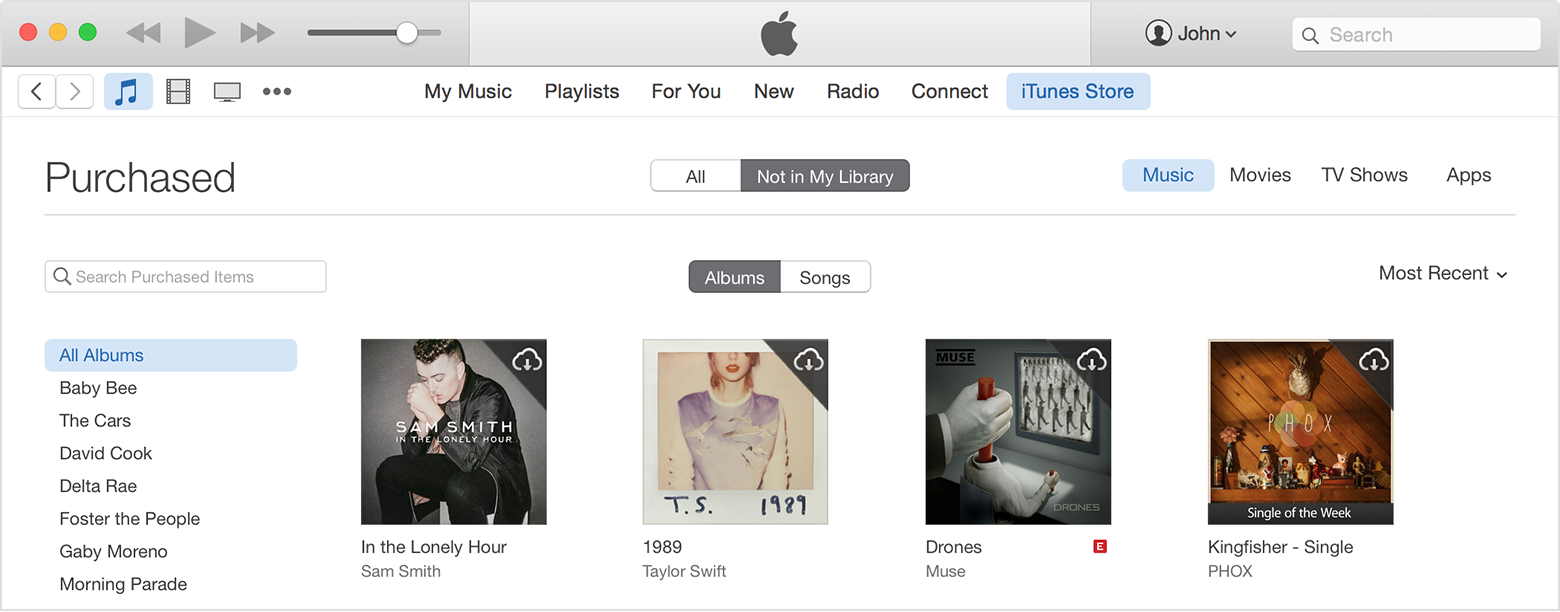
If I understand your post correctly, you have purchased the new Adele album in iTunes, and it is not appearing in iTunes in order for you to sync it. Please follow the steps below to ensure it has been downloaded to your computer, and then you can try to sync it.


  1. Open iTunes.
  2. Click Sign In, and then enter your Apple ID and password.
    User uploaded file
  3. Click your name and select Purchased from the menu.
    User uploaded file
  4. Click "Not in My Library" to view purchased content that isn't on your computer.
    User uploaded file
  5. Scroll to find the item that you want to download.
  6. Click the Download icon User uploaded file in the upper-right corner of the item that you want to download. Your song downloads to your library.
    If a song is already in your library, the Download icon won't appear.

Download your past purchases


Take care.

This thread has been closed by the system or the community team. You may vote for any posts you find helpful, or search the Community for additional answers.

I downloaded the Adele 25 CD to my laptop. When I tried to synch it to my phone, but it didn't show up. Also, when I plugged my phone in, no music showed up on the music tab, so I couldn't try it that way.

Welcome to Apple Support Community
A forum where Apple customers help each other with their products. Get started with your Apple Account.