masa.sajeeth

Q: my iphone 5s having a network problem

I have a iPhone  5s

its have network problem. some times automatically searching and its says no coverage. but in my area particular carier have good coverage. I tried with many network sims but it saying no coverage some time automatically detecting coverage.

this problem after I updating my phone to ios9.

now  my phone

version 9.2.1(13D15)

carrier 23.0

model NE434AE/A

imei ******

modem firmware 6.01.00


please say best solution for me please


<Personal Information Edited by Host>

Posted on Jan 21, 2016 10:37 PM

Close

Q: my iphone 5s having a network problem

  • All replies
  • Helpful answers

  • by Nubz N.,

    Nubz N. Nubz N. Jan 23, 2016 9:23 AM in response to masa.sajeeth
    Community Hosts
    Jan 23, 2016 9:23 AM in response to masa.sajeeth

    Hi masa.sajeeth,


    It sounds like you are getting a cellular connection intermitently, sometimes it connects fine but not other times.


    Thanks for testing with other SIMs.  That is one of the things to try.


    For conituned troubleshooting, please see


    If you can't connect to a cellular network or cellular data - Apple Support


    If you see No Service or Searching

    If you see No Service or Searching on your device, or can't connect to a cellular network or cellular data, follow these steps:

    1. Check your coverage area to make sure that you're in an area with cellular network coverage. 
      • If you can't connect to a cellular network on your iPhone, make sure that cellular data is on in Settings > Cellular*. On your iPad, go to Settings > Cellular Data.
      • If you're traveling internationally, make sure that your device is set up for data roaming. Go to Settings > Cellular > Data Roaming.
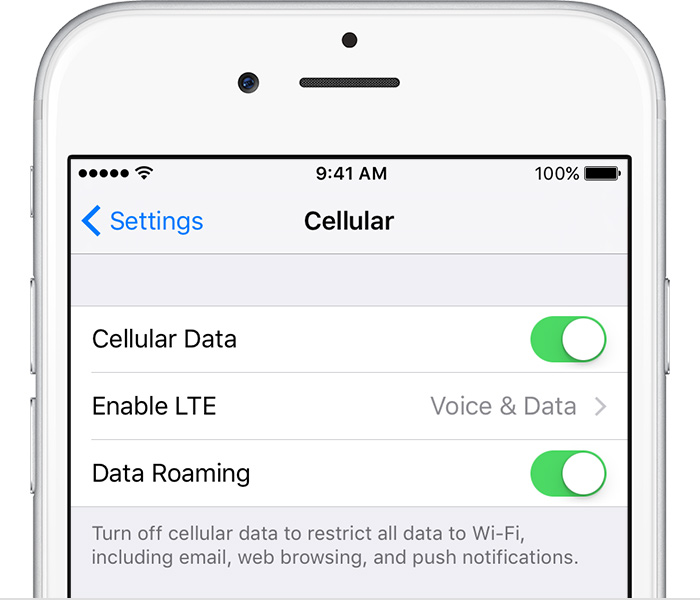
         
    2. Restart your iPhone or iPad.
    3. Check for a Carrier Settings Update.
    4. Take out the SIM card and put it back in. If the SIM card is damaged, or doesn't fit in the SIM tray, contact your carrier.
    5. Reset your Network Settings. Tap Settings > General > Reset > Reset Network Settings. This also resets Wi-Fi networks and passwords, cellular settings, and VPN and APN settings that you've used before.
    6. If you have another device, see if you can connect your carrier's network with it in that location.
    7. Contact your carrier to: 
      • Verify that your account is active and in good standing.
      • Make sure there are no outages in your area.
      • Check that your device isn't blocked from receiving cellular services and is set up with the right data plan.
    8. Update your iPhone or iPad to the latest version of iOS.

    If you still can't connect to a cellular network, and have confirmed with your carrier that there isn't an issue with your account or network, try restoring your device.


    Please let us know what you find.

  • by masa.sajeeth,

    masa.sajeeth masa.sajeeth Jan 27, 2016 8:20 AM in response to Nubz N.
    Level 1 (0 points)
    Jan 27, 2016 8:20 AM in response to Nubz N.

    thank you for the reply!!!

    I tried all of which are you said above. but still I have the same problem.

    now

    if I access  with data connection its going to no service. otherwise nothing problem. if it came to no service after that I want to switch off the phone to some minutes around 30 minutes. after that normally coverage detecting.

    pls help me for the problem. I updated last version of ios

  • by Nubz N.,

    Nubz N. Nubz N. Jan 27, 2016 10:17 AM in response to masa.sajeeth
    Community Hosts
    Jan 27, 2016 10:17 AM in response to masa.sajeeth

    Hi masa.sajeeth,


    Thank you for using the Apple Support Community. Due to the nature of your issue or question you may find more information by using another one of Apple's support resources - https://getsupport.apple.com/GetproductgroupList.action.


    Best regards.
