i m not getting whatsapp notificatition while using wifi
i m not getting whatsapp. mail notificatition while using wifi
iPhone 5s, iOS 9.2.1
i m not getting whatsapp. mail notificatition while using wifi
iPhone 5s, iOS 9.2.1
Hello there, irfan2787.
It sounds like you're not seeing notifications, in particular from the WhatsApp application. The following Knowledge Base article offers up some good recommendations for troubleshooting:
Use Notifications on your iPhone, iPad, and iPod touch
If you don't see notifications for a specific app
To get notifications, you need to be connected to a Wi-Fi or cellular network. If you’re not getting notifications for a specific app, try these steps:
- Make sure that the app supports notifications. Go to Settings > Notifications, select the app, and make sure that Notifications are turned on.
- Make sure that you’re signed in to your Apple ID on your iOS device. Go to Settings > iTunes & App Stores and enter your Apple ID and password.
- Make sure that Do Not Disturb is turned off. Go to Settings > Do Not Disturb and tap Manual if it's turned on.
- If you’ve recently installed an app or restored from a backup, open the app to start getting notifications.
Learn more
Notifications use Wi-Fi only when a cellular connection is unavailable. Firewalls and proxy servers might affect your ability to receive notifications. Get help using Apple Push Notification service (APNs).
If you continue to see issues with your notifications, you might find the information in this article useful as well:
If an app you installed unexpectedly quits, stops responding, or won’t open
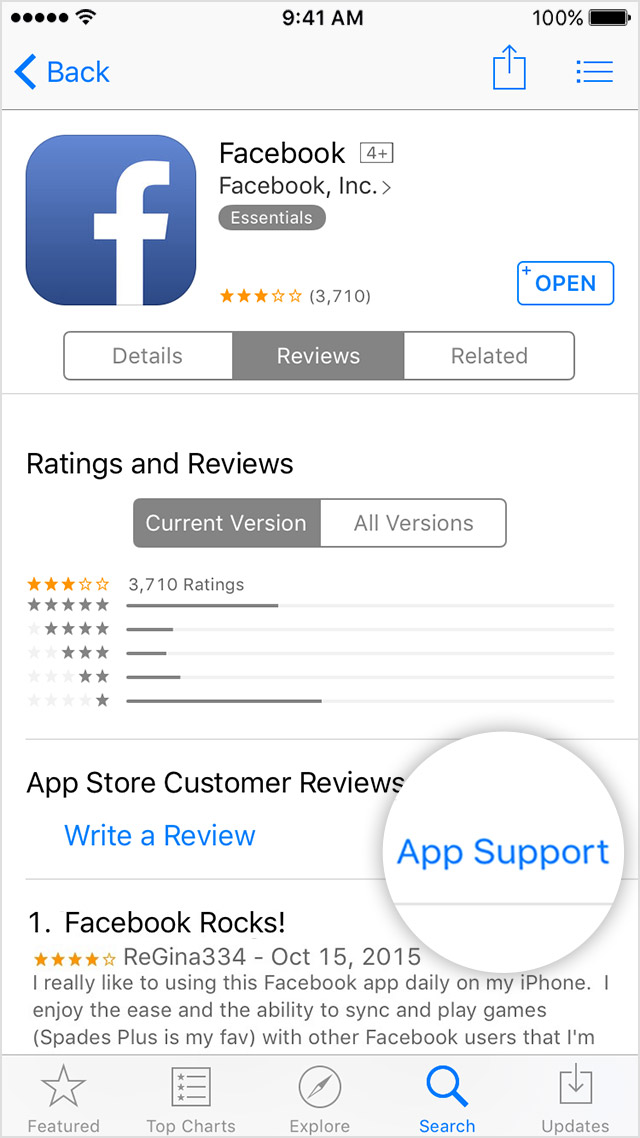
Contact the app developer
If you see this issue again, contact the app developer for help:
- Find the app in the App Store.
- Tap the app, then tap Reviews.
- Underneath App Store Customer Reviews, tap App Support.
Thanks for reaching out to Apple Support Communities.
Cheers.
i m not getting whatsapp notificatition while using wifi