I have my watch mirror my phone but neither will make the chime noise when I receive a text? They both have volume is on and are not on do not disturb. All I get is the haptic alert

I have an iPhone 6S plus and a 38mm apple watch. Both are up to date on software. Since I got the watch my phone and watch don't make the chime sound when I receive a text. The watch will only give me the haptic indication and the cell phone doesn't make a sound at all. I have the volume on high and it is not on do not disturb. What gives?

Apple watch 38mm-OTHER, using with an iPhone 6S plus

Posted on Jan 26, 2016 12:30 PM

Reply
3 replies

Jan 26, 2016 12:45 PM in response to fulmerpartyofsix

Hi


How notifications behave depends on the status of your devices. In order to bring notifications to your attention as soon as possible:


- If your iPhone is unlocked, you will receive notifications on your iPhone instead of on your watch.

- If your iPhone is locked or asleep and your watch is unlocked (regardless of whether the watch screen is asleep or awake) and on your wrist, you will receive notifications on your watch.

- If your watch is locked or has Do Not Disturb enabled, notifications will go to your iPhone.


More information:

About notifications on your Apple Watch - Apple Support


To check your alert settings for Messages on your watch:


On your iPhone, in the Watch app, go to: My Watch > Messages:

- Perhaps choose Custom and check - under Alerts - that Show Alerts, Sound and Haptic are each enabled.


On your iPhone, in the Watch app, go to: My Watch (bottom left tab) > Sounds & Haptics:

- Check the Alert Volume;

- Check that Silent Mode is not enabled;

- Check that Haptic Strength is set to the middle or far right hand side of the slider.

Oct 14, 2016 10:07 PM in response to Pmintz25

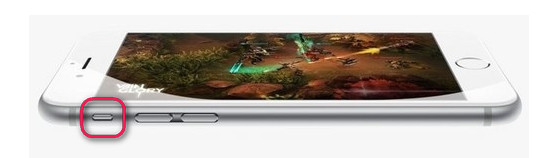
The new iPhone 6/6 Plus and iPhone 6s/6s Plus delivers user-friendly design and inherit the "mute button" located on the side from iPhone 5/4. You are able to switch to "silent mode" by turn off the mute button. Once on, you are no longer able to hear any sounds while receiving calls and messages. Make sure it is not turned on. Very small switch on upper left side. I turned the mute on accidentally when installing new phone into case. Drove me crazy for two days. Flip the switch.

User uploaded file

This thread has been closed by the system or the community team. You may vote for any posts you find helpful, or search the Community for additional answers.

I have my watch mirror my phone but neither will make the chime noise when I receive a text? They both have volume is on and are not on do not disturb. All I get is the haptic alert

Welcome to Apple Support Community
A forum where Apple customers help each other with their products. Get started with your Apple Account.