which banking software is best for macbook pro

I have my first Mac, a Macbook Pro. Yay!!! Now, of course after over a decade of using MS products I am at a loss what to choose for my Mac. I did purchase MS Office with Outlook for a Mac and all is well.


Now I need to figure out a banking software and the reviews are making me crazy. As a long time user of Quicken, the reviews for Quicken Mac are horrid. I do wish MS would bring back MS Money but that is not going to happen. Best software compared to what we have now. Even though I Quicken I truly do not like it.


So, I have heard there are other financial softwares out there that can run on a Mac. I've checked out Money Dance but it seems the conversion is a nightmare because a Mac does not support a QIF file.


I use this type of software for personal use only. I don't keep my Investments or a budget on my computer. I just need a simple online checking and decent year end reporting software. I do need great reporting as we do finance a new company and need to keep track of loans.


I am coming to you hoping that you all have dealt with this issue and can give me a helping hand.


Thank you in advance for your attention to my personal little problem.


Brenda

MacBook Pro (Retina, 15-inch, Mid 2015), OS X El Capitan (10.11.3)

Posted on Jan 29, 2016 12:19 PM

Reply
17 replies

Jan 30, 2016 8:41 AM in response to Csound1

While the OP can make his own decision, you should at least stick to claims that are true and do not mislead the OP:


Csound1 wrote:


8 Year old software

Quicken 2007 for Mac was completely rewritten by Intuit to work natively on Intel Macs in 2011.


Csound1 wrote:


...software that is largely unsupported

Since the 2011 rewrite, it has been updated multiple times, including to the most recent revision which supports El Capitan.


Csound1 wrote:


...from a vendor that regularly abandons its Mac users.

The Mac users of TurboTax would take great exception to your comment!

Jan 30, 2016 1:36 PM in response to BKFuller

Maybe I should have been more specific in my question. It seems a better approach would be to ask "What software are others using for the specifications of my Mac?" I need some decent reporting that Quicken doesn't really have. It has great summary data buy if you want it by payee, as required for itemized deductions it is not as good and hard to export and work with it in Excel. After being through an IRS audit, they want each name of who you contributed money to not what category. You just can't say Medical. They want all the doctors and hospitals. You can't say Charitable Donations, they want the name of each organization. Maybe the questions is "What software are you using and how do you like it?" All I have gotten from the web is people are not happy with Quicken for Mac. After reading how difficult it is to migrate data from MS Quicken QIF files I was ready to give up on Quicken for Mac. What software are all of you using and are you satisfied with the reporting available? I just want to make the IRS happy. I want software that doesn't crash on the Mac when it ran fine on MS OS. I'm too new as a Mac user to try to go around the software to get what I need via Excel. I'm not even sure if Excel would accept exported Quicken files. I'm still trying to get used to the filing system and how to access it as it seems so different from MS OS. Please remember this is my first Mac. I haven't even exported all of my data over from my MS OS laptop. I have been working with vendors to get the software for the Mac OS and migrate the files. For example, ScanSoft. It was so easy. I just need to get my financial data from 2003 to current on my Mac.


I apologize for how wordy I am. I end up writing a lot to ask a simple question.

Jan 30, 2016 6:28 PM in response to BKFuller

You might check Banktivity (recently renamed from iBank). I've used it for several years, originally importing all of my data from a Windows version of Quicken and I'm very happy with it. It does offer reporting that meets your request of the ability to see each payees within categories (e.g. Donations) -- the Category Detail report is one example and there may be others. If you get it through their website rather than the Mac App store there is a 30 day free trial option. https://www.iggsoftware.com/banktivity/

Jan 30, 2016 7:23 PM in response to BKFuller

BKFuller wrote: [summarized for ease of response]


Maybe I should have been more specific in my question:


I need some decent reporting that Quicken doesn't really have. It has great summary data buy if you want it by payee, as required for itemized deductions it is not as good and hard to export and work with it in Excel.


After being through an IRS audit, they want each name of who you contributed money to not what category. You just can't say Medical. They want all the doctors and hospitals. You can't say Charitable Donations, they want the name of each organization.


I'm not even sure if Excel would accept exported Quicken files.


I am not familiar with Quicken 2010 for Windows, but I am very experienced on Quicken 2007 for Mac, including the use of QIF and CSV files.


I was audited by the IRS in 2010 for an earlier tax year when I used Quicken Deluxe 2002.


More importantly, I resolved litigation five months ago that involved complex issues of a family trustee commingling their own funds and expenses in bank accounts of their own and my father's. This required me to subpeona seven years of bank accounts of my father's and the trustee's and analyze them for ultimate testimony by my forensic accountant.


Had I let the forensic accountant do all the work, the cost would have been prohibitive. Instead I had all of the bank accounts spreadsheet registers scanned and I imported them into one large Quicken 2007 file. I then exported specific reports to the forensic accountant in MS Excel format so that he could further analyze them after I did all of the legwork. I saved tens of thousands of dollars in this way.


Quicken 2007 has a very powerful report generator built in. Please see the following screenshots:


Standard Reports

User uploaded file


Business Reports

User uploaded file


Investment Reports

User uploaded file


"Easy Answer" Reports

User uploaded file


And each of these reports is easily modified to make more specific selections and more powerful reports, which then can be memorized for ready access again later:


User uploaded file


User uploaded file


User uploaded file


So for example, here is one page of a sample master PAYEE schedule:


User uploaded file

[click on images to enlarge]


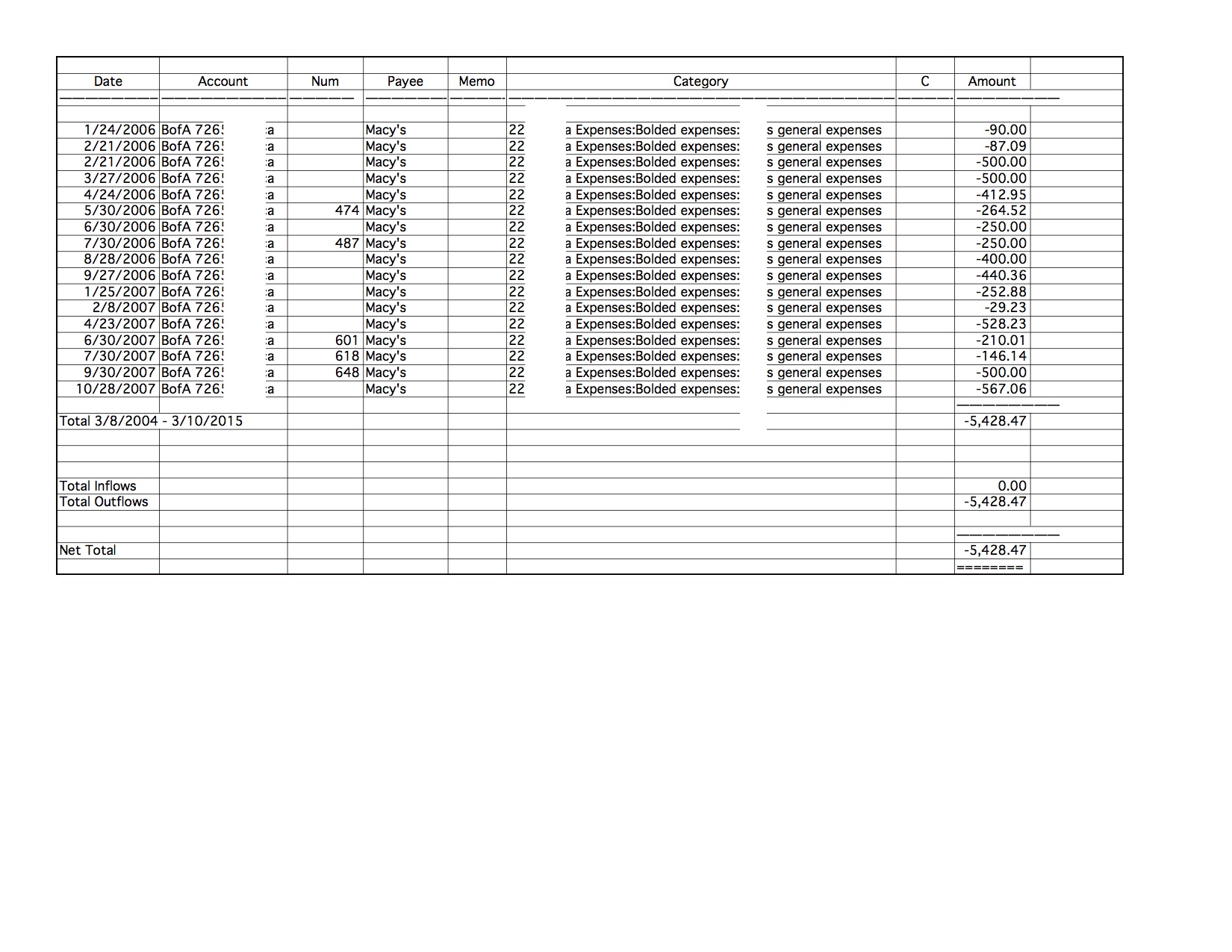
Or a more specific Payee Quick Report (Macy's):


User uploaded file


And after I easily EXPORT the Macy's Quick Report to an EXCEL file, here it is in Excel, for easy numeric manipulation:

User uploaded file


Quicken 2007 is available for $15 from Intuit's chat function on their Support website. The latest version is El Capitan compatible. I would suggest you avoid Quicken Essentials for Mac and Quicken 2015 for Mac and Quicken 2016 for Mac; which are where most of the user complaints originate.


Here are the instructions for converting your Quicken Windows data to Quicken 2007 for Mac:


https://quicken.intuit.com/support/help/how-do-i-convert-quicken-for-windows-fil es-to-quicken-for-mac-2007-/GEN82890.html


Let me know if you have any further questions.

Jan 31, 2016 2:05 AM in response to MlchaelLAX

Hi,

As to home accounting software then the Mac is a sorry place to be. I have tried the majority of available software with iBank probably being the best, at that time it had lamentable support for investments so was not so great for me and I didn't like that there was no option to have one line display per entry, perhaps they have added that as an option but I found the two line permanent option to be too space greedy for my taste. I see they have changed a few things so I will probably take another look at iBank (Banktivity)


MS Money remains my program of choice so the only option would be to run it in Boot Camp, Parallels or do as I do and keep an old Windows laptop for the sole purpose of running MS Money for those accounts, Not ideal I know and I keep on looking for a decent MS Money replacement.


Your question has prompted me to look again at this so I will now take a look at iBank again plus a look at BankTree and Moneydance which are UK focused option.

Thanks,

Mickey

This thread has been closed by the system or the community team. You may vote for any posts you find helpful, or search the Community for additional answers.

which banking software is best for macbook pro

Welcome to Apple Support Community
A forum where Apple customers help each other with their products. Get started with your Apple Account.



