MacBook thinks my new 2TB hard drive capacity is the same size as my old 750GB hard drive

I recently began digitizing a lot of home movies and photos and I decided to upgrade to a new 2TB internal hard drive since my 750GB could not hold everything. To facilitate the move, I purchased a disk cloning "toaster" and used that to clone my 750gb to the 2TB before installing the 2TB into my laptop. Now that I have my 2TB installed, I noticed that "About my mac", finder, and disk utility all show my drive as having only 750gb available even though the text underneath the icon says 2TB SATA Disk. In disk utility, the serial number based name for the disk shows 2TB as the capacity, but my computer's named HD only shows 750GB available.


I am assuming that I missed the step of formatting the entire 2TB drive before cloning and was hoping that someone could let me know if that is correct before I take my new drive back out to troubleshoot. Or if someone knows how to expand my available space to the entire 2TB drive without reformatting that would be even better.

MacBook Pro, OS X El Capitan (10.11.2)

Posted on Feb 3, 2016 9:25 PM

Reply
1 reply

Feb 5, 2016 8:28 AM in response to AeroJammin

Hi AeroJammin,


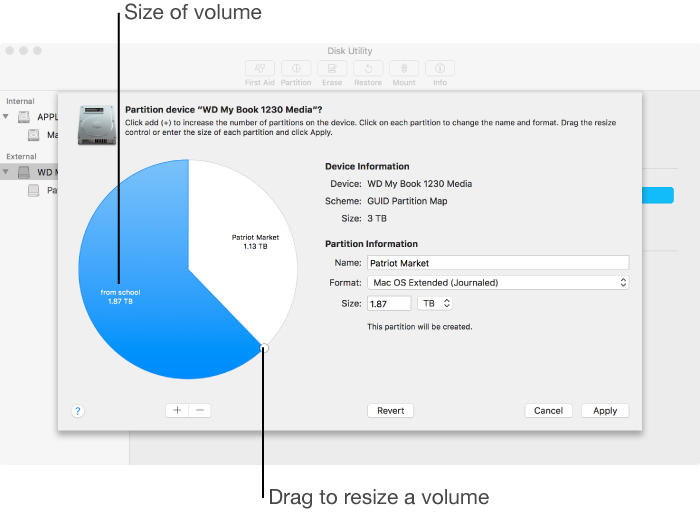
Welcome to the Apple Support Communities! I'm sorry to hear you are having this issue with your Mac and your new hard drive. While I can't speak to the details of the cloning process you may have used, from your description it sounds like you may have cloned the exact volume size of your previous hard drive, creating a single 750GB partition on your 2TB drive. If this is the case, you should be able to confirm it in Disk Utility, and possibly even expand that partition to the full size of the drive. You may find the information and steps outlined in the following article helpful:


User uploaded file


Disk Utility (El Capitan): Partition a physical disk


Regards

This thread has been closed by the system or the community team. You may vote for any posts you find helpful, or search the Community for additional answers.

MacBook thinks my new 2TB hard drive capacity is the same size as my old 750GB hard drive

Welcome to Apple Support Community
A forum where Apple customers help each other with their products. Get started with your Apple Account.