Chur19

Q: Base station switches from green to amber

I have an Airport Time Capsule and added a base station. When plugging in the light is green and the immediately switches to amber. I thought it might be out of range but it does it even in the room where the AirPort Time capsule is located.

iMac, Mac OS X (10.0.x)

Posted on Feb 6, 2016 9:28 AM

Close

Q: Base station switches from green to amber

  • All replies
  • Helpful answers

Page 1 Next
  • by Tesserax,

    Tesserax Tesserax Feb 6, 2016 9:49 AM in response to Chur19
    Level 9 (54,398 points)
    Wireless
    Feb 6, 2016 9:49 AM in response to Chur19

    Is the amber status LED on the AirPort Express flashing or steady? A flashing LED would indicate that some additional configuration steps may be necessary. Which exact model of both the Time Capsule and AirPort Express do you have? Will the Express be used to extend the wireless range of the TC or just use for streaming / sharing a network printer? Finally, will the connection between base stations be via wire or by wireless?

  • by Chur19,

    Chur19 Chur19 Feb 6, 2016 10:18 AM in response to Tesserax
    Level 1 (4 points)
    iPad
    Feb 6, 2016 10:18 AM in response to Tesserax

    The amber light is steady. It is an AirPort Time Capsule 2TB 802.11ac. Base station A1392. It will be used to extend the range. Connection is wireless.

  • by Chur19,

    Chur19 Chur19 Feb 6, 2016 10:24 AM in response to Tesserax
    Level 1 (4 points)
    iPad
    Feb 6, 2016 10:24 AM in response to Tesserax

    The amber light is steady. It is an AirPort Time Capsule 802.11ac 2TB. The Base Station, Model No. A1392, is to extend the wireless range, connection is wireless.

  • by Tesserax,

    Tesserax Tesserax Feb 6, 2016 10:27 AM in response to Chur19
    Level 9 (54,398 points)
    Wireless
    Feb 6, 2016 10:27 AM in response to Chur19

    Unfortunately a steady amber status LED would indicate a unit failure. If you haven't already, I would suggest performing a "factory default" reset on the Express to see if this will "recover" it.

  • by Chur19,

    Chur19 Chur19 Feb 6, 2016 10:56 AM in response to Tesserax
    Level 1 (4 points)
    iPad
    Feb 6, 2016 10:56 AM in response to Tesserax

    I tried it with a soft reset. But the device does not show up in Airport Utility. Only the Airport Time Capsule. The unit is flashing but it looks like it is not picked up by Airport. Express not usable?

  • by Bob Timmons,

    Bob Timmons Bob Timmons Feb 6, 2016 11:11 AM in response to Chur19
    Level 10 (105,067 points)
    Wireless
    Feb 6, 2016 11:11 AM in response to Chur19

    I think we need to back up a few steps here for clarification.....then start over again on the setup.


    You mentioned a few times that the AirPort Express indicator light was "steady" amber.  Then, you mentioned that it was "flashing".  Which is it?


    You indicated in your profile that your iMac was running OS X (10.0.x), but that operating system number is not valid. To find out what operating system your iMac is running.....click on the Apple icon in the upper left corner of the screen, then click About This Mac. Post back with the OS X Version number that you see there.

  • by Chur19,

    Chur19 Chur19 Feb 6, 2016 11:39 AM in response to Bob Timmons
    Level 1 (4 points)
    iPad
    Feb 6, 2016 11:39 AM in response to Bob Timmons

    Sorry for the confusion. The system is OS X Yosemite 10.10.5. I was referring to the soft reset. Then the amber light starts blinking and then following the instructions I tried to go into the Utility but there only the Airport Capsule shows up. I cannot find the Express.

  • by Bob Timmons,

    Bob Timmons Bob Timmons Feb 6, 2016 11:56 AM in response to Chur19
    Level 10 (105,067 points)
    Wireless
    Feb 6, 2016 11:56 AM in response to Chur19

    Thanks for the clarification. Please follow these steps carefully.


    Power off the Time Capsule by pulling the power cord from the back of device

    Wait a few seconds

    Plug the power cord back into the Time Capsule


    Restart your Mac


    Temporarily, locate the AirPort Express in the same room or close proximity to the Time Capsule


    Power up the AirPort Express....if it is not already on

    Hold in the reset button on the back of the AirPort Express for 5 to 6 seconds, then release

    Allow a full minute for the Express to restart to a slow, blinking amber light status


    The AirPort Express will NOT appear in AirPort Utility until it has been set up. You have to run the setup "wizard" on the Express...and then....it will appear in AirPort Utility.  This is likely where you are having the problems.


    Click the WiFi icon at the top of the Mac's screen

    Look for a listing of New AirPort Base Station

    Click directly on AirPort Express just below that
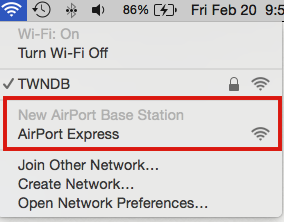
     

    New AirPort Base Express.png


    When you click on AirPort Express, that will get the setup "wizard" running. It will take a few seconds to analyze the network and then display a screen that looks similar to this......except that you will see your devices pictured with the name of your network.
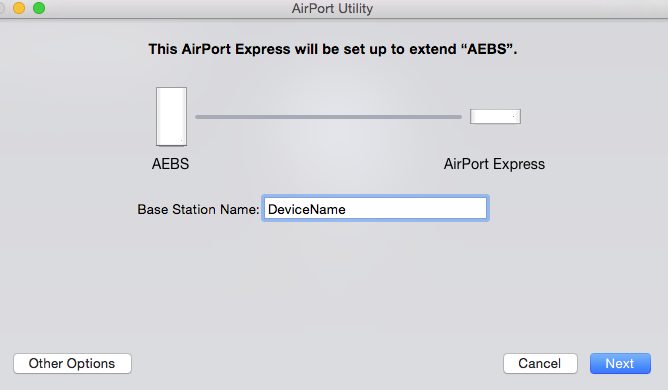
     

    Extend Wireless 1.png


    Type in a simple, short name that you want to call the AirPort Express

    Click Next


    The setup wizard will configure everything for you automatically
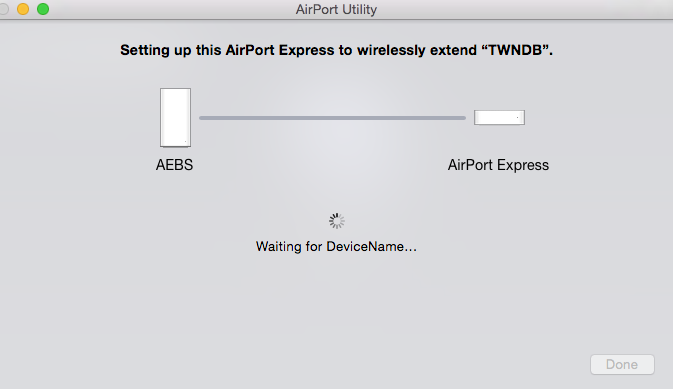
     

    Extend Wireless 2.png


    When you see the message of Setup Complete, click Done


    Now move the AirPort Express to a location that is about half way between the Time Capsule and the general area where you need more wireless signal coverage.  The more that you have line-of-sight between the Time Capsule and AirPort Express, the better the network will operate.


  • by Chur19,

    Chur19 Chur19 Feb 6, 2016 12:21 PM in response to Bob Timmons
    Level 1 (4 points)
    iPad
    Feb 6, 2016 12:21 PM in response to Bob Timmons

    Followed your steps but the Airport Express does not show up. See screenshot below:


    Screenshot 2016-02-06 14.59.57.png

    Does it mean it is defect?

  • by Bob Timmons,

    Bob Timmons Bob Timmons Feb 6, 2016 12:24 PM in response to Chur19
    Level 10 (105,067 points)
    Wireless
    Feb 6, 2016 12:24 PM in response to Chur19

    What happens if you click on Apple Network a19858?

  • by Chur19,

    Chur19 Chur19 Feb 6, 2016 12:36 PM in response to Bob Timmons
    Level 1 (4 points)
    iPad
    Feb 6, 2016 12:36 PM in response to Bob Timmons

    It no longer shows up!

  • by Bob Timmons,

    Bob Timmons Bob Timmons Feb 6, 2016 1:16 PM in response to Chur19
    Level 10 (105,067 points)
    Wireless
    Feb 6, 2016 1:16 PM in response to Chur19

    Do you have an iPhone or iPad handy?

  • by Chur19,

    Chur19 Chur19 Feb 6, 2016 2:25 PM in response to Bob Timmons
    Level 1 (4 points)
    iPad
    Feb 6, 2016 2:25 PM in response to Bob Timmons

    Yes. both.

  • by Bob Timmons,Solvedanswer

    Bob Timmons Bob Timmons Feb 6, 2016 2:55 PM in response to Chur19
    Level 10 (105,067 points)
    Wireless
    Feb 6, 2016 2:55 PM in response to Chur19

    Try the same setup as above, except on the iPhone or iPad home screen.....


    Tap on Settings

    Tap on WiFi

    Look for a listing of Set Up New Base Station

    Tap on AirPort Express


    The setup is the same as above

Page 1 Next
