Why Can't Numbers Subtract Correctly?

I was putting together a spreadsheet earlier with a very simple formula and I got a very unexpected result. I have tried the same calculation in multiple ways across multiple computers and short of forcing the precision (by formatting the resulting cell as Currency or setting it to round to the hundredths place) I get the unexpected answer. The formula is simply "=5.52-5.49" which for some reason results in the answer "0.0299999999999994'. Originally I was referencing multiple cells, but I've boiled it down to as simple an equation as possible for the sake of discussion. Please feel free to try it and let me know if your results vary.


User uploaded file

MacBook Pro with Retina display, OS X El Capitan (10.11.3), Numbers 3.6.1 (2566)

Posted on Feb 7, 2016 3:45 AM

Reply
5 replies

Feb 7, 2016 6:53 AM in response to TheTubbyOne

Hi TheTubbyOne,


Welcome to Apple Support Communities!

Welcome also to the way that computers handle floating point arithmetic. This is not a bug in Numbers, just a fact of life. That is how computers convert "human" (decimal) numbers to binary and back to decimal.

A Screen Shot of a decimal subtraction and an integer subtraction:

User uploaded file

Use the ROUND function in the final formula (don't keep 'rounding' at each step). Let Numbers handle the arithmetic in the intermediate steps.

User uploaded file

Compare that to the integer subtraction in Row 3.

Tested in Numbers 3 and with pencil and paper 🙂.


Regards,

Ian.

Feb 7, 2016 6:47 AM in response to Yellowbox

Howdy Yellowbox,


I understand the premise of your statement (and appreciate your input), but still don't necessarily agree with it not being a bug. Other applications make considerations for this and considering the general use-case for the application it seems like you would make the default precision less than what your math fails at. I suppose the argument can be made that maybe they're trying to give you the most specific answer they can, but to me it seems like a common sense move. At the end of the day it's just another eccentricity I'll make considerations for. After all, not really fair to complain about free software.

Feb 7, 2016 7:12 AM in response to TheTubbyOne

This topic has been covered many times in these forums. Numbers (and all other programs on all other computers) use the sam specification for how a numeric value is represented on a computer. In all cases there are small, well-known errors when you show all decimal places.


Try the same computation on MS Excel... you;ll get the same difference between your expected value and the true value.

Try LibreOffice... same thing

Try Excel on a Windows computer... same thing


the specification is discussed here:

https://en.wikipedia.org/wiki/Floating_point


You can also search for the spec:

IEEE-754


The correct answer is to round results using the round function or format the numeric values in cells to the number of places you need.

Feb 7, 2016 8:32 AM in response to Wayne Contello

Hello Wayne,


I apologize for opening a discussion that's been had before. It wasn't intentional. That being said, the gentleman before you essentially said the same thing you did, but I appreciate your input anyway. I have tried the same computation in Excel and LibreOffice at your request, and to my point they both have made considerations for the discrepancy (whether intentional or not). You're not inaccurate that if you go out of your way you can replicate the same results, but that's the exception not the default behavior. I was just surprised that this is the default behavior considering what most people use the software for.


To any future contributors. No more input needed.

Feb 7, 2016 5:14 PM in response to TheTubbyOne

HI T1,


You wrote: "I have tried the same computation in Excel and LibreOffice at your request, and to my point they both have made considerations for the discrepancy (whether intentional or not)."


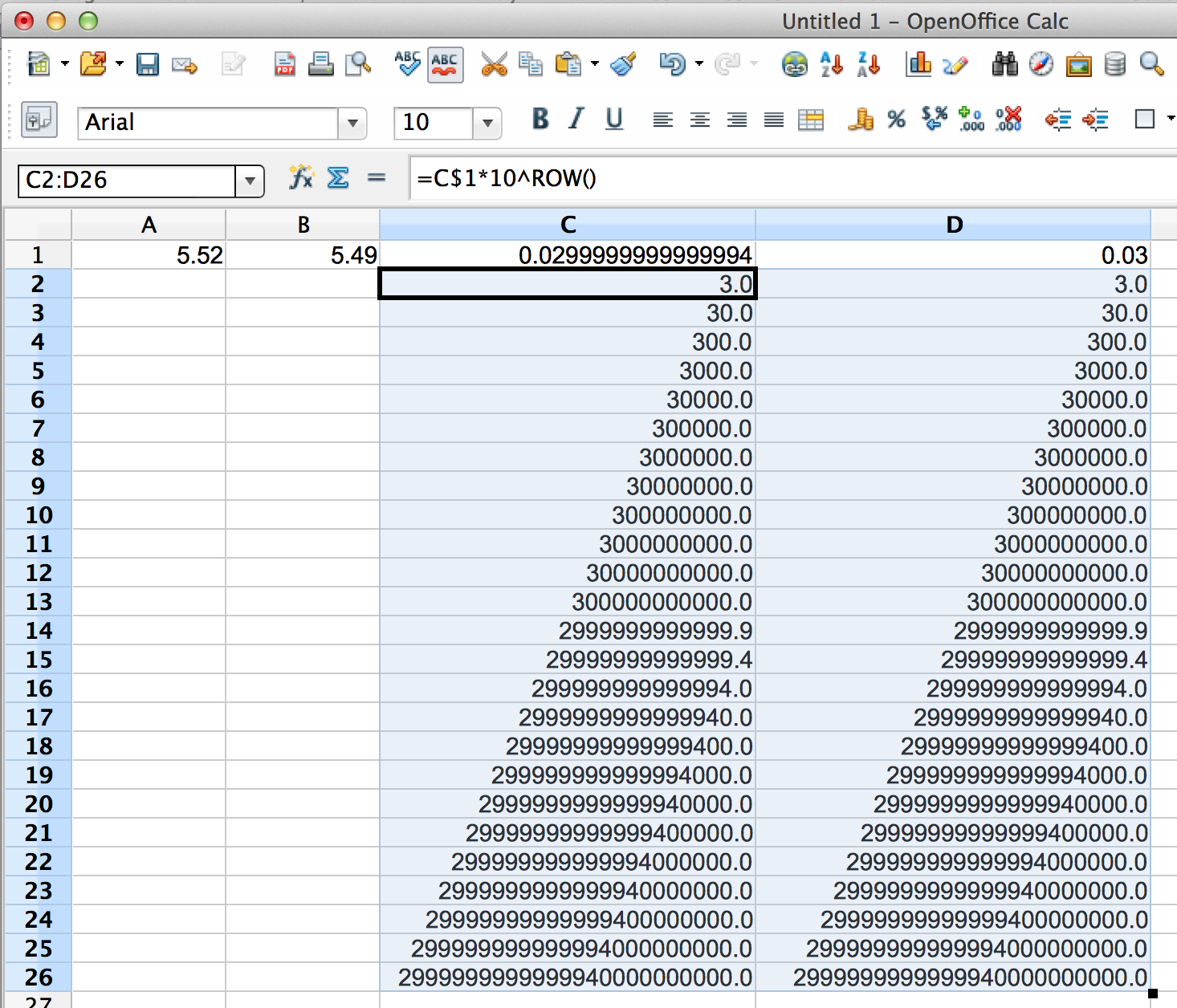
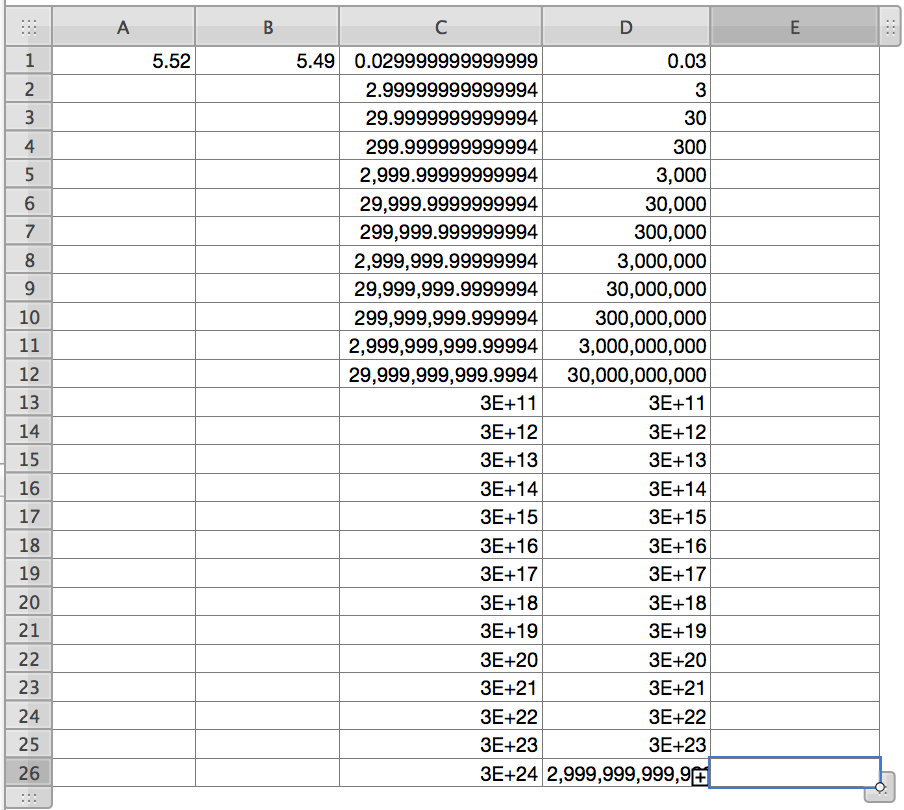
"Made considerations," perhaps, but the consideration appear to be only cosmetic. The underlying value in the cell is the same, judging by this example from Apache OpenOffice. See notes on this and the similar table made in Numbers ('09) below:
User uploaded file

Formulas:

C1: =A1-B1 D1: =A1-B1

C1: Column C was made wider to accommodate more digits. The "+" places button in the toolbar was used to increase the number of decimal places until the first 0 appeared, then the "X" places was clicked once.

D1: Places after the decimal were left at the default value.


C2, then filled right to D2 and down to row 26: =C$1*10^ROW(). Both columns were then widened to accommodate the calculated results.


Numbers example below uses the same formulas. Formatting is slightly different.
User uploaded file

Left at the default width of 1 inch, and the default formatting setting of 'Automatic,' cells C1 and D1 both displayed the result as 0.3. As Column C was widened, the displayed value changed to the result shown.

Entering the formula shown above for the OpenOffice example, and filling it right and down as described there gave the results shown in Numbers.

With one exception, the cells of columns C and D in the Numbers table are left at the default "Automatic" formatting, with Numbers determining the number of places following the decimal. The exception is in the selected cell, where I've changed the cell format to "Number." As can be seen, the result in this cell is the same as that obtained by OpenOffice—both applications displayed rounded results in this column until the point where there were fewer decimal values than they were set for, then started displaying it differently—OO as the actual conversion result, Numbers as the same number as before, but now in scientific notation, and with its end obscured by the cell overflow marker on the right.


The thing that interests me here, though, is that although OpenOffice (and presumably Libre Office and MS Excel) are showing your expected result, they are still using the IEEE-754 standard result in their calculations, as can be seen in rows 14 to 26 of the Open Office screen shot.


Regards,

Barry

This thread has been closed by the system or the community team. You may vote for any posts you find helpful, or search the Community for additional answers.

Why Can't Numbers Subtract Correctly?

Welcome to Apple Support Community
A forum where Apple customers help each other with their products. Get started with your Apple Account.

