Hello Jbigger87,
Thanks for using Apple Support Communities.
I see that after changing your carrier features, your iPhone is showing No Service. To help troubleshoot this issue please follow through the support steps outlined below.
If you see No Service or Searching on your device, or can't connect to a cellular network or cellular data, follow these steps:
- Check your coverage area to make sure that you're in an area with cellular network coverage.
- If you can't connect to a cellular network on your iPhone, make sure that cellular data is on in Settings > Cellular*. On your iPad, go to Settings > Cellular Data.
- If you're traveling internationally, make sure that your device is set up for data roaming. Go to Settings > Cellular > Data Roaming.
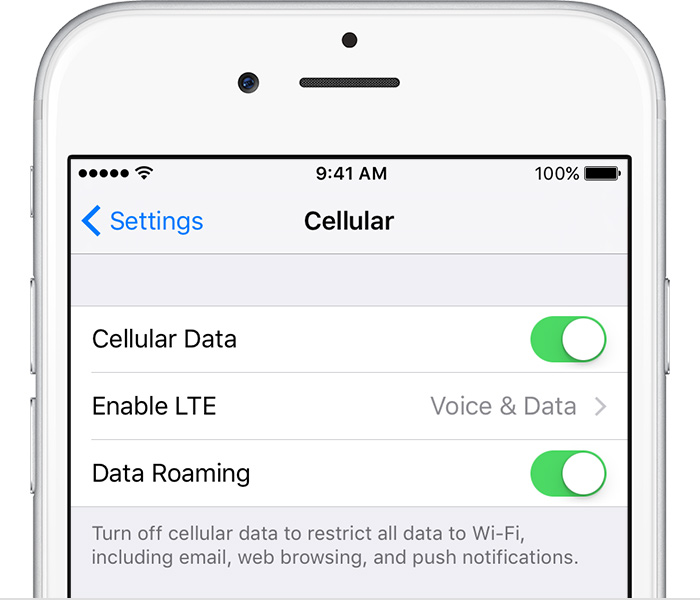
- Restart your iPhone or iPad.
- Check for a Carrier Settings Update.
- Take out the SIM card and put it back in. If the SIM card is damaged, or doesn't fit in the SIM tray, contact your carrier.
- Reset your Network Settings. Tap Settings > General > Reset > Reset Network Settings. This also resets Wi-Fi networks and passwords, cellular settings, and VPN and APN settings that you've used before.
- If you have another device, see if you can connect your carrier's network with it in that location.
- Contact your carrier to:
- Verify that your account is active and in good standing.
- Make sure there are no outages in your area.
- Check that your device isn't blocked from receiving cellular services and is set up with the right data plan.
- Update your iPhone or iPad to the latest version of iOS.
If you still can't connect to a cellular network, and have confirmed with your carrier that there isn't an issue with your account or network, try restoring your device.
If you can‘t connect to a cellular network or cellular data
Cheers.


