The "default" picker is a "color wheel" typical favorite of most artists. It is indicative of the perceptual nature of color (red - orange - yellow - green - cyan - blue - violet - red.)
The system color picker can be a color wheel circle, sliders, "tags" or tabs or swatches (however you want to refer to them), spectrum, and colored pencils (48 colors). There are five small icons at the top of the picker window. Pick the system you want to use. If you select the sliders picker, you will have the option of grayscale, RGB, CMYK and HSB. You can also "load" the squares at the bottom with your "favorites".
You might prefer the Spectrum picker:

You might also want to try right clicking on the color tab in the inspector (or click on the down arrow on the right side) and you'll get this compact popup version:
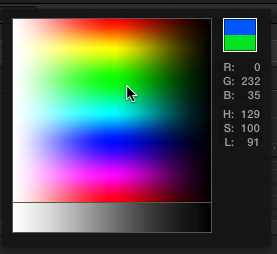
except there will be an eyedropper cursor in place of the arrow shown.


