Hello there, cheeseballs09.
It sounds like you are wanting to manually manage your music from iTunes to your iPhone 6. The following Knowledge Base article offers up some great information on how to do just that:
Move content from iTunes on your computer to your iPhone, iPad, or iPod touch
By default, iTunes manages the content of your iTunes library (including your music, TV shows, movies, and more) manually, which gives you control over the content you want to take with you on your iPhone, iPad, or iPod touch. This is useful if your iTunes library contains more items than can fit on your device.
If you're a member of Apple Music or have an iTunes Match subscription, you have iCloud Music Library turned on. When you have iCloud Music Library turned on, you can't manually manage music. You can still manage videos using the steps below.
- Connect your device to your computer.
- Open iTunes. Make sure that you have the latest version.
- Choose the content that you want to add to your device from your iTunes library.

- Drag the content to your iPhone, iPad, or iPod. A panel should appear. Locate your device.

If you're using an iPhone, you can only add music or video from a single iTunes Library.
If you're using an iPad or iPod, you can add music from multiple iTunes Libraries, but video from only one iTunes Library.
Check to make sure that the "Manually manage music and videos" option is turned on:
- Connect your device to your computer.
- Open iTunes. Make sure that you have the latest version.
- Locate and click on your device.

- In the left sidebar, click Summary.
- Scroll down to the Options section.
- Click the box next to "Manually manage music and videos."
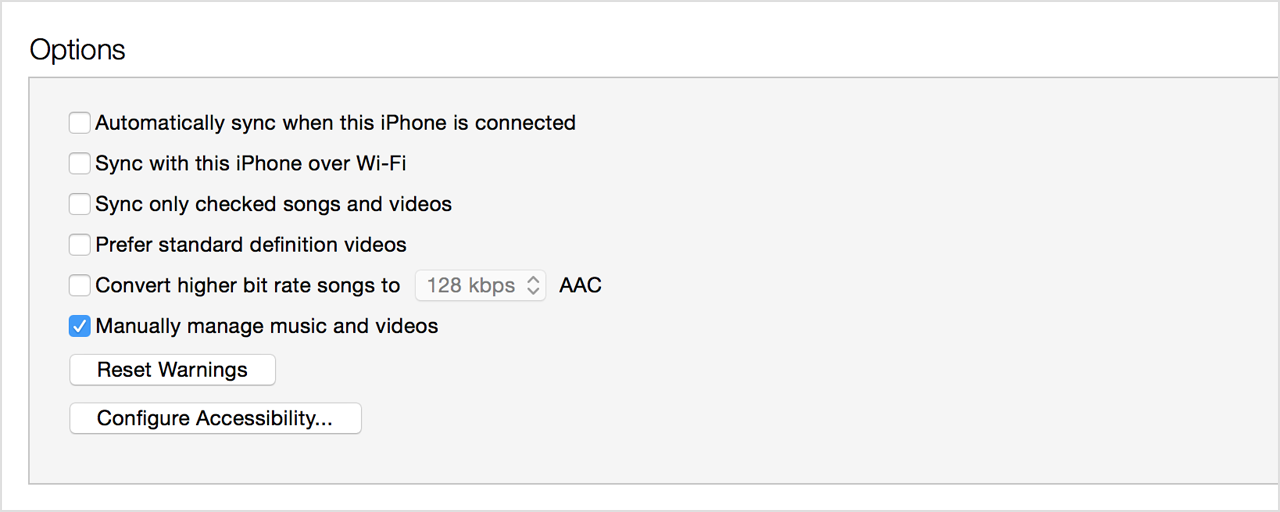
- Click Apply.
You might see a message that your device is synced with another library. This means that you've used a different computer to sync your device in the past, and iTunes can't sync without first erasing and replacing all iTunes content on your device.
Thanks for reaching out to Apple Support Communities.
Kind Regards.


