alfiemoon

Q: Unable to download app.  Not available at this time

I have IMovie on my iPhone 6 and had it on my iPad pro, too.  The app store had it queued with a couple of other apps for "update" so I clicked on "update" for them, individually.  It updated every app except IMovie.  It starts to update (the black progress circle like a clock, in the screenshot I've attached), but after about a minute I get a small white window saying what is in the title of this question, above ^^ (in the other screenshot I've attached). This has been going on for a couple of weeks, every app will update except IMovie.  I have uninstalled it from the iPad and tried to reinstall it, but I get the same white window with the same message..image.pngimage.png

iMovie (iOS), iOS 9.2.1, iPad Pro

Posted on Feb 28, 2016 3:17 AM

Close

Q: Unable to download app.  Not available at this time

  • All replies
  • Helpful answers

  • by judysings,

    judysings judysings Feb 29, 2016 11:46 AM in response to alfiemoon
    Community Specialists
    Feb 29, 2016 11:46 AM in response to alfiemoon

    Hello alfiemoon,

    If your iMovie for iOS app won't update or install on your iPad Pro, try the following steps:

    1. Open the App Store.
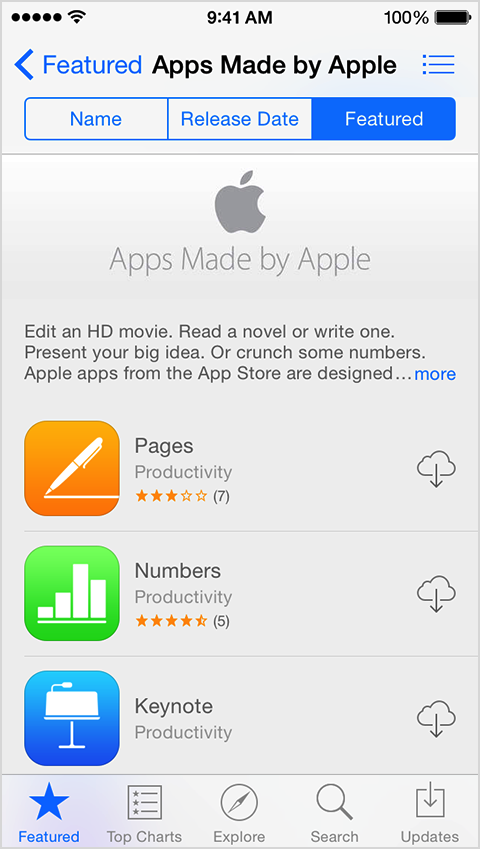
    2. Tap Apps Made by Apple under Quick Links. 
    3. Tap Download All, or you can download apps one at a time.
      Featured screen in App Store showing Apps Made my Apple option.     Apps Made by Apple screen showing download options.

    To download apps larger than 100 MB, you need to be connected to Wi-Fi.

    Source:  https://support.apple.com/en-us/HT202794

    If the issue with iMovie for iOS still persists, try downloading it again.  Make sure that you are signed in with the Apple ID that you used to download the app initially.   ​

    Download your past purchases


    If you are still unable to download iMovie for iOS to your iPhone and iPad, contact Apple Support.


    Take care,