why is my wlan allways active?
why is my wlan allways active, after every reboot?? macbook pro retina
MacBook Pro (Retina, Mid 2012), OS X El Capitan (10.11.3), null
why is my wlan allways active, after every reboot?? macbook pro retina
MacBook Pro (Retina, Mid 2012), OS X El Capitan (10.11.3), null
Hello Dancerffm,
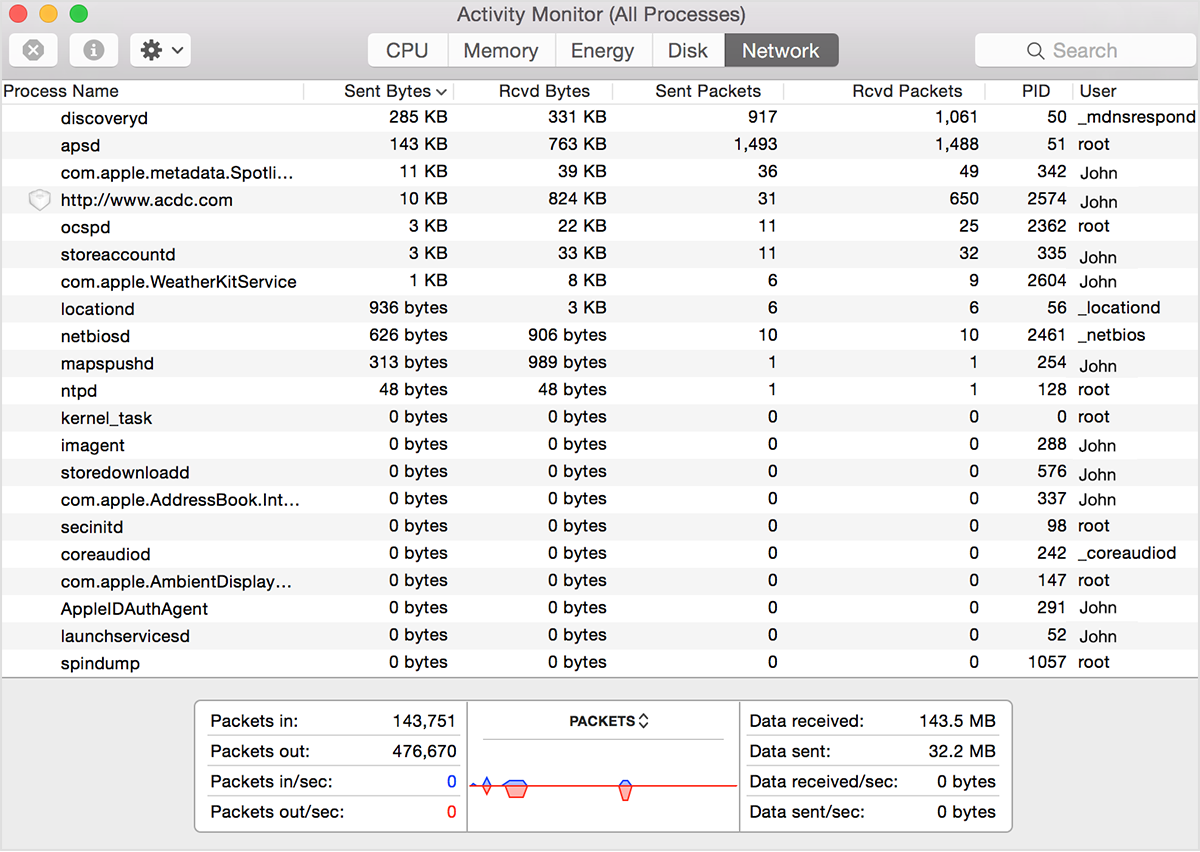
It sounds like you are concerned that your Wi-Fi is constantly sending data even after you restart the computer. I would suggest using the Network tab of the Activity Monitor to determine what, if anything is sending data:
Network
The Network pane shows how much data your Mac is sending or receiving over your network. Use this information to identify which processes are sending or receiving the most data.
The information at the bottom of the Network pane shows total network activity across all apps. The graph moves from right to left and updates at the intervals set in View > Update Frequency. The graph also includes a pop-up menu to switch between showing packets or data as a unit of measurement. The color blue shows either the number of packets received per second or the amount of data received per second. The color red shows either the number of packets sent per second or the amount of data sent per second.
To show a graph of network usage in your Dock, choose View > Dock Icon > Show Network Usage.
If that is not the case, then can you please elaborate on what you are seeing, and need help with? Thank you for using Apple Support Communities! All the best.
why is my wlan allways active?