Transfer Media
How do I transfer photos from my samsumg sd card to my iphone or macbook air? Right now I only have my sd card, not my old phone anymore
iPhone 5s, iOS 9.2.1
How do I transfer photos from my samsumg sd card to my iphone or macbook air? Right now I only have my sd card, not my old phone anymore
iPhone 5s, iOS 9.2.1
Hi Nicholette Lynn,
Thanks for contributing to the Apple Support Communities.
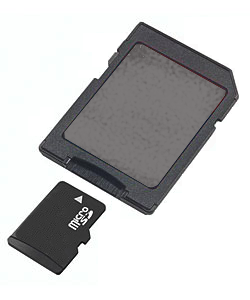
You can use the SD card slot on your MacBook Air (or a USB SD card reader) to import the pictures. If your old phone used a Micro or Mini SD card, you can use an adapter like the one mentioned in About the SD and SDXC card slot:
Which SD card formats work in the SD card slot?
Cards that conform to the SD 1.x, 2.x, and 3.x standards should work. The SD card slot can use cards that are Standard SD (Secure Digital) 4 MB to 2 GB, SDHC (Secure Digital High Capacity) 4 GB to 32 GB, and SDXC (Secure Digital Extended Capacity) 4G B to 2 TB. MMC can also be used in this slot. MiniSD, MicroSD, and higher density formats like MiniSDHC and MicroSDHC can also work with the use of "passive" adapters that conform to the width and thickness specifications listed above.
Example of a passive adapter:
Once you've copied the pictures on to your Mac, you can sync them to your iPhone with Sync photos from your computer to your iOS device using iTunes.
All the best.
Transfer Media