How to create a PDF/A File with Pages

Hi everyone,

I am writing my University thesis with Pages and I really need to know how can I convert it into a PDF/A document.

I can't upload it because the normal PDF format is not valid...

I would be very grateful if someone could help me, thanks a lot.

Posted on Mar 10, 2016 5:32 AM

Reply
2 replies

Mar 10, 2016 7:50 AM in response to lucacaporal94

No version of Pages offers PDF/A document export support because the Apple OS X PDF Quartz libraries are still restricted to PDF v1.3 output. PDF/A-1 requires PDF v1.4, among its other criteria. You will need a third-party, word processing application that uses its own PDF generation package that includes the ability to produce PDF/A output. LibreOffice v5.1.0.3 (current as of this post) has that checkbox in its Print panel.


I exported a Pages document to Word .docx, and then opened that in LibreOffice Writer, where I could export as PDF/A-1a.


Here is the Export to PDF panel in LibreOffice Writer:

User uploaded file

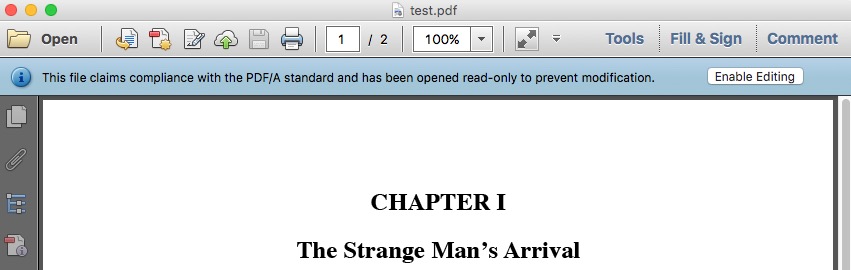
And the PDF/A notification when opening this PDF in Adobe Reader 11.0.15.
User uploaded file

This thread has been closed by the system or the community team. You may vote for any posts you find helpful, or search the Community for additional answers.

How to create a PDF/A File with Pages

Welcome to Apple Support Community
A forum where Apple customers help each other with their products. Get started with your Apple Account.

