-
All replies
-
Helpful answers
-
Mar 25, 2016 9:10 AM in response to Maker45by pedro d,Hello there, Maker45.
It seems the issue you're having is that you've forgotten the password and security questions for the Apple ID being used on your parent's iPhone. The following Knowledge Base article offers up some great troubleshooting steps and recommendations:
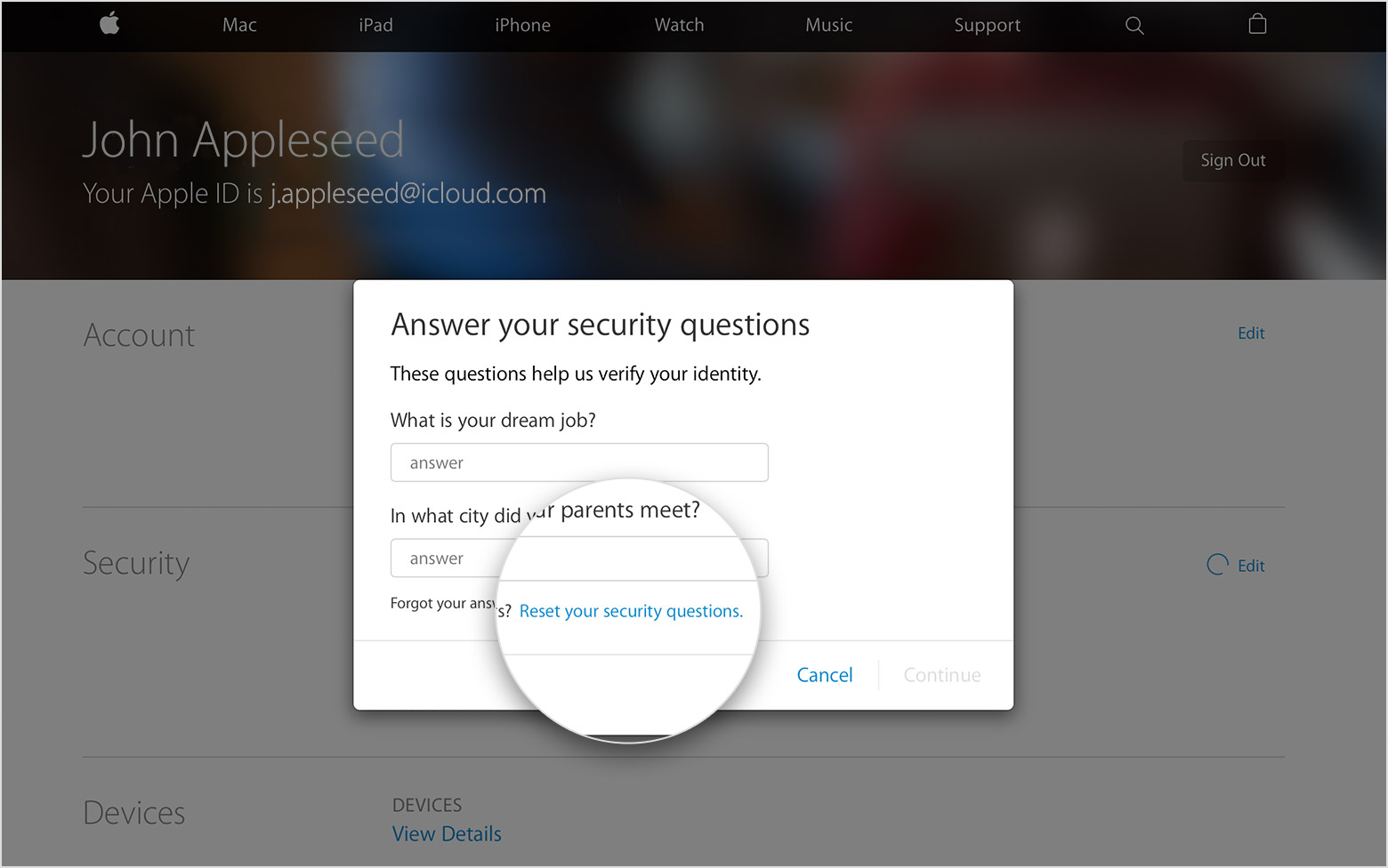
If you forgot the answers to your Apple ID security questions
Reset your security questions
- Sign in to your Apple ID account page.
- In the Security section, click Change Questions.
- When you're asked to answer your security questions, click "Reset your security questions." We'll email you at your rescue email address. If you don't see "Reset your security questions," you don't have a rescue email address and you need to call us for help.

- Follow the steps in the email to set up new questions and answers. Didn't get the email?
If you have trouble remembering your security questions, you might want to set up two-step verification. With two-step verification, you don't need security questions to secure your account or verify your identity.
You can also secure your account with two-factor authentication when it's available for your Apple ID.
If you can't reset your security questions
If you can't send a reset email, don't have a rescue email address, or can't access email at your rescue email address, call us for help. When you call, you might need to create a temporary support PIN to verify your identity. After you reset your security questions, you might want to update your rescue email address.
If you answer your security questions incorrectly too many times in a row, you temporarily can't access your account. You can try to reset your questions after the waiting period ends.
Thanks for reaching out to Apple Support Communities.
Kind Regards.
-
Mar 27, 2016 9:02 PM in response to pedro dby Maker45,Hi pedro d,
Thanks for your help. But it seems helpless.
Context:
1> Forget password, and only remember one 'Security question' to recovery. (And the account is locked which I can't try anymore now)
2> The rescue mail is invalid 'yahoo.cn' which is obsolete. (can't to receive email anymore).
I call the service several times, the only solution/suggestion is to reset the device with removing the apple id on it and ALL data on the device would missing.
(And I need wait around 10 days for there are many cases this time upgrade...)
The concern is
Yes, I admit that I missed the password and security question, but I didn't think it's reasonable to lose all data as:
I definitely prove it's my legal device (iphone5) with invoice and packaging, but now I have to helplessly see its data missing and can't open it.
p.s.
What's the meaning about "When you call, you might need to create atemporary support PIN to verify your identity. After you reset your security questions, you might want to update your rescue email address."
There is other solution?
Thanks,

-
Mar 29, 2016 2:57 PM in response to Maker45by pedro d,Hello again, Maker45.
Thank you for the follow up on the issue you've been having. There are some additional recommendations in the following Knowledge Base article that may prove useful with your issue as well:
If you can‘t activate your iPhone, iPad, or iPod touch after installing iOS 9.3
In some cases, the hint that you see on the Activate iPhone screen might not match your current Apple ID. To make sure that you're entering your Apple ID information correctly, try these steps:
- Sign in to iCloud.com from a computer. You can get help if you forgot your Apple ID or need to reset your Apple ID password.
- Open Settings and scroll to the My Devices section.
- Confirm that your device is listed in the My Devices section. If you don’t see it listed, check all your accounts.
If you still need help, try these steps in iTunes from a computer:
- Connect your iPhone, iPad, or iPod touch to the computer.
- Open iTunes. Make sure that you have the latest version of iTunes.
- Select your device. You should see the Activate [your device] screen in iTunes.
- Enter your Apple ID and password and click Continue.
Or try to sign in to iCloud.com, so you can remove Activation Lock:
- Turn off your device or take it offline.
- Sign in to iCloud.com with your Apple ID and password.
- Open Find My iPhone.
- Select All Devices, then select your device.
- Click Remove from Account. If you still see a map in the device detail view, select All Devices again, click
next to your device, then click Remove. - After you set up your device successfully, make sure that you sign in to iCloud and turn on Find my iPhone again.
If you need help, contact Apple Support.
Cheers.
P.S. Your question in regard to the quoted material from the initial article refers to the possibility of needing to create a Temporary Support pin when you call in. If applicable, you can click the link to see how to create the support PIN:
If you can't reset your security questions
If you can't send a reset email, don't have a rescue email address, or can't access email at your rescue email address, call us for help. When you call, you might need to create a temporary support PIN to verify your identity. After you reset your security questions, you might want to update your rescue email address.
-
Mar 29, 2016 8:51 PM in response to pedro dby Maker45,Hi pedro d,
Thanks again for your info.
But the key is:
I forgot Password of specific Apple ID. And:
1> remember only one 'Security question' to recovery. (And the account is locked which I can't try password and question anymore now)
2> the rescue mailbox 'yahoo.cn' is invalid to receive email which is obsolete.
No Password, how could I sign-in to process the other operation??
-
Apr 13, 2016 6:16 AM in response to Maker45by Maker45,After more than two weeks wait, I get the feedback from services like:
Apple Case ID: ****
But it must not work as I could not login as above specifications.
I have provide invoice and outer packing to the service. But I still could not use MY phone.
So disappointed!!! About the policy and service about this case...
<Personal Information Edited by Host>
-
Apr 25, 2016 11:23 PM in response to Maker45by Maker45,After several weeks wait, no feedback from Apple side but a tracking case ID: 1074585544
Then, I called the apple Support again, he said "please wait, ... ...".
How long I should wait with the phone out of work.
So disappointed about the service