iphone 6 internet acces locked
my internet acces is locked
iPhone 6, iOS 9.3
my internet acces is locked
iPhone 6, iOS 9.3
Hi there filhenry,
Welcome to Apple Support Communities.
If I understand correctly, you're unable to connect to a Wi-Fi network on your iPhone 6 because you can't enable Wi-Fi or the password that you're entering isn't accepted.
If Wi-Fi is grayed out and there's an issue turning it on then try taking a look at the article linked below and running through the troubleshooting suggestions that it provides.
If Wi-Fi is grayed out or dim on your iPhone, iPad, or iPod touch - Apple Support
If you are able to turn Wi-Fi on, but you aren't able to join the Wi-Fi network, use this article should help you resolve the issue joining the network.
Connect to Wi-Fi on your iPhone, iPad, or iPod touch - Apple Support
Cheers.
Thanks for your answer, but the problem is to get acces to internet sites, my WIFI connection is running properly. For exemple GOOGLE site appear with a padlock and i can't surf on internet.
Hi filhenry,
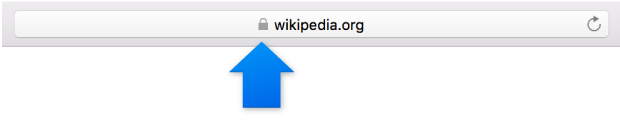
It sounds like your iPhone 6 is connected to a Wi-Fi network, but there's an issue browsing the web with Safari and you're wondering if it is related to the lock icon that's appearing next to the website URL. The lock indicates that the website is secure, as described in the article below.
Identify encrypted websites and avoid fraud - Safari Help
Look for an encryption icon in the Smart Search field. An encryption icon indicates that the website uses the HTTPS protocol, has a digital identity certificate, and encrypts information. To view the website’s certificate, click the icon.
A gray icon indicates a standard certificate.
If Safari isn't responding normally, try running through the general app troubleshooting tips in the article below.
If an app you installed unexpectedly quits, stops responding, or won’t open - Apple Support
Restart the app
Close the app and open it again.
Restart your device
Turn your device off and back on.
Check for iOS and app updates
Make sure that you're using latest version of iOS.
If you aren't sure how to use Safari to browse the web on your iPhone, try taking a look at this article:
Cheers.
Thanks for your answer.
The new version iOS 9.3.1 solved the problem
You're welcome.
I'm happy to hear that you were able to resolve the issue.
iphone 6 internet acces locked