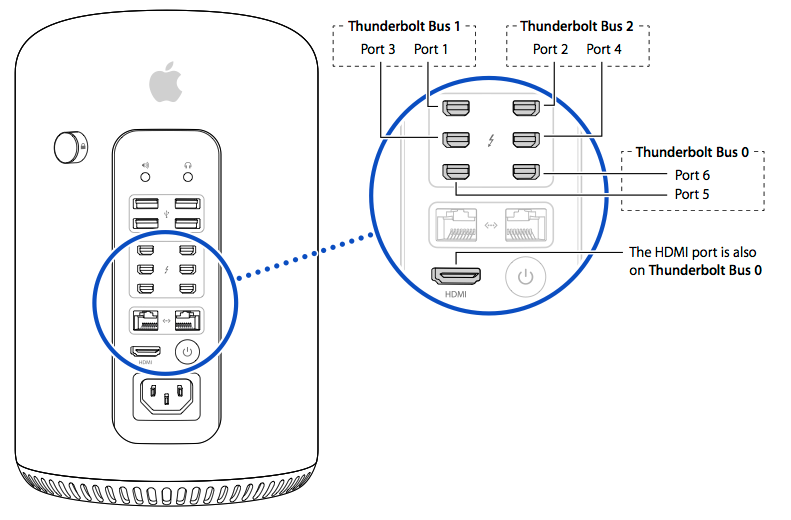
Can't connect three external monitors to mid 2013 Mac Pro?
Hey All,
Running into quite some issues after updating to el capitan.
I have three external monitors (1x hdmi tv, 1x hdmi-minidisplay, 1xdvi - minidisplay) and can only have two connected and visible at one time.
when i have all plugged in, I see only two, but if I then unplug one of these, the third shows up.
So all cables are working, so are the monitors. I did PRAM, SMC, and safe boot, no difference.
What do I do? I am an editor and need three, how do I make this happen?
Please help,
best
Leah
Etre-check:
EtreCheck version: 2.9.10 (261)
Report generated 2016-04-07 12:43:34
Download EtreCheck from https://etrecheck.com
Runtime 1:28
Performance: Excellent
Click the [Support] links for help with non-Apple products.
Click the [Details] links for more information about that line.
Problem: No problem - just checking
Hardware Information: ⓘ
Mac Pro (Late 2013)
[Technical Specifications] - [User Guide] - [Warranty & Service]
Mac Pro - model: MacPro6,1
1 3.5 GHz 6-Core Intel Xeon E5 CPU: 6-core
64 GB RAM Upgradeable - [Instructions]
DIMM1
16 GB DDR3 ECC 1866 MHz ok
DIMM2
16 GB DDR3 ECC 1866 MHz ok
DIMM3
16 GB DDR3 ECC 1866 MHz ok
DIMM4
16 GB DDR3 ECC 1866 MHz ok
Bluetooth: Good - Handoff/Airdrop2 supported
Wireless: en2: 802.11 a/b/g/n/ac
Video Information: ⓘ
AMD FirePro D500 - VRAM: 3072 MB
AMD FirePro D500 - VRAM: 3072 MB
SMB2330H 1920 x 1080 @ 60 Hz
S22E310 1920 x 1080
System Software: ⓘ
OS X El Capitan 10.11.4 (15E65) - Time since boot: less than an hour
Disk Information: ⓘ
APPLE SSD SM0512F disk0 : (500.28 GB) (Solid State - TRIM: Yes)
EFI (disk0s1) <not mounted> : 210 MB
Recovery HD (disk0s3) <not mounted> [Recovery]: 650 MB
Macintosh HD (disk1) / : 499.10 GB (159.84 GB free)
Core Storage: disk0s2 499.42 GB Online
USB Information: ⓘ
Apple Inc. BRCM20702 Hub
Apple Inc. Bluetooth USB Host Controller
Mitsumi Electric Hub in Apple Extended USB Keyboard
Mitsumi Electric Apple Extended USB Keyboard
Thunderbolt Information: ⓘ
Apple Inc. thunderbolt_bus_2
Apple Inc. thunderbolt_bus_1
Apple Inc. thunderbolt_bus_0
Configuration files: ⓘ
/etc/sysctl.conf - File exists but not expected
Gatekeeper: ⓘ
Anywhere
Kernel Extensions: ⓘ
/Applications/DiskWarrior.app
[not loaded] com.alsoft.Preview (4.4 - 2012-07-23) [Support]
/Applications/Toast 12 Titanium/Toast Titanium.app
[not loaded] com.roxio.TDIXController (2.0 - 2016-02-04) [Support]
/Applications/TuneClone.app
[not loaded] com.tuneclone.driver.TuneClone_Virtual_CDWriter (1.0.0d1 - 2012-01-15) [Support]
/Library/Extensions
[not loaded] com.TrustedData.driver.VendorSpecificType00 (1.7.0 - SDK 10.7 - 2016-04-07) [Support]
[not loaded] com.drobo.SCSI.ThunderBolt (1.1 [72278] - SDK 10.8 - 2016-04-07) [Support]
[not loaded] com.sony.pci.SxS (1.0 - SDK 10.9 - 2016-04-07) [Support]
/System/Library/Extensions
[not loaded] com.Cycling74.driver.Soundflower (1.5.1 - 2016-04-07) [Support]
[loaded] com.logmein.driver.LogMeInSoundDriver (4.1.60f87 - 2016-04-07) [Support]
[loaded] com.nvidia.CUDA (1.1.0 - 2016-04-07) [Support]
Startup Items: ⓘ
ProTec6: Path: /Library/StartupItems/ProTec6
Startup items are obsolete in OS X Yosemite
System Launch Agents: ⓘ
[not loaded] 7 Apple tasks
[loaded] 167 Apple tasks
[running] 64 Apple tasks
System Launch Daemons: ⓘ
[not loaded] 43 Apple tasks
[loaded] 158 Apple tasks
[running] 87 Apple tasks
Launch Agents: ⓘ
[not loaded] com.adobe.AAM.Updater-1.0.plist (2016-04-06) [Support]
[running] com.adobe.AdobeCreativeCloud.plist (2016-02-11) [Support]
[running] com.logmein.logmeingui.plist (2016-03-21) [Support]
[running] com.logmein.logmeinguiagent.plist (2016-03-21) [Support]
[not loaded] com.logmein.logmeinguiagentatlogin.plist (2016-03-21) [Support]
[not loaded] com.nvidia.CUDASoftwareUpdate.plist (2015-04-06) [Support]
Launch Daemons: ⓘ
[running] com.adobe.adobeupdatedaemon.plist (2016-02-16) [Support]
[loaded] com.adobe.agsservice.plist (2015-09-24) [Support]
[loaded] com.adobe.fpsaud.plist (2016-03-18) [Support]
[loaded] com.apple.aelwriter.plist
[running] com.apple.qmaster.qmasterd.plist
[running] com.cleverfiles.cfbackd.plist (2014-12-03) [Support]
[running] com.datarobotics.ddservice64d.plist (2015-01-12) [Support]
[not loaded] com.datarobotics.ddserviced.plist (2015-01-12) [Support]
[running] com.edb.launchd.postgresql-8.4.plist (2015-01-20) [Support]
[running] com.logmein.logmeinserver.plist (2016-03-21) [Support]
[loaded] com.logmein.raupdate.plist (2015-02-03) [Support]
[not loaded] com.nvidia.cuda.launcher.plist (2016-02-02) [Support]
User Launch Agents: ⓘ
[not loaded] com.adobe.AAM.Updater-1.0.plist (2014-11-11) [Support]
[loaded] com.adobe.ARM.[...].plist (2015-03-25) [Support]
[loaded] com.bittorrent.uTorrent.plist (2015-03-16) [Support]
[loaded] com.google.keystone.agent.plist (2016-03-02) [Support]
[loaded] com.redgiantsoftware.updater.plist (2015-02-20) [Support]
User Login Items: ⓘ
iTunesHelper Application (/Applications/iTunes.app/Contents/MacOS/iTunesHelper.app)
Dropbox Application (/Applications/Dropbox.app)
uTorrent UNKNOWN (missing value)
Other Apps: ⓘ
[running] com.adobe.CCLibrary.78432
[running] com.adobe.CCXProcess.78752
[running] com.adobe.acc.AdobeDesktopService.108512.1645FD35-9F90-4D19-956C-5C721FC9E25F
[running] com.adobe.accmac.79072
[running] com.etresoft.EtreCheck.110112
[running] com.getdropbox.dropbox.61152
[running] com.google.Chrome.47392
[loaded] 416 Apple tasks
[running] 178 Apple tasks
Internet Plug-ins: ⓘ
AdobeAAMDetect: 3.0.0.0 - SDK 10.9 (2016-02-16) [Support]
FlashPlayer-10.6: 21.0.0.197 - SDK 10.6 (2016-03-23) [Support]
QuickTime Plugin: 7.7.3 (2016-03-12)
AdobePDFViewerNPAPI: 11.0.0 - SDK 10.6 (2012-09-24) [Support]
AdobePDFViewer: 11.0.0 - SDK 10.6 (2012-09-24) [Support]
Flash Player: 21.0.0.197 - SDK 10.6 (2016-03-23) Outdated! Update
Default Browser: 601 - SDK 10.11 (2016-03-12)
Flip4Mac WMV Plugin: 3.3.1.8 - SDK 10.8 (2014-12-09) [Support]
3rd Party Preference Panes: ⓘ
CUDA Preferences (2016-02-02) [Support]
Flash Player (2016-03-18) [Support]
Flip4Mac WMV (2014-11-25) [Support]
Paragon NTFS for Mac ® OS X (2015-07-30) [Support]
Time Machine: ⓘ
Auto backup: YES
Volumes being backed up:
Macintosh HD: Disk size: 499.10 GB Disk used: 339.26 GB
Destinations:
Darth Mac Backup [Local]
Total size: 499.76 GB
Total number of backups: 1
Oldest backup: 3/28/16, 12:28 PM
Last backup: 3/28/16, 12:28 PM
Size of backup disk: Too small
Backup size 499.76 GB < (Disk used 339.26 GB X 3)
Top Processes by CPU: ⓘ
76% Google Chrome Helper(5)
14% Google Chrome
4% WindowServer
3% fontd
1% kernel_task
Top Processes by Memory: ⓘ
2.81 GB kernel_task
786 MB Google Chrome Helper(5)
197 MB Dropbox
197 MB mds_stores
197 MB ocspd
Virtual Memory Information: ⓘ
53.00 GB Free RAM
11.00 GB Used RAM (3.76 GB Cached)
0 B Swap Used
Diagnostics Information: ⓘ
Apr 7, 2016, 12:33:03 PM Self test - passed
Apr 7, 2016, 12:29:55 PM /Library/Logs/DiagnosticReports/loginwindow_2016-04-07-122955_[redacted].crash
com.apple.loginwindow - /System/Library/CoreServices/loginwindow.app/Contents/MacOS/loginwindow
Apr 7, 2016, 12:29:49 PM /Library/Logs/DiagnosticReports/WindowServer_2016-04-07-122949_[redacted].crash
/System/Library/Frameworks/CoreGraphics.framework/Versions/A/Resources/WindowSe rver
Apr 7, 2016, 12:07:55 PM ~/Library/Logs/DiagnosticReports/Adobe CEF Helper_2016-04-07-120755_[redacted].crash
/Library/Application Support/Adobe/*/Adobe CEF Helper.app/Contents/MacOS/Adobe CEF Helper
Apr 6, 2016, 07:03:06 PM ~/Library/Logs/DiagnosticReports/Adobe Premiere Pro CC 2015_2016-04-06-190306_[redacted].crash
com.adobe.AdobePremierePro - /Applications/Adobe Premiere Pro CC 2015/Adobe Premiere Pro CC 2015.app/Contents/MacOS/Adobe Premiere Pro CC 2015
Apr 4, 2016, 06:54:06 PM ~/Library/Logs/DiagnosticReports/Adobe Premiere Pro CC 2015_2016-04-04-185406_[redacted].crash