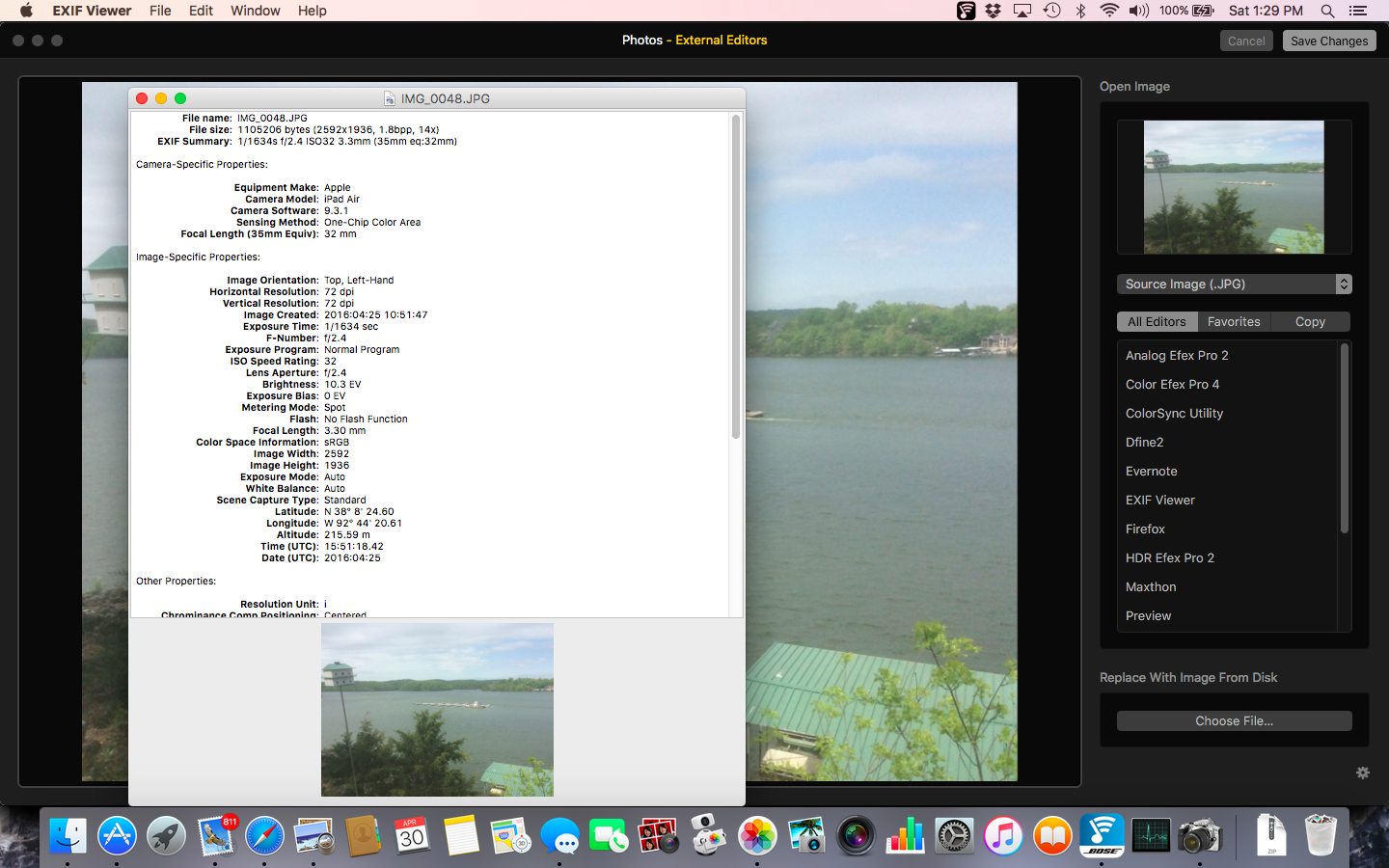
EXIT viewer works just fine in edit mode
I'm not sure it is still available but it is a good utility
EXIF Viewer
Version 2.7.1, released 10/3/09
By Ali Ozer, aozer@mac.com
—————————————————————————————————————————————————
EXIF Viewer is a small Mac OS X application to display EXIF information in JPEG and THM (thumbnail) files. I use it to display EXIF info for images from digital cameras; it's not too useful for images from other sources.
To open files, drag and drop them to the application icon, or open them using the open panel in the app. The EXIF data will be displayed, followed a little later by a small version of the image.
The EXIF reading code in EXIF Viewer 2.x comes from Eric M. Johnston's exiftags package. Please see below for the exiftags copyright notice.
EXIF Viewer 2.x does requires Mac OS X version 10.2 or later — you can download version 1.3 of the application if you need to use it on Mac OS X version 10.1.
EXIF Viewer 2.7.1 has a small interim workaround for a SnowLeopard issue, and is recommended for SnowLeopard users only. Leopard and earlier users should continue using 2.7.
The application comes with no guarantees, use at your own risk!
If and when the app is upgraded, newer versions might be available at:
http://homepage.mac.com/aozer/EV/index.html
—————————————————————————————————————————————————
History
1.0 (1/13/02) First release.
1.1 (1/14/02) Deal with Nikon D1X images.
1.2 (1/22/02) Report actual compression ratio (as JPEG quality tag isn't necessarily correct).
1.3 (1/2/03) Fix problem with Canon flash reporting.
2.0 (9/23/03) Switch from jhead to exiftags for extracting EXIF info. More accurate 35mm equivalent focal length. Text finding functionality (Mac OS X 10.3 and higher only). THM file support. Higher quality images.
2.1 (9/25/03) Rich text output, allowing clearer distinction between tag names and values.
2.2 (3/14/04) Allow open panel to accept upper case extensions ("JPG", "JPEG", "THM"). This was only a problem on 10.2.x and earlier systems.
2.3 (9/28/04) Switch to exiftags version 0.99.1, including support for additional cameras.
2.4 (10/3/05) Switch to exiftags version 1.00, including support for more cameras (and Nikon ISO settings in D70, etc).
2.5 (1/12/06) Universal (PowerPC and Intel) release; no other changes.
2.6 (5/27/07) Better handling of ISO in Canon files.
2.7 (8/28/08) Switch to exiftags version 1.01, including a number of bug fixes and support for Canon 5D custom functions.
2.7.1 (10/3/09) Provides a workaround for a Mac OS X 10.6 issue where images cannot be dragged from Safari to the EXIF Viewer app icon in the dock. Note that this is an interim fix and will not work for all image drags. This interim version has no additional changes and is recommended for SnowLeopard users only.
—————————————————————————————————————————————————
Copyright notice for exiftags - Exchangeable image file format (Exif) parser
Copyright (c) 2001-2007, Eric M. Johnston <emj@postal.net>
All rights reserved.
Redistribution and use in source and binary forms, with or without modification, are permitted provided that the following conditions are met:
1. Redistributions of source code must retain the above copyright notice, this list of conditions and the following disclaimer.
2. Redistributions in binary form must reproduce the above copyright notice, this list of conditions and the following disclaimer in the documentation and/or other materials provided with the distribution.
3. All advertising materials mentioning features or use of this software must display the following acknowledgement: This product includes software developed by Eric M. Johnston.
4. Neither the name of the author nor the names of any co-contributors may be used to endorse or promote products derived from this software without specific prior written permission.
THIS SOFTWARE IS PROVIDED BY THE AUTHOR AND CONTRIBUTORS ``AS IS'' AND ANY EXPRESS OR IMPLIED WARRANTIES, INCLUDING, BUT NOT LIMITED TO, THE IMPLIED WARRANTIES OF MERCHANTABILITY AND FITNESS FOR A PARTICULAR PURPOSE ARE DISCLAIMED. IN NO EVENT SHALL THE AUTHOR OR CONTRIBUTORS BE LIABLE FOR ANY DIRECT, INDIRECT, INCIDENTAL, SPECIAL, EXEMPLARY, OR CONSEQUENTIAL DAMAGES (INCLUDING, BUT NOT LIMITED TO, PROCUREMENT OF SUBSTITUTE GOODS OR SERVICES; LOSS OF USE, DATA, OR PROFITS; OR BUSINESS INTERRUPTION) HOWEVER CAUSED AND ON ANY THEORY OF LIABILITY, WHETHER IN CONTRACT, STRICT LIABILITY, OR TORT (INCLUDING NEGLIGENCE OR OTHERWISE) ARISING IN ANY WAY OUT OF THE USE OF THIS SOFTWARE, EVEN IF ADVISED OF THE POSSIBILITY OF SUCH DAMAGE.
—————————————————————————————————————————————————
LN




