Hey there Elvis Boy,
I understand that you have a question about location-based reminders. Since your reminder will alert you based on location, an alarm cannot be triggered by a location and can only be triggered by a time and date qualifier. More information about location-based reminders can be found in this article:
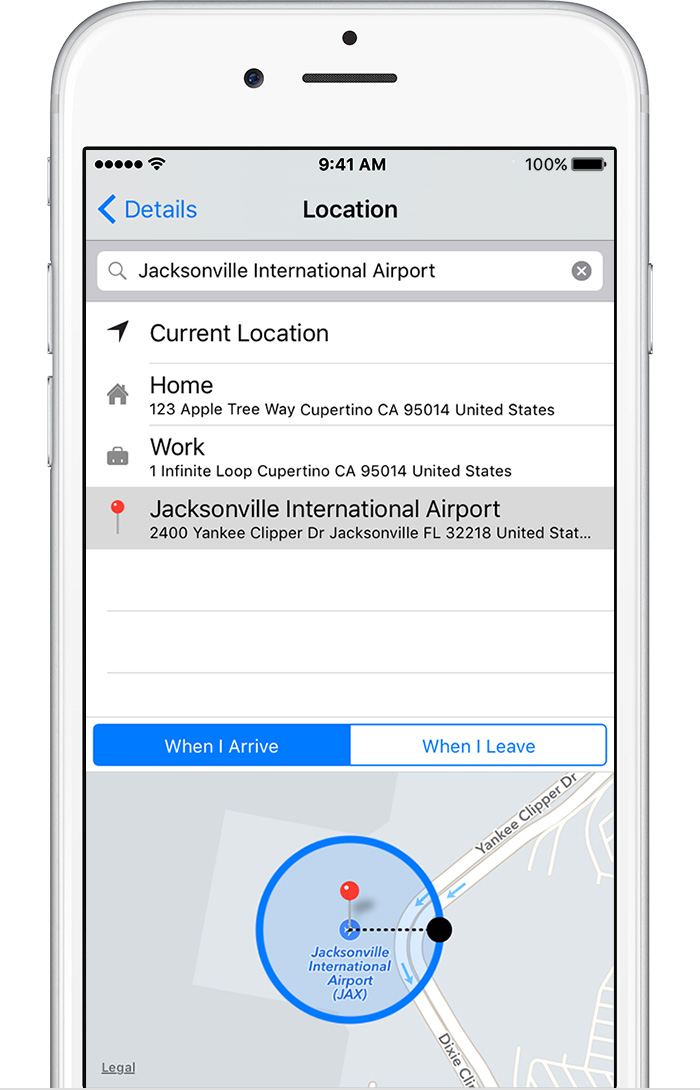
Location reminders notify you when you arrive or leave a location, like your home or work. To receive location based reminders, make sure that Location Services is turned on and that your device supports this feature.
To be reminded at a location:
- Tap
 to the right of your reminder, turn on Remind me at a location, and then tap Location.
- Search or enter the address where you want to be reminded. You can even use your current location.
- Choose whether you want a reminder when you leave or arrive at that location.
- Drag the black dot on the circle in or out to change the perimeter of your reminder area.
- Tap Details to return to the previous screen, then tap Done.
Location based reminders are available in iOS 8 or later on iPhone 4 and later, iPad Pro (Wi-Fi + Cellular), iPad (4th generation Wi-Fi + Cellular), iPad Air and later (Wi-Fi + Cellular), iPad mini 4 (Wi-Fi + Cellular), and iPod touch (6th generation).
Use Reminders on your iPhone, iPad, or iPod touch - Apple Support
https://support.apple.com/en-us/HT205890
If you would like to have a time-based alert to back up your location-based reminder, I would suggest that you set an alarm using the Clock app, or simply use Siri to set up an alarm:
Siri can help you set reminders too.* To talk to Siri, hold down the Home button. If you have an iPhone 6s or iPhone 6s Plus, say “Hey Siri.” When a message asks, "What can I help you with,” tell Siri what you need to be reminded about.
Here are some examples of reminders you can ask Siri:
- "Hey Siri, remind me when I get home to check the mail."
- "Remind me to email John when I get to work."
- "Siri, remind me when I leave here to stop by the grocery store."
- "Hey Siri, remind me tomorrow at 3:00 p.m. to call Jane."
Siri uses Location Services when your reminder needs to use your location.
If you give Siri your home or work address, you can personalize your requests like, “remind me to call my wife when I get home."
- Add your work or home address to your contact card in Contacts.

- Then go to Settings > General > Siri > and tap My Info. Tap your contact card to add it to My Info.
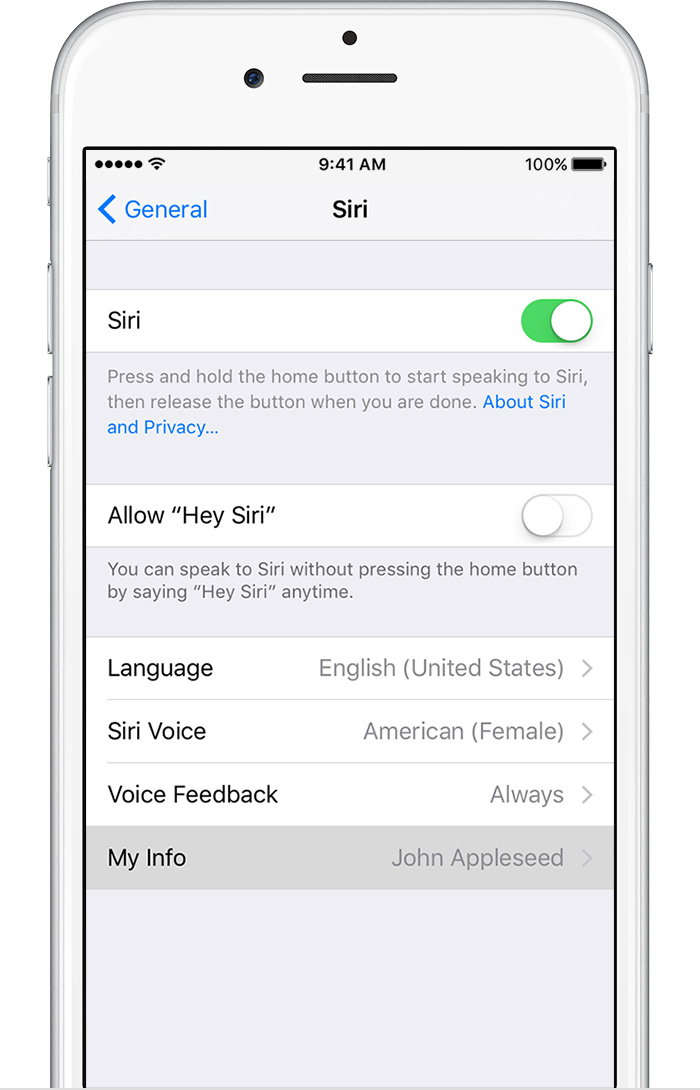
*Siri availability varies by country and language. Learn which Siri features are supported in which countries.
Thanks for using the Apple Support Communities!


