How do you tune Garageband instruments

Hello folks - I need to tune my garageband string instrument slightly sharp of where it is now to sit with

the rest of the material - but I can't see where to do that. It must be devastatingly simple - could

someone enlighten me please? Thanks!

Posted on May 25, 2016 6:13 AM

Reply
6 replies

May 25, 2016 6:47 AM in response to floorjam

To tune your instrument use the guitar tuner: Click the tuning fork icon in the toolbar and pluck a string.

The tuner will sho you the note you played and how far it is off the perfect note:

User uploaded file


Other options are:

  • You can lower or raise the pitch of a track using the "Pitch correction" slider, but that will adjust all strings the same way.
  • Or use the option "limit to key". Then all notes will be moved towards the perfect note on the scale.

Both are available in the Smart Controls fro the track.

User uploaded file

May 26, 2016 1:40 AM in response to floorjam

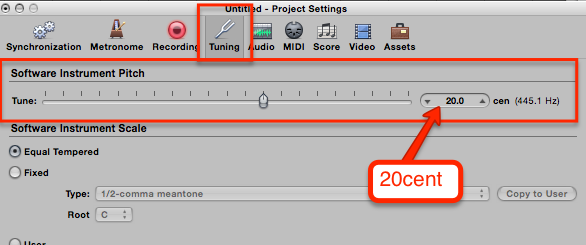
Open the Project Settings (File ➤ Project Setting ➤ Tuning...) and select the Tuning tab.

The first slider lets you set the the pitch of ALL Software Instrument sin your Project. Enter the 20 into the numeric field on the right
User uploaded file


If you need to tune individual instruments, then you have to do it in the Instrument itself (like you did with the EXS24). If the instrument doesn't have that parameter, then you might be out of luck.

BTW, most of the "orignal" GarageBand Software Instruments are based on Logic instruments, just with a more simpler GUI. If you use an Instrument that is based on the EXS, then you can open that directly in the EXS24 Sampler and do the tuning offset there.


Hope that helps


Edgar Rothermich - LogicProGEM.com

(Author of the "Graphically Enhanced Manuals")

http://DingDingMusic.com/Manuals/

'I may receive some form of compensation, financial or otherwise, from my recommendation or link.'


This thread has been closed by the system or the community team. You may vote for any posts you find helpful, or search the Community for additional answers.

How do you tune Garageband instruments

Welcome to Apple Support Community
A forum where Apple customers help each other with their products. Get started with your Apple Account.
