Two Factor Authentication – A Huge Risk & Insecure

  • I bought an Apple Ipad Pro at the Apple Store and I logged in with my apple id at the store.
  • I did not have my other registered device, which was an iphone, with me while I was travelling in USA.
  • It asked me for a verification code sent to my other device, but since I did not have access to it, I could not enter it.
  • A couple of minutes later I got an email from Apple saying that my registered other device phone number has been changed.
  • A few minutes later I got another email that my date of birth has been changed.
  • I tried logging in through the web, but it would ask me for the verification code or the new other device phone number. But since this had changed, there was no way it would let me go through.


I logged a case with Apple support but they claimed that they were unable to help and I would need to provide the changed phone number or else they could not verify my identity.


On coming back to India I see another device added to Find My Phone under the name Ayaan ****. I am worried because this hacker would now be accessing all my phone data, my icloud data and could also be using my credit card associated with the apple id. I logged another case with Apple support when I came back to India a few days later and again they could not do anything in the absence of the new phone number. I put an Erase on this other device of Ayaan **** through find my phone app. Apple would not help at all.


When I try logging in with my apple id, it lets me go through the 1st step if I use my original password and then it ask me the verification code. If I put an incorrect password it would not let me proceed saying incorrect password.


I still have access to the email associated with the apple id and the credit card details associated with the apple ID are still mine. I argued that a my email and my credit card would be a more secure way for verifying my id because they are more secure than a phone device. Apple insist that the only way they can verify my identity is if I give them the other device phone number. It is crazy that my id verification is restricted to a mere device that can be lost or stolen and accessed by almost anybody. And in case I happen to lose this, all my personal / business data and my finances are at the risk of being used by a hacker.


  • It is very surprising that the hacking happened from an Apple Store, which would mean their network is compromised.
  • The hacker changed the phone number – which means that the Two Factor Authentication is not as secure and has loop holes.
  • Apple ID is solely dependent on the other device which is the least secure device as it can be stolen, lost or accessed by anybody when left alone for a few moments.
  • Apple needs to add the email security also to its apple id authentication. Email are not mobile and would be more secure.


I have lost complete trust in the Apple Two Form Authentication and would appreciate any help to recover by apple id

<Personal Information Edited by Host>

iPad Pro, iOS 9.3.2, null

Posted on May 26, 2016 2:18 AM

Reply
21 replies

May 27, 2016 6:35 AM in response to raveenjain

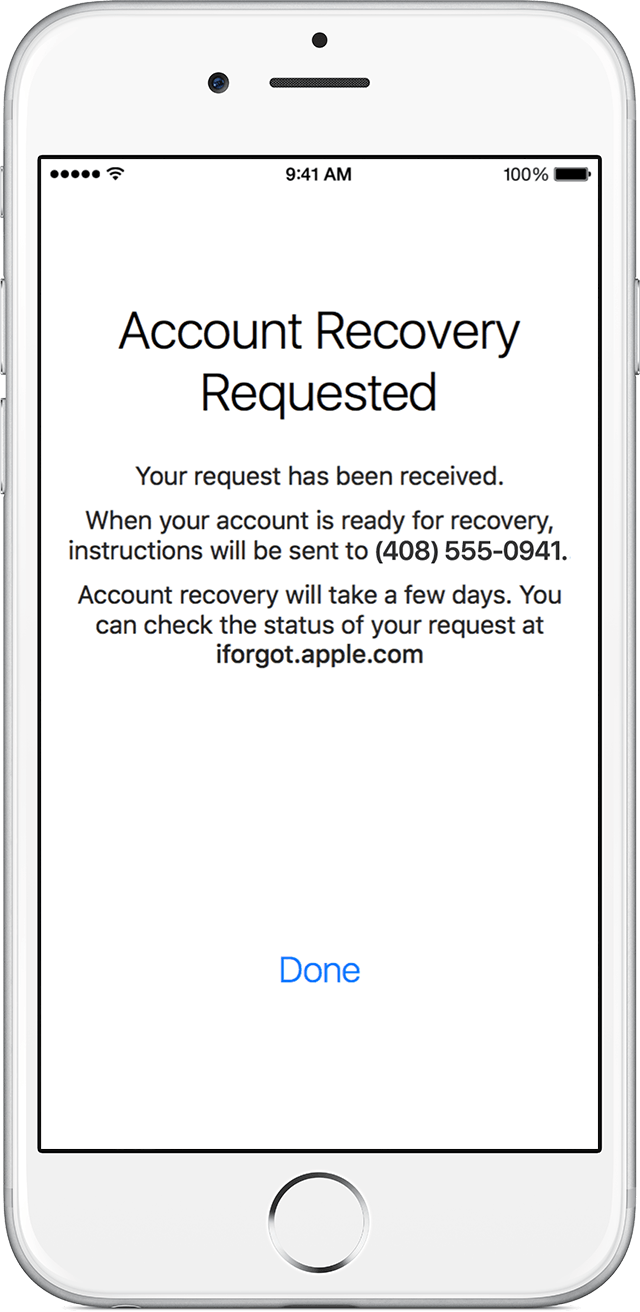
What is the phone number on the physical device that you have in your hands? That is the number you need to provide for the recovery. Or, if you have a different device that can receive text messages or a phone call, use that number. The instructions are very specific, and have nothing to do with the Trusted device that is on file:


Follow these steps to begin the account recovery process:

  1. Choose Request Account Recovery.
  2. Provide a number where you can receive a text message or phone call when your account is ready for recovery.
  3. Enter the verification code we send to that number to verify the information is correct and you have access.

You might be asked to verify other account information to help shorten your recovery period. After you verify your phone number, you'll see a confirmation that your request has been received and you'll be contacted when your account is ready for recovery.

User uploaded file


GB

May 27, 2016 12:03 AM in response to gail from maine

No. They both use trusted devices and verification codes by phone.


2FA has no recovery key. Just trusted devices, phone devices for codes and a password.


User uploaded file

2SV has that you-must-always-possess-2-of-these-3-things aspect to it. Lose your recovery key, (very easy for users to do), and then forget your password... you're done. No access for you. You need your trusted device AND your recovery key to create a new password. 2FA is deemed to be "easier".


2FA does away with the recovery key. If you forget your password, you must "recover your account"

User uploaded file

May 26, 2016 5:55 AM in response to raveenjain

Even if someone else had your iPhone and saw the verification number, they also have to know your AppleID's password to actually get into your account or change anything. The authentication token by itself does not let them actually do anything - BOTH the token and password must be known to get into your account. And, the token expires in 10 minutes once sent, so they have a very limited window of opportunity to login as you and alter your account information.


You say you did not have your iPhone with you at the time you tried to set up the new device. So, who did have it or have access to it? Did that person know your password, or were you foolish enough to use a weak or easily guessed password?


Your post implies that someone else already had your "other" device and also knew or easily guessed your AppleID password as that would be the only way they could log in as you and alter your Account information.

May 26, 2016 11:25 AM in response to raveenjain

raveenjain wrote:


I bought an Apple Ipad Pro at the Apple Store and I logged in with my apple id at the store.

Why would you sign in to your private account in public place?


raveenjain wrote:


It is very surprising that the hacking happened from an Apple Store, which would mean their network is compromised.

<Personal Information Edited by Host>


What makes you think their network is compromised? That "hacking" could be as easy as standing next to you or behind you, shoulder surfing while you're logging in at Apple store. The most important thing to do to protect your ID is to be extremely careful. The last line (in bold) tells me that you are not a careful type so it doesn't matter if your account is linked to a phone or credit card/email address. Someone will steal it if you're not careful.

May 26, 2016 11:10 PM in response to Michael Black

What you say is correct. You need the applied password and the verification code both. That is what is baffling me !!


My apple ID password was extra strong password and I have not shared with anybody.. Since I was travelling to USA, my iPhone had the US sim in the phone and the Indian sim was in my possession, but not in the phone.


Common sense say it is not possible, but it happened. So there must be a bug. Since it happened the moment I logged in and that even after a few days gap, it had to be an instantaneous thing and not planned. Maybe the carrier delivered to an another device just as you have wrong numbers calls.


The issue is not just this, but how I do I re-claim my id. I was highlighting that mobile device is not a secure device for 2 factor verification. An email id would be more secure but not easily accessible as a mobile device. Apple does not accept an email verification.

May 26, 2016 11:28 PM in response to gail from maine

Yep, but Apple would never ask you for one during the verification process.


In fact, 2FA's security is entirely self-serve. No Apple involvement whatsoever, other then telling you that.


2SV still uses a Support PIN and such for verification, but not 2FA.


So, the OPs accounting of things doesn't hold up. He would not have had a conversation about his identity with Apple if he is using 2FA.

May 26, 2016 11:32 PM in response to raveenjain

The only way that a new number can be added as a Trusted Number is by signing into the Apple ID, which means that the person would have to know your password, and would also have to have access to one of you existing Trusted Devices or to the phones that used the Trusted Numbers.....


You cannot change or add anything to Two Step without the password and the verification code. So, before a new number could be added, they would have to know your Apple ID password, and have a way to get the verification code.


And the Trusted Devices and Trusted Numbers cannot be used in the way you described:

Apple ID is solely dependent on the other device which is the least secure device as it can be stolen, lost or accessed by anybody when left alone for a few moments

Since you are the person who chooses which trusted device to send the verification code to, if your device was lost, stolen, or not in your possession, you would not select that one to receive the second part of the Two Step. If you had no other device or number to send it to, you would click on Device not Available, and then you would have to put in your Recovery Key. So, at any time, you can select that as the second step.


If you are able to sign into your Apple ID, change the password immediately.


Best of luck,


GB

May 26, 2016 11:36 PM in response to LACAllen

This article says that both Trusted Devices and Trusted Phone Numbers are used for Two Factor as they are for Two Step:


Two-factor authentication for Apple ID

Two-factor authentication is an extra layer of security for your Apple ID designed to ensure that you're the only person who can access your account, even if someone knows your password.


How it works

With two-factor authentication, your account can only be accessed on devices you trust, like your iPhone, iPad, or Mac. When you want to sign in to a new device for the first time, you'll need to provide two pieces of information—your password and the six-digit verification code that's automatically displayed on your trusted devices. By entering the code, you're verifying that you trust the new device. For example, if you have an iPhone and are signing into your account for the first time on a newly purchased Mac, you'll be prompted to enter your password and the verification code that's automatically displayed on your iPhone.

Because your password alone is no longer enough to access your account, two-factor authentication dramatically improves the security of your Apple ID and all the personal information you store with Apple.

Once signed in, you won’t be asked for a verification code on that device again unless you sign out completely, erase the device, or need to change your password for security reasons. When you sign in on the web, you can choose to trust your browser, so you won’t be asked for a verification code the next time you sign in from that computer.


Trusted devices

A trusted device is an iPhone, iPad, iPod touch, or Mac using iOS 9 or OS X El Capitan that you've already signed in to using two-factor authentication. It’s a device we know is yours and that can be used to verify your identity by displaying a verification code from Apple when you sign in on a different device or browser.

Trusted phone numbers

A trusted phone number is a number that can be used to receive verification codes by text or phone call. You must verify at least one trusted phone number to enroll in two-factor authentication. You should also consider verifying other phone numbers you can access, such as a home phone, or a number used by a family member or close friend. You can use these numbers if you temporarily can't access your own devices.


Am I missing something?


GB

May 26, 2016 11:42 PM in response to gail from maine

You are correct but it happened.

The trusted device (my iPhone) and the sim of the trusted device was in my possession all the time.

The verification code must have got sent to the hacker phone and .....; I don't comprehend how it could have happened without him knowing my applied password.


I am able to sign in with my apple id, but it ask for the verification code (which has now been sent to the new number) or the new number itself, which I don't know.

May 27, 2016 12:01 AM in response to raveenjain

Gail points out the only option available to you right now.


FYI, the SIM of your phone holds nothing in terms of Apple security. All the encryption for the security is in the device itself. You can change carriers and still have 2FA on your Apple ID.


That's why a thief or dishonest person can't simply jack your phone, put in their own SIM and have a functioning device. They would have to know your password to get past the activation lock. And your passcode to open the device. Although eh passcode can be removed, the activation lock can't.

May 27, 2016 5:24 AM in response to raveenjain

raveenjain wrote:


What you say is correct. You need the applied password and the verification code both. That is what is baffling me !!


My apple ID password was extra strong password and I have not shared with anybody.. Since I was travelling to USA, my iPhone had the US sim in the phone and the Indian sim was in my possession, but not in the phone.


Common sense say it is not possible, but it happened. So there must be a bug. Since it happened the moment I logged in and that even after a few days gap, it had to be an instantaneous thing and not planned. Maybe the carrier delivered to an another device just as you have wrong numbers calls.


The issue is not just this, but how I do I re-claim my id. I was highlighting that mobile device is not a secure device for 2 factor verification. An email id would be more secure but not easily accessible as a mobile device. Apple does not accept an email verification.

Earlier you said you did not have the other iPhone with you? Now you say you had your iPhone but the SIM was not in it? Was there another trusted device back in India and out of your control or not?


I Don't think there is a bug at all. I think someone simply knows your password. Everything you have posted, and assuming the token was somehow actually illegally or unintentionally intercepted, could not have happened at all without someone else knowing your password. That is the whole point of two step systems - someone in possession of just one part is barred from the account. Only someone with both token AND password can get in and change or do anything at all to your account.


At this point all you can do is call Apple, ask for account servicees and see if they can help you regain control of your account.

May 27, 2016 6:31 AM in response to LACAllen

I Know. I've been using 2 Step Verification for years, long before the 2 Factor Authentication system came into being and am more than passingly familiar with both systems. I'm not saying the OP's account was not compromised, just that their explanation of how it occurred is difficult for me to swallow. Something is either missing from this story, or is not being explained fully or clearly.


i also use 2-step systems with my banking and investment apps and accounts, my google accounts and anything that offers it. These systems are all similar and use similar features and systems. And they are universally far more secure and reliable than any password-only security system.

This thread has been closed by the system or the community team. You may vote for any posts you find helpful, or search the Community for additional answers.

Two Factor Authentication – A Huge Risk & Insecure

Welcome to Apple Support Community
A forum where Apple customers help each other with their products. Get started with your Apple Account.