Hello there Mailrebel,
It sound like you are unable to see any of the music you purchased from the iTunes Store in your iTunes library. I would start by checking to see if it shows in your Purchased history:
See your purchase history in the iTunes Store on a Mac or PC
If it is there, then check to see if you can download it with the instructions from this article:
Download your past purchases
If you do not see it there, then that would indicate that the items are in your library already. Search for a few of the tracks in iTunes using Spotlight:
Find items and duplicates
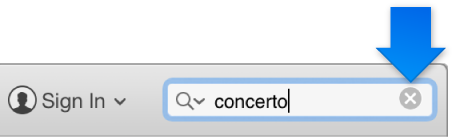
Click the search field in the top-right corner of the iTunes window and type search criteria for the item you want to find.

As you type, iTunes displays a list of items that match the criteria you entered. To see your search results in the iTunes window, press the Return key.
To see all your items again, delete the text from the search field (or press the Escape key).
Tip: To delete text quickly, click  in the Search field.
If you're still not seeing it there, then I would report a problem with the purchase to the iTunes Store support directly:
To get help, follow these steps:
- Go to reportaproblem.apple.com.
- Enter the Apple ID and password that you used to buy the item, then choose Sign In.
- Choose Report a Problem next to the item that you need help with.
- Choose your problem from the menu.
- Follow the onscreen steps. You might need to send us more information, contact the app developer, or download the item again.
From: Get help with an item purchased from the iTunes Store, App Store, Mac App Store, or iBooks Store
Thank you for using Apple Support Communities, all the best!


