My gopro4 videos play choppy
My gopro4 videos play choppy in one second intervals. Gopro3 played fine. When I try and download a graphics driver update it won't let me. (not enough room?) Is there a fix for this?
MacBook Pro, Mac OS X (10.6.4)
My gopro4 videos play choppy in one second intervals. Gopro3 played fine. When I try and download a graphics driver update it won't let me. (not enough room?) Is there a fix for this?
MacBook Pro, Mac OS X (10.6.4)
Hello there, TrailRider987.
It sounds like you are seeing stuttered or choppy playback in GoPro Studio with video recorded on your GoPro Hero4 camera. The following information provided on the GoPro support site provides some great insight on possible option for resolving your issue:
Stuttering Video Playback in GoPro Studio
If you experience stuttering or jerky playback within GoPro Studio, it could be that your computer is having a hard time keeping up with the high quality video preview. If this occurs, please try the following:
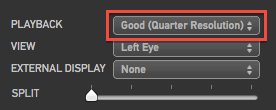
In the upper-right section of GoPro Studio in Step 2: Edit, you will see the Playback setting. Try lowering it to Half or Quarter resolution. This just impacts the preview and has no impact on the final output.
- Make sure that your computer meets the minimum system requirements.
- Check with your graphics card manufacturers website or your computer manufacturers website if you are using a laptop to ensure that you have the latest graphics driver installed
How to Correct Choppy or Broken Up Playback
How to do it
If you are experiencing choppy or broken up playback when viewing your videos, this will usually come down to the computer not being able to process the data of the large HD video files fast enough.
We have a few things for you to try that should help clear up the choppy playback issue you’re seeing on your computer:
1. Make sure you copy your videos to your computer’s hard drive from your camera’s SD card before you play them back.
Playing back videos from your SD card can result in choppy playback.
2. Play back your videos with VLC Media Player.
This is a free program that doesn’t take up a lot of resources to run on your computer. This means that your computer can focus more on playing back your videos smoothly. We've found that it's common for Windows Media Player to give you choppy playback, so we recommend against using it. You can download VLC Media Player here: www.videolan.org. If you’re looking for a quick fix, you might want to skip down to Step 4. Windows Media Player may not support playing back camera video resolutions higher than 720p 120fps. This means that 1080p resolutions and higher may not play back. You'll hear audio, but you won't see any video.
3. Make sure that your computer meets the minimum system requirements to play back videos from your camera.
For lower resolution videos (1080p 30fps and lower): We require at least 2.4 GHz Core 2 Duo processors (at least 2.4 GHz 2nd Generation Core-based processors recommended) and 4 GB RAM to play back lower resolution videos (1080p 30fps and lower).
For higher resolution videos (1080p 60fps and higher): We recommend at least 3.0 – 3.7 GHz Ivy Bridge processors (third-generation Core-based processors or AMD equivalent), 4 GB RAM, and a graphics card comparable to an NVIDIA GeForce GT 650M. The graphics card and processor speed is important particulary for 4K and 2.7K resolution video playback.
Here’s how you can check if your computer meets the minimum system requirements:
Mac:
Click the “apple” icon in the top left corner of your screen, and then click “About this Mac”. Next, click “More Info…”
{...}
4. Record in a lower video resolution & turn off Protune.
If your computer can’t play 1080p 30fps smoothly, try recording videos at 720p 30fps instead. The lower resolution means that your computer will have less work to do when playing back the video, so it’ll have an easier time giving you smooth playback. If your camera is equipped with Protune, turn off this feature to make playback easier for your computer.
Thanks for reaching out to Apple Support Communities.
Kind Regards.
Thank you so much for taking the time to help me. Works great now. Thanks again
Hello again, trailrider987.
Thanks for following up on our response. I'm glad you found the information helpful in resolving your issue.
Sincerely.
My gopro4 videos play choppy