The edit buttons on photos are not working. Any idea how I can fix this? I love the edits through photos!

The edit buttons on Photos are not working. I am using my iMac. Any idea how to fix it? I love the edit buttons through Photos/iPhoto. Thank you!

iMac (21.5-inch Mid 2010), OS X Yosemite (10.10.5)

Posted on Jun 5, 2016 1:37 PM

Reply
9 replies

Nov 17, 2017 10:31 AM in response to stumarty

Do what Larry suggested. Also follow these directions to make the User/Home/Library visible:

NOTE: In Lion, Mountain Lion, Mavericks, Yosemite, El Capitan, Sierra and High Sierra the Home/Library folder is now invisible. To make it permanently visible enter the following in the Terminal application window: chflags nohidden ~/Library and press the Return key - 10.7: Un-hide the User Library folder.


For Mavericks, Yosemite, El Capitan, Sierra and High Sierra go to your Home folder and use the View ➙ Show View Options menu to bring up this window:

User uploaded file

Jun 6, 2016 3:31 PM in response to bighaircajun

Why can't you edit? What exactly happens if you double click on a photo to enlarge it and then click edit?


Photos help has a large section on editing - what step of the process is failing?


Editing basics

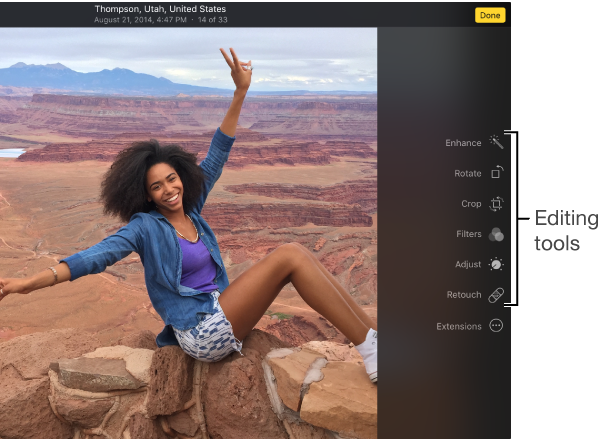
You can use the Photos editing tools to easily make simple changes to your photos, such as rotating them or cropping them to get the best framing.

User uploaded file

When you change a photo, Photos keeps the original so you can always undo your changes and revert to the original look.

Changes you make to a photo appear everywhere the photo appears in your library—every album, project, and so on. If you want to give a photo a unique look that appears in one version of the photo, first duplicate the photo and work on the copy.

Open Photos for me

Edit a photo

To edit a photo, first you open it in editing view, where you can see the editing tools.

Do one of the following:

  • Double-click a photo thumbnail, then click Edit in the toolbar.
  • Select a photo thumbnail, then press Return. To stop editing, click Done or press Return.
If you have badges displayed, edited photos appear with a toolbox badge User uploaded file.About editing Live PhotosYou can edit the still image of a Live Photo, but not the video portion. If you edit a Live Photo using any editing tool (except for enhance and red-eye), you can no longer play the video portion of the Live Photo. To discard your edits and play the video again, click Restore to Original, or choose Image > Turn On Live Photo.For more information about editing a photo in different ways, see Crop and straighten photos, Adjust a photo, Retouch photos, Remove red-eye, and Apply filters for special looks.

Duplicate a photo

Compare photos before and after editing

Choose to use a RAW file as the original

Undo changes to a photo


LN


<Edited by Host>

This thread has been closed by the system or the community team. You may vote for any posts you find helpful, or search the Community for additional answers.

The edit buttons on photos are not working. Any idea how I can fix this? I love the edits through photos!

Welcome to Apple Support Community
A forum where Apple customers help each other with their products. Get started with your Apple Account.