Greetings aveldstra,
Thanks for posting your question to the Apple Support Communities! This is a great place to find resources for how to best manage the cellular data use on your iPhone 6. I'll be more than happy to provide you with some helpful information.
Check out this article for how you can adjust your settings for specific apps to change the amount of cellular data being used:
About cellular data settings and usage on your iPhone and iPad
I would suggest this section specifically:
Some apps from the App Store use the Apple Push Notifications to alert you of new data. Apps that use push notifications (such as instant messaging or social media apps) will use cellular data. To turn off push notifications, go to Settings > Notifications.
To view the cellular data usage for your apps, tap Settings > Cellular. You can turn cellular data on or off for each app. Contact your carrier if you have questions about your cellular data usage.
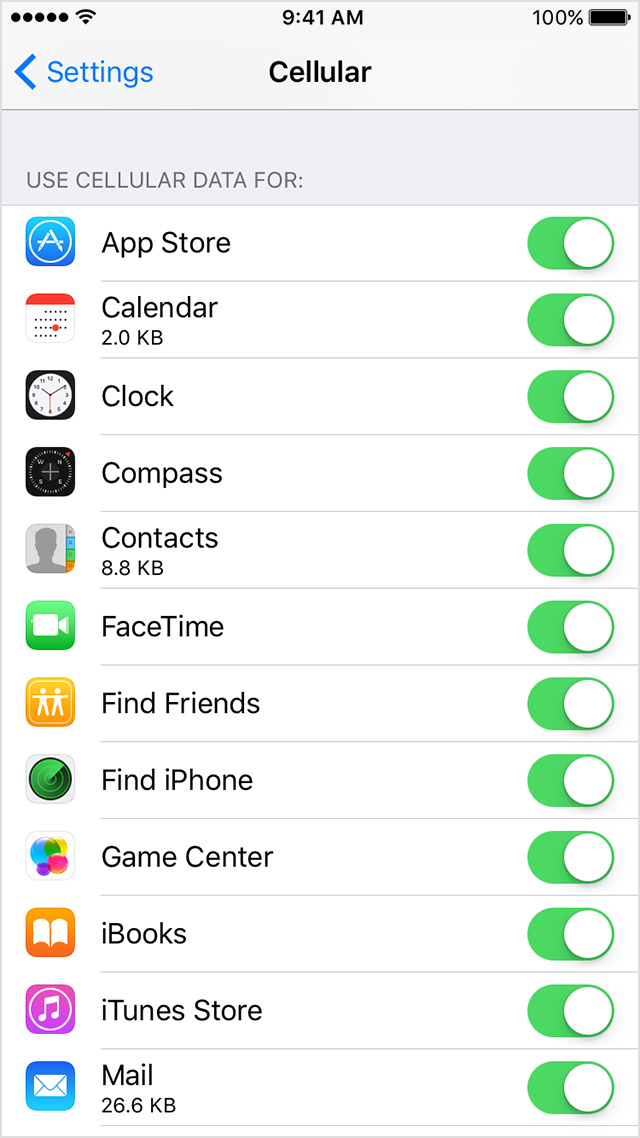
With iOS 9, you can use Wi-Fi Assist to automatically switch to cellular when you have a poor Wi-Fi connection.
Exchange ActiveSync accounts are handled separately from other Mail and Calendar accounts. Exchange ActiveSync accounts will continue to use cellular data even if you turn off cellular data for Mail and Calendar. To view your Exchange ActiveSync cellular data usage, tap Settings > Cellular > System Services.
When your device is connected to Wi-Fi, any FaceTime Video or Audio calls you make will use the Wi-Fi network. If your router loses its Internet connection, or if the Wi-Fi connection degrades, you'll stay connected to the Wi-Fi network, but your device will route the data over cellular data.
You can set apps like Mail to fetch data wirelessly at specific intervals. The more frequently your device fetches email or other data, the faster data is consumed.
- To fetch new data manually, tap Settings > Mail, Contacts, Calendars > Fetch New Data. Turn off Push, then tap Manually.
- To increase the fetch interval, tap Settings > Mail, Contacts, Calendars > Fetch New Data and tap Hourly.
This is a global setting, which means it applies to all apps that don't support push services.
FaceTime is not available in all countries or regions.
Have a wonderful rest of your day!



