Battery percentage keep changing numbers and die too fast

Hi. I just got an iPhone 6 about a year ago and about a month ago, my iPhone battery percentage suddenly keep changing numbers. Example 70% and within 10 min or so it became 35% for no reasons. And if i charge it, the percentage will jump up again to 50% or so.


After a few days, my phone keep dying around 50% or 40%. Today, my iPhone died at 60+%.


I don't know if it's my battery issue and is there any way to solve this issue?


Thanks kind soul who's willing to help ! >.<

iPhone 6, iOS 9.3.2

Posted on Jul 3, 2016 4:00 AM

Reply
Question marked as Top-ranking reply

Posted on Jul 3, 2016 6:27 AM

The first thing you may want to to is bring your iPhone into an Apple store. They can help you determine if it's a hardware issue.
If it's not a hardware issue, below are a few things you can do to preserve battery life.
One of the biggest battery drains is screen brightness.
To make sure your brightness is not too high, swipe up from the bottom of the screen. You should see this pop up. From here, you can turn down the brightness if it's too high.

User uploaded file

User uploaded file

The screens below are all available from Settings:

User uploaded file

User uploaded file
Now, you'll want to see which apps are draining the most juice.
Apple has battery usage stats built into the OS.
To see them:
1. (first to to Settings, as shown at the beginning above) Go to UsageUser uploaded file

User uploaded file

2. Then click "Battery Usage."

User uploaded file

User uploaded file
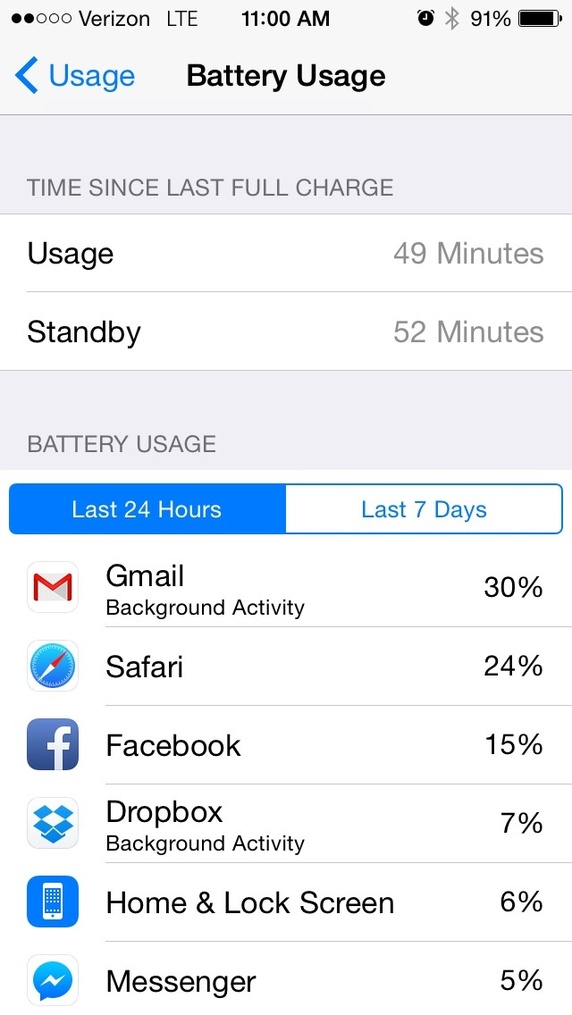
3. Voila! You can see which apps are using the most battery.User uploaded file

User uploaded file

To turn off apps' ability to auto-refresh in the background:
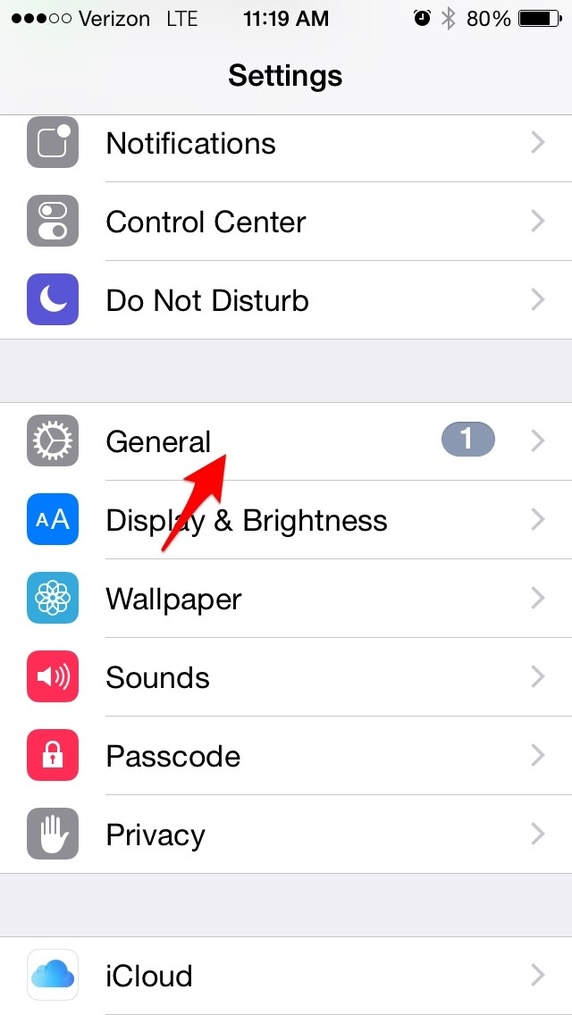
1. (from Settings, as shown above)
User uploaded file

User uploaded file

2. Thengo to Background App Refresh.

User uploaded file

User uploaded file
3. From here, you can toggle indivual apps off, or just turn all of them off, based on what you just learned about which apps are hogging battery.

User uploaded file

User uploaded file
GPS is also a huge drain. Some apps are on all the time pinging your location. To adjust your location settings, and restore some sanity on your phone:
1. From settings, go to privacy

User uploaded file

User uploaded file
2. Then, go to "Location Services."
User uploaded file

User uploaded file

3. Finally, you can scroll through the list of apps using your location. I noticed that Dropbox was a battery hog, so I turned its setting from "Always" to "Never." (all Dropbox needs my GPS for is to begin a camera upload; not a critical function, I can just open Dropbox every once in a while to begin a camera upload).

User uploaded file

User uploaded file
My last suggestion is to turn off automatic downloads, app suggestions, etc from the App Store.
1. From Settings, go to iTunes & App Store

User uploaded file

User uploaded file
2. I turned all of these off. No automatic downloads of music, apps, books, or updates will happen. And Spotlight will use less juice hunting around on the App Store. I left Apps alone; this way the spotlight can still find installed apps on my device.

User uploaded file

User uploaded file
If anybody from Apple is listening, stop the madness!!!! Either spend more energy on getting better batteries to us, or have your UX and engineering teams handle more of this in the background.
It's crazy how fast my battery drains without doing these things.

5 replies
Question marked as Top-ranking reply

Jul 3, 2016 6:27 AM in response to wonghengyee

The first thing you may want to to is bring your iPhone into an Apple store. They can help you determine if it's a hardware issue.
If it's not a hardware issue, below are a few things you can do to preserve battery life.
One of the biggest battery drains is screen brightness.
To make sure your brightness is not too high, swipe up from the bottom of the screen. You should see this pop up. From here, you can turn down the brightness if it's too high.

User uploaded file

User uploaded file

The screens below are all available from Settings:

User uploaded file

User uploaded file
Now, you'll want to see which apps are draining the most juice.
Apple has battery usage stats built into the OS.
To see them:
1. (first to to Settings, as shown at the beginning above) Go to UsageUser uploaded file

User uploaded file

2. Then click "Battery Usage."

User uploaded file

User uploaded file
3. Voila! You can see which apps are using the most battery.User uploaded file
User uploaded file

To turn off apps' ability to auto-refresh in the background:
1. (from Settings, as shown above)
User uploaded file

User uploaded file

2. Thengo to Background App Refresh.

User uploaded file

User uploaded file
3. From here, you can toggle indivual apps off, or just turn all of them off, based on what you just learned about which apps are hogging battery.

User uploaded file

User uploaded file
GPS is also a huge drain. Some apps are on all the time pinging your location. To adjust your location settings, and restore some sanity on your phone:
1. From settings, go to privacy

User uploaded file

User uploaded file
2. Then, go to "Location Services."
User uploaded file

User uploaded file

3. Finally, you can scroll through the list of apps using your location. I noticed that Dropbox was a battery hog, so I turned its setting from "Always" to "Never." (all Dropbox needs my GPS for is to begin a camera upload; not a critical function, I can just open Dropbox every once in a while to begin a camera upload).

User uploaded file

User uploaded file
My last suggestion is to turn off automatic downloads, app suggestions, etc from the App Store.
1. From Settings, go to iTunes & App Store

User uploaded file

User uploaded file
2. I turned all of these off. No automatic downloads of music, apps, books, or updates will happen. And Spotlight will use less juice hunting around on the App Store. I left Apps alone; this way the spotlight can still find installed apps on my device.

User uploaded file

User uploaded file
If anybody from Apple is listening, stop the madness!!!! Either spend more energy on getting better batteries to us, or have your UX and engineering teams handle more of this in the background.
It's crazy how fast my battery drains without doing these things.

This thread has been closed by the system or the community team. You may vote for any posts you find helpful, or search the Community for additional answers.

Battery percentage keep changing numbers and die too fast

Welcome to Apple Support Community
A forum where Apple customers help each other with their products. Get started with your Apple Account.