PoisonGreen

Q: I cannot get Garageband for free from app store. I am using iPhone 6 and iOS 9. Help me!

My friend got garage band free on his iPhone and I didn't have it. Later I went to the store and saw I have to buy it and the in-app purchases are free. Please help me I am using iPhone 6 with iOS 9

Posted on Jul 14, 2016 2:34 AM

Close

Q: I cannot get Garageband for free from app store. I am using iPhone 6 and iOS 9. Help me!

  • All replies
  • Helpful answers

  • by léonie,

    léonie léonie Jul 14, 2016 4:59 AM in response to PoisonGreen
    Level 10 (105,599 points)
    iLife
    Jul 14, 2016 4:59 AM in response to PoisonGreen

    Have you tried the procedure described in this document?

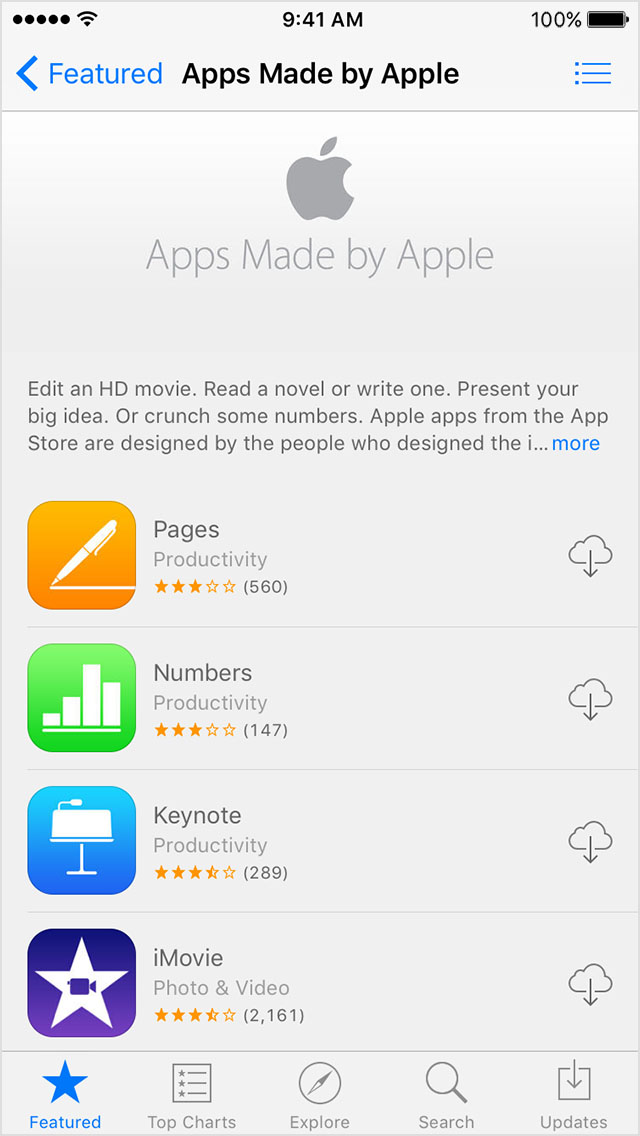
              Get Pages, Numbers, Keynote, iMovie, GarageBand, and iTunes U for free on your iPhone, iPad, and iPod touch - Apple Supp…


    *To download GarageBand for free, you need a device that was activated or purchased on or after September 1, 2014.


    If you purchased a device with iOS 9 or later that's 16 GB or smaller, or if you updated your existing device to iOS 9 or later, you can download the apps for free. Follow these steps:

    Open the App Store. Scroll down to Quick Links and tap Apps Made by Apple.


    Tap the apps that you want to download. To download apps larger than 100 MB, your device needs to be connected to a Wi-Fi network.


  • by PoisonGreen,

    PoisonGreen PoisonGreen Jul 14, 2016 6:06 AM in response to léonie
    Level 1 (8 points)
    iOS Apps
    Jul 14, 2016 6:06 AM in response to léonie

    Hi! Thanks for your reply. Unfortunately I have tried those methods and none of them work. I can locate GarageBand and iMovie and other apps(which were all supposed to be free) but instead of the cloud icon, it says buy and the price is written and in the app description page it says in all purchases free. Also iPhone 6 was on September 2014 so I am sure it was activated after the mentioned date. I hope I can find a solution to this soon.

  • by léonie,

    léonie léonie Jul 14, 2016 6:21 AM in response to PoisonGreen
    Level 10 (105,599 points)
    iLife
    Jul 14, 2016 6:21 AM in response to PoisonGreen
    Hi! Thanks for your reply. Unfortunately I have tried those methods and none of them work. I can locate GarageBand and iMovie and other apps(which were all supposed to be free)

    But can you locate them on the "Apps made by Apple" page?  On the regular App Store pages you have to pay for them. It is important to download from a page, where you do not have to pay, because it is showing apps you already own.


    If the "Apps made by Apple" section does not show GarageBand, look for it in your Purchases history as described here: https://support.apple.com/en-us/HT201272

    Scroll down to the paragraph "Redownload an app".


    Redownload an app

    You can redownload apps on your iPhone or iPod touch, iPad, Mac or PC, or Apple TV (4th generation). You can also redownload some in-app purchases.

    On an iPhone, iPad, or iPod touch

    1. Open the App Store app.
    2. On an iPhone or iPod touch: Tap Updates, then tap Purchased.
      On an iPad: Tap Purchased.
    3. Find the app that you want to download, then tap the Download icon  . After the app downloads, you can open it from your Home screen.

     

  • by PoisonGreen,

    PoisonGreen PoisonGreen Jul 14, 2016 10:49 PM in response to léonie
    Level 1 (8 points)
    iOS Apps
    Jul 14, 2016 10:49 PM in response to léonie

    Hi again. I tried following your instructions but "apps made by apple" is completely missing from the app store on my iPhone and there is no garageband in the purchase history. Thanks again for your attempts so far.


    <Image Edited by Host to Remove Personal Information>

  • by léonie,

    léonie léonie Jul 14, 2016 10:53 PM in response to PoisonGreen
    Level 10 (105,599 points)
    iLife
    Jul 14, 2016 10:53 PM in response to PoisonGreen

    Are you using the same AppleID you originally used when you set up the iPhone?

  • by PoisonGreen,

    PoisonGreen PoisonGreen Jul 15, 2016 1:51 AM in response to léonie
    Level 1 (8 points)
    iOS Apps
    Jul 15, 2016 1:51 AM in response to léonie

    No. This iPhone was sent to me by from abroad and I believe a different ID was used to first open and check the device. I do not have access to that ID. Does that mean I cannot get the apps for free?

  • by léonie,Helpful

    léonie léonie Jul 15, 2016 4:20 AM in response to PoisonGreen
    Level 10 (105,599 points)
    iLife
    Jul 15, 2016 4:20 AM in response to PoisonGreen

    The free, preinstalled apps are tied to AppleID that has been used when the iPhone has first been set up. They can to be transferred to a different AppleID.

  • by PoisonGreen,

    PoisonGreen PoisonGreen Jul 15, 2016 4:26 AM in response to léonie
    Level 1 (8 points)
    iOS Apps
    Jul 15, 2016 4:26 AM in response to léonie

    I'm sorry but did you mean they can be or cannot be transferred? If they can be transferred what is the procedure? Thanks in advance.

  • by léonie,Solvedanswer

    léonie léonie Jul 15, 2016 5:01 AM in response to PoisonGreen
    Level 10 (105,599 points)
    iLife
    Jul 15, 2016 5:01 AM in response to PoisonGreen

    Sorry that was a bad typo. I meant to write "cannot". Once an app has been associated with an AppleID it cannot be transferred to a different AppleID. And you are having the added complication, that the apps may have been associated with an AppleID bound to a different country.