shotliff_13

Q: iPhone 5c searching for network and carrier option missing

Hi,


On July 15th my iPhone lost it's connection to my network (EE). Throughout the day it would reconnect for a few seconds then disconnect again but since then it has not been able to connect to a network and I do not have any carrier options in my settings.

I tried all the combinations of resets, backups, and shut downs that I could find in other threads here and none of them worked. I then went to my local phone repair store who for the past four years have been able to solve every problem I have come to them with.

They said that they had had a lot of customers come in that day with the same problem. They changed some of the hardware on the first customers phone and it did not work. They said it is an issue with iOS 9.3.2 (the iOS my phone is running and the one my phone is backed up on on itunes). They said there was a patch coming shortly that should fix it but I haven't been able to find any information about this.

Can anyone give me some more information or recommend a fix that I may not of tried?


Thanks for the help,

Shotliff_13

iPhone 5c, iOS 9.3.2

Posted on Jul 18, 2016 3:46 AM

Close

Q: iPhone 5c searching for network and carrier option missing

  • All replies
  • Helpful answers

  • by Jonathan UK,Apple recommended

    Jonathan UK Jonathan UK Jul 18, 2016 4:19 AM in response to shotliff_13
    Level 7 (31,324 points)
    Apple Watch
    Jul 18, 2016 4:19 AM in response to shotliff_13

    Hi


    Check that you have followed all of the steps here:


    If you can't connect to a cellular network or cellular data - Apple Support

  • by deadman.walking,

    deadman.walking deadman.walking Jul 18, 2016 4:26 AM in response to shotliff_13
    Level 2 (199 points)
    Jul 18, 2016 4:26 AM in response to shotliff_13

    If you can‘t connect to a cellular network or cellular data

    Learn what to do if you see No Service or Searching on your iPhone or iPad (Wi-Fi + Cellular), or have cellular network and 4G LTE issues.

    If you see No Service or Searching

    If you see No Service or Searching on your device, or can't connect to a cellular network or cellular data, follow these steps:

    1. Check your coverage area to make sure that you're in an area with cellular network coverage.
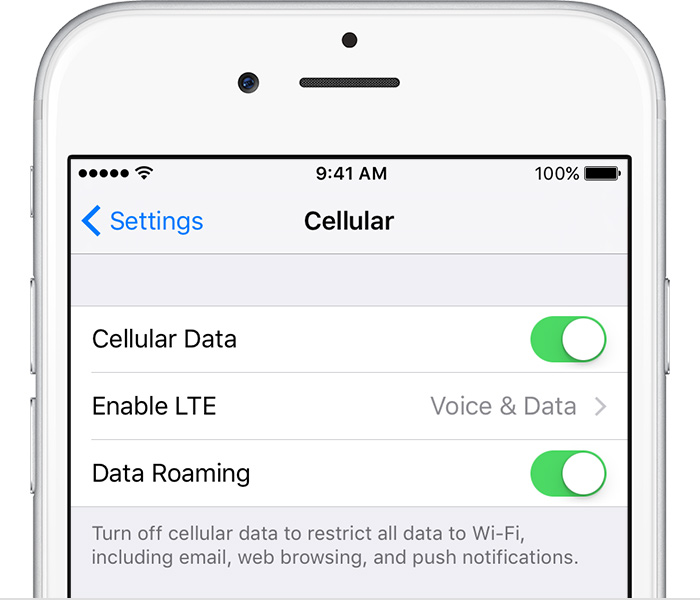
      • If you can't connect to a cellular network on your iPhone, make sure that cellular data is on in Settings > Cellular*. On your iPad, go to Settings > Cellular Data.
      • If you're traveling internationally, make sure that your device is set up for data roaming. Go to Settings > Cellular > Data Roaming.
    2. Restart your iPhone or iPad.
    3. Check for a Carrier Settings Update.
    4. Take out the SIM card and put it back in. If the SIM card is damaged, or doesn't fit in the SIM tray, contact your carrier.
    5. Reset your Network Settings. Tap Settings > General > Reset > Reset Network Settings. This also resets Wi-Fi networks and passwords, cellular settings, and VPN and APN settings that you've used before.
    6. If you have another device, see if you can connect your carrier's network with it in that location.
    7. Contact your carrier to:
      • Verify that your account is active and in good standing.
      • Make sure there are no outages in your area.
      • Check that your device isn't blocked from receiving cellular services and is set up with the right data plan.
    8. Update your iPhone or iPad to the latest version of iOS.

    If you still can't connect to a cellular network, and have confirmed with your carrier that there isn't an issue with your account or network, try restoring your device.

    If you can connect to 3G but not 4G LTE

    Make sure that your device is compatible with LTE. Go to Settings > Cellular > Enable LTE. Identify your iPhoneand compare its model number with the list of supported LTE carriers for your country or location. Or identify your iPad and compare its model number with the list of supported LTE carriers for your country location. LTE options might vary depending on your carrier's network.

    In some countries, you might see Mobile instead of Cellular. For example, you might see Settings > Mobile or Settings > Mobile > Mobile Data Network instead of Settings > Cellular or Settings > Cellular > Cellular Data Network.