Iwatchissue

Q: Microphone on Apple watch not working again

I bought my watch over a year and a half ago. Just before the warranty expired, the microphone stopped working. Apple said it was a hardware problem and sent me a new watch. It had a three month warranty. Within that three months, the microphone stopped working again. I took it back and they sent it off again and this time they said it was a software problem.


Now, again within the three months, the microphone has stopped working again. They want to send me a new watch again, but this time, it will only have a one month warranty.


Is there a known issue with the microphone? What other options do I have? I'm concerned that it will stop working again within a couple of months, but this time there's nothing that I can do about it since I won't have a warranty anymore.

Posted on Aug 18, 2016 4:23 PM

Close

Q: Microphone on Apple watch not working again

  • All replies
  • Helpful answers

  • by Carolyn Samit,

    Carolyn Samit Carolyn Samit Aug 18, 2016 4:30 PM in response to Iwatchissue
    Level 10 (119,384 points)
    Apple Watch
    Aug 18, 2016 4:30 PM in response to Iwatchissue

    You are keeping the watch software up to date?


    Before you begin

    To update the software on your Apple Watch, you need to:

    Update your Apple Watch

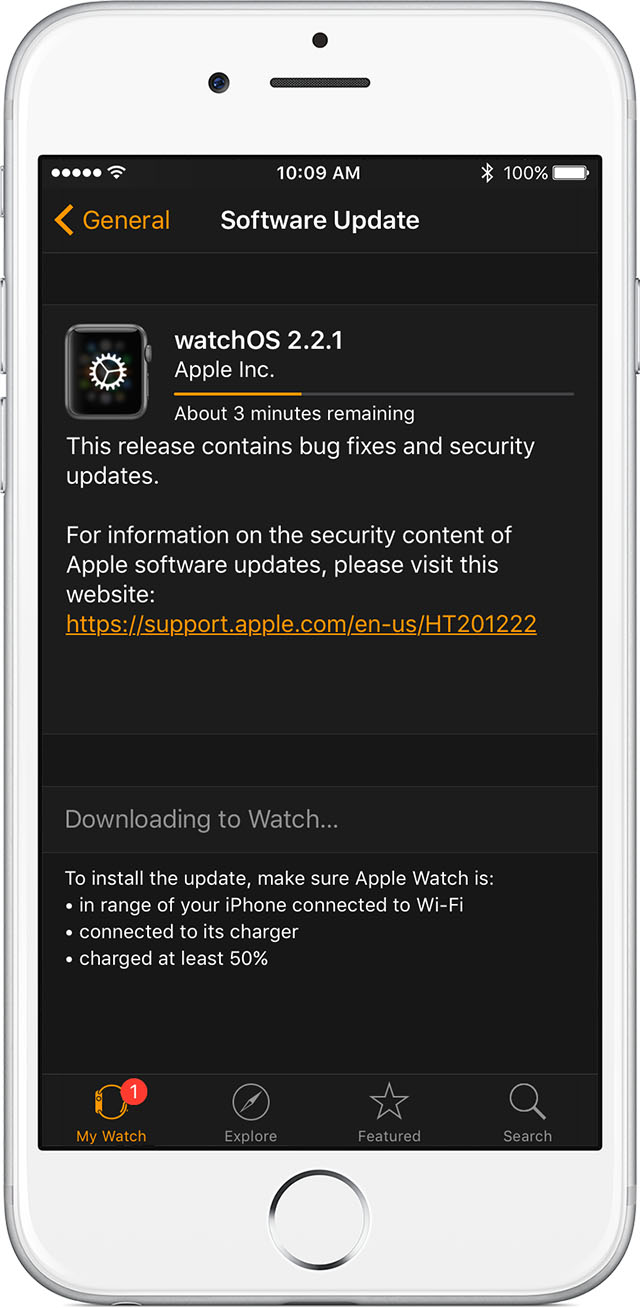
    1. Connect your Apple Watch to power, and keep it on the charger until the update is complete.
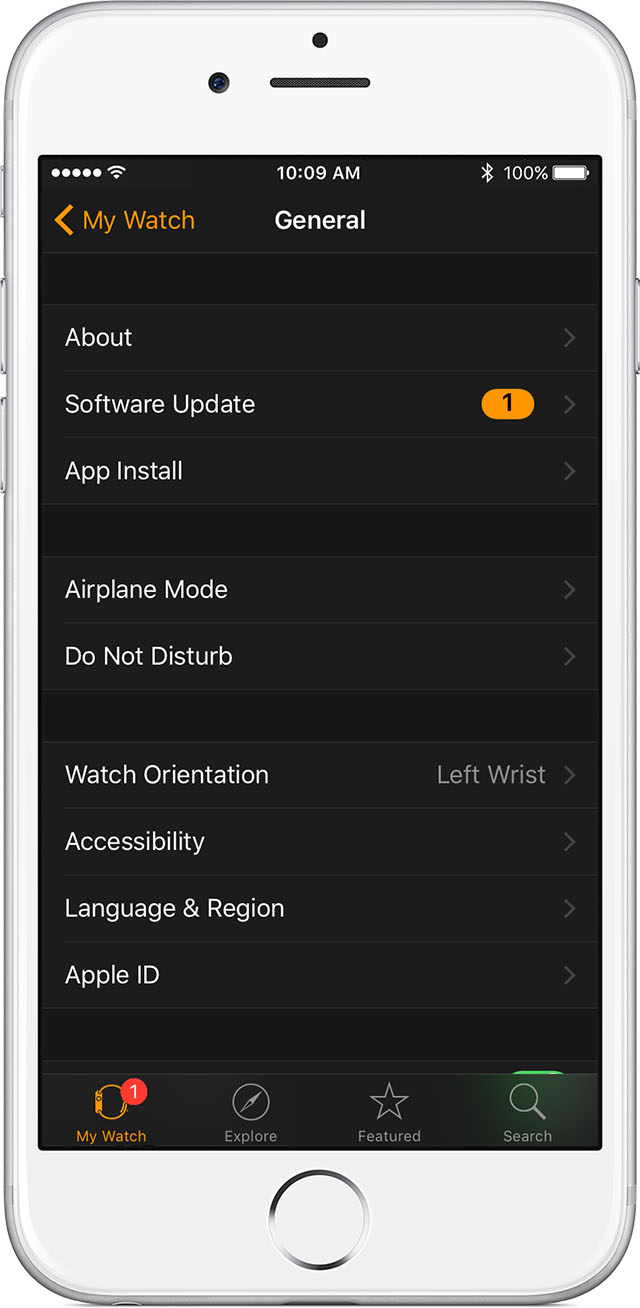
    2. On your iPhone, open the Watch app, tap the My Watch tab, then tap General > Software Update.
    3. If asked for your iPhone passcode or Apple Watch passcode, enter the passcode.
    4. Wait for the progress bar to appear and complete. Don't restart your Apple Watch during the update, which might take some time. When the update finishes, your Apple Watch will restart on its own.

    If you installed an iOS or watchOS beta or developer seed

    Before you update, remove the beta profile from your device. To view and remove profiles:

    • Open the Watch app on your iPhone and go to General > Profiles. Tap the beta profile you want to remove, then tap Delete Profile. Enter your iPhone passcode if requested.
    • Go to Settings > General > Profiles & Device Management on your iPhone. Tap the beta profile you want to remove, then tap Delete profile. Enter your iPhone passcode if requested.

    To continue using the public beta of iOS, you can install the beta profile again.

    If you need help updating

    Try these steps:

    1. Restart your Apple Watch. Press and hold the side button until you see the Power Off slider, then drag the slider. To turn your watch on again, press and hold the side button.
    2. Restart your paired iPhone. Press and hold the Sleep/Wake button until the red slider appears, then drag the slider. To turn your iPhone on again, press and hold the Sleep/Wake button. 
    3. Try to start the install again.

    If the install won't start, open the Watch app on your iPhone, tap General > Usage > Software Update, then delete the update file. After you delete the file, try to download and install watchOS 2 again.

  • by Iwatchissue,

    Iwatchissue Iwatchissue Aug 18, 2016 5:02 PM in response to Carolyn Samit
    Level 1 (8 points)
    Apple Watch
    Aug 18, 2016 5:02 PM in response to Carolyn Samit

    Yes. and when I have taken it to the Apple Store they always double check and run some diagnostic tests. For example, they try calling my watch and I answer, and they can't hear me. Same issue again for the third time.


    I am just wondering if there is a known problem?  I am worried about allowing them to send me a new watch, but having only one month warranty. I am almost inclined to just take it back to the Apple Store and send it off for repair again for the third time. At least then, I would have a three month warranty.


    The first time I took it in, they replaced it with a brand-new watch. But the microphone stopped working again in less than three months.

  • by throughthemill,

    throughthemill throughthemill Aug 31, 2016 8:08 PM in response to Iwatchissue
    Level 1 (14 points)
    Apple Watch
    Aug 31, 2016 8:08 PM in response to Iwatchissue

    I have the same problem.


    Try calling your iPhone with another phone then, answer the call with your iPhone and pass it off to your Watch.  If you can hear yourself on the calling phone the problem is software related.  If you talk through the calling phone and can not hear your voice on the Watch then, again, it is software related.  The second part assumes that the speaker is otherwise working fine.


    I do not have an answer for how to fix it but constantly swapping Watches when there is no hardware issue is not the answer.

  • by Iwatchissue,

    Iwatchissue Iwatchissue Sep 1, 2016 6:06 AM in response to throughthemill
    Level 1 (8 points)
    Apple Watch
    Sep 1, 2016 6:06 AM in response to throughthemill

    Thanks very much for your response. The first time I took it back to the Apple Store, they told me it was a hardware problem and they sent me a new watch. The second time they sent it off and told me it was a software problem that they had fixed. Again, within less than three months, the microphone stopped working for the third time. This time they just decided to send me a new watch and told me I only have a one month warranty on it.


    It makes me suspicious that there may be an issue that they aren't telling us about. I have a stainless steel 38 mm. 


    I have pretty much resolved myself to the fact that the microphone will probably stop working again and I won't be able to get it fixed this time.