iPhoto iOS
I can no longer make my images original after iPhoto for iOS apparently is merged with Photos. Or can I?
iPhone 6s, iOS 9.3.5, 16GB
I can no longer make my images original after iPhoto for iOS apparently is merged with Photos. Or can I?
iPhone 6s, iOS 9.3.5, 16GB
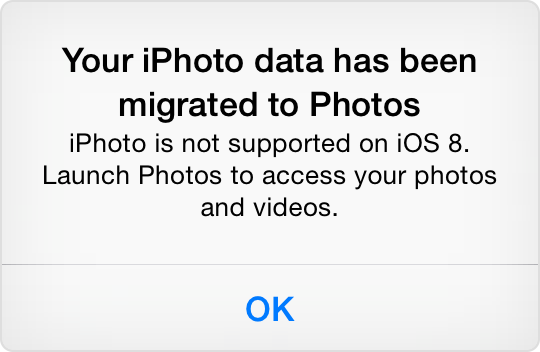
iPhoto does no longer run on any iOS version since iOS 8. Your iPhoto Library should have been migrated to Photos. What is the problem? Are photos missing from your library? The Photos.app is more limited than iPhoto has been.
First of all, I paid for the app. Now it's worthless, am I corrrect? Second, my non destructive pictures are gone. Maybe I'm wrong. Thank's for reply!
First of all, both iPhoto and Photos, are free. Second, as léonie stated, your images should have migrated to Photos.
If you're experiencing any specific issues, we'd be happy to help, but you have to provide us with details.
Photos User / Help guide: https://help.apple.com/photos/mac/1.0/?lang=en
First of all, both iPhoto and Photos, are free.
I had to pay $4.99 for iPhoto on the iPad. It was not free, when I as been released alongside the iPad 3.
(https://en.wikipedia.org/wiki/IPhoto).
At an Apple media event on March 7, 2012, Tim Cook announced a new version of iPhoto for use on the iOS mobile operating system.[10] iPhoto for iOS was made available that day on the App Store for US$4.99 alongside the already-released iMovie and GarageBand for iOS. It is officially supported on the iPhone 4 and later, iPod Touch (4th and 5th generations), iPad 2 and later and iPad Mini (1st and 2nd generations),
It was really a great app and worth the money, but the joy was short, because the iOS8 upgrade made it impossible to run iPhoto any longer on the iPad.
First of all, I paid for the app. Now it's worthless, am I corrrect?
You can no longer run it on the iPad, if you upgraded to iOS8, yes.
When I upgraded to iOS8, and tried to run iPhoto, I got a prompt to migrate the photos to Photos. Did that not happen? Which version of iOS are you running? Tell us more - which adjustments did you apply, and are your originals JPEGS or RAW photos?
I can revert the edited photos to the original version. There is a red button "revert" in the lower right corner of the Edit panel, if I open a photo in Edit mode in Photos.
The migration from iPhoto to Photo is lossy, however. Photos on the iPad does neither support books nor journals. The books and journals will be gone, if you did not save them before the migration. You can also no longer access any slideshows you may have published on the web.
And the advanced adjustments applied with the brushes in iPhoto cannot be reproduced in Photos. So you cannot revert the edits individually. Photos will have saved a JPEG with the adjustments burned in, but also have kept the original.
You cannot see the titles and the tags you applied in iPhoto, but you can search for them. The metadata are stored with the photos, but not shown in the viewer.
I just found the support document again - I had to use the wayback machine, because my old link was no longer valid: https://support.apple.com/en-us/HT201386
Migrating from iPhoto for iOS to Photos on iOS 8
iPhoto for iOS is not supported on devices with iOS 8 or later. This article will explain how to migrate your iPhoto data to Photos.
This article has been archived and is no longer updated by Apple.
How to migrate
To migrate your iPhoto for iOS data to Photos, tap the iPhoto app. When you do so a "Migrate data from iPhoto to Photos" dialogue appears.
Tap Migrate to start the migration process. If you choose Cancel, the dialog is dismissed, but will again appear the next time you tap the iPhoto icon. When you start the migration process, Photos opens and a progress bar appears.
Important: Do not delete iPhoto from your device until after you've successfully migrated your data or it won't be possible to migrate your data.
What you will see in Photos
The following data will migrate from iPhoto to Photos.
- Any photos in your iPhoto library that aren't already in Photos are added.
- Image adjustments you made in iPhoto are migrated to Photos.
- If you applied image adjustments to photos synced to your iOS device from iTunes, a duplicate of each photo will be created in Photos with adjustments applied.
- Photos hidden in iPhoto do not appear in the Years, Moments, or Collections views in Photos, but are placed in an album titled Hidden.
- Photo Books, Web Journals, and Slideshows are converted into regular albums in Photos. Text and layouts are not preserved.
- Only projects created on the device performing the migration will be converted. Projects you synced from other devices to iPhoto via iCloud must be converted from the devices on which they were created.
- Photos marked as Favorites in iPhoto are marked as Favorites in Photos.
- Tags and captions from iPhoto are not displayed in Photos, but you can use them as search terms and they will show up respectively as Keywords and Titles in Photos search results.
- Flags from iPhoto are converted to the keyword Flagged.
Working with photos you edited in iPhoto
Photos you edited in iPhoto migrate to Photos with all adjustments intact. However, you can't further modify these adjustments. You can apply additional adjustments to the edited image or you can use the Revert to Original command to remove the iPhoto adjustments completely.
iPhoto iOS