
How do I hide offline music with iOS 10?
I would like the hide purchased songs, that I have deleted in my music. This way hiding offline songs.
I would like the hide purchased songs, that I have deleted in my music. This way hiding offline songs.
I have found a work around, which is a bit inconvenient, but works.
Got to Settings > iTunes & App Store, once in there, simply 'sign out'.
Go back to Music, and all it shows you is what's actually on your device.
This will hopefully also solve the issue of my car picking up purchases too, so less confusion when I'm driving and trying to select an album.
I am amazed at the amount of gimmicks and in-flexible crud that apple have added in iOS10. I only upgraded to the SE so i could give my mum my old 5s as she had a crap Sony phone. Now she has a better phone than me, and i have the apparent latest model. This is going to be the last Apple purchase unless they make Music player a LOT friendlier like it used to be.
This partially helps, but doesn't stop my car seeing all my purchases too. I may then inadvertently select one that's not not on my phone and incite streaming charges through my data plan.
I could sign out of iTunes, that will stop the purchases being seen by the car. BUT, and this is really annoying, apple won't let you play tunes you OWN without being dogged it to iTunes. Unless they're ones your have ripped yourself or bought by other means, not through iTunes. Which is mad. Because it restricts the playback of iTunes purchased material. But a allows non iTunes material to be downloaded and played back when signed out of iTunes. Which almost promotes either other sources of music downloads or pirateism. Which is mad.
You can, by signing out of iTunes. Except, when you do so, all your iTunes purchased material vanishes off your device too. So, apparently you have to be signed in to listen iTunes music you "own".
I totally get your comment about storage and clutter. I bought a 64Gb phone exactly so I could play without streaming. I gave my perfectly healthy 5s on iOS 9 to my mum and she doesn't even play music. I've spent a lot of money with Apple and feel insulted that they are forcing behaviours that so strongly interfere with the usability and cost of a product.
This is month old though, are they just not going to address it?
Hi HM57,
Thanks for your questions, but I am unsure of what you are trying to ask. I see this one of two ways. The first is you want to hide your purchases so that you don't see them on your iPhone. The second is that you only want to see downloaded content on your iPhone. I can answer both of these for you.
To start with the first scenario, you can hide purchases from the iTunes Store. To do that, you will need to use iTunes. Navigate to your purchased content as if you are going to download them again. When you move your mouse over the content, you will see an X in the upper hand corner of the artwork. Click that and you will see the option to hide the purchased content. This will make it so that when you look at your iPhone and the content is not downloaded, you won't see it.
Take a look at the article below for more details.
Hide and unhide iTunes Store, App Store, or iBooks Store purchases
https://support.apple.com/en-us/HT201322
For the second scenario, you can show only downloaded content on your iPhone. To accomplish that, open the Music app and make sure that you are on the Library tab. You should see and option for Downloaded Music. Tap that, and you will only see the downloaded content. Refer the image below for reference. 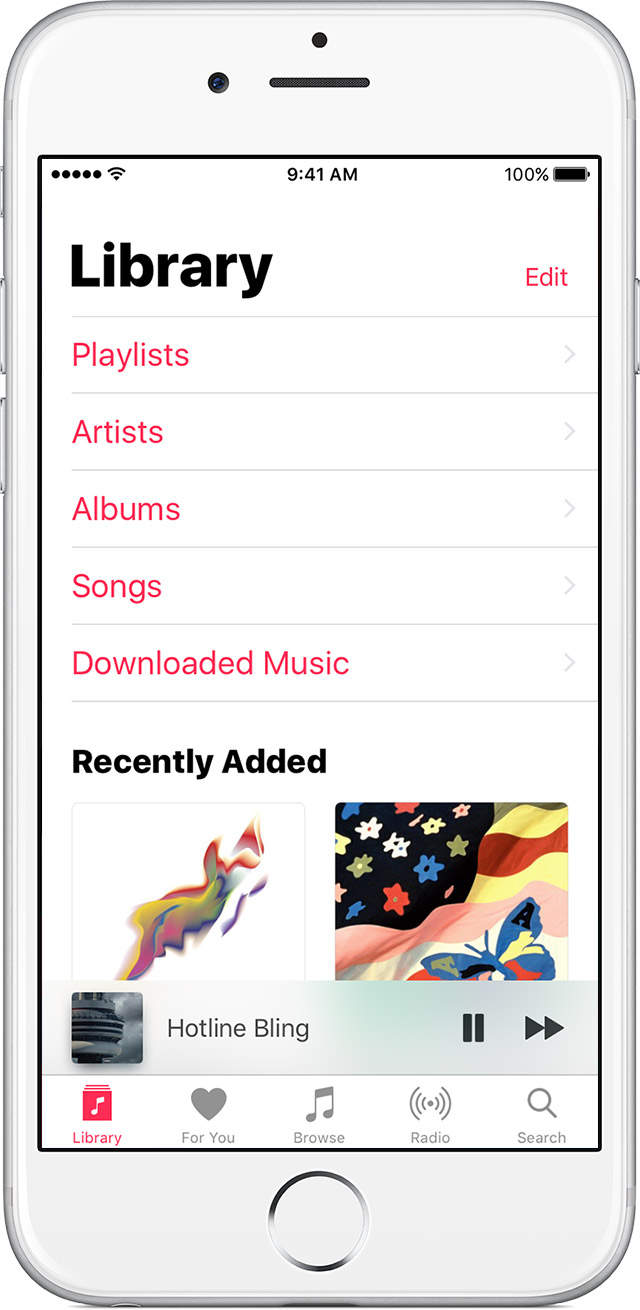
Have a good day
Look, it's a very simple question. I have a lot of music in my library. Some downloaded from the iTunes Store, some from Amazon, some are imported from CDs, etc. Any given time, I'm only interested in a small fraction of that - the ones that I've uploaded unto my iPhone. These are the ones I'm planning to listen to in the near future. My iPhone's storage space is more than enough for me, so little need to show the purchased music in the cloud. Actually, they are disturbing, because it makes it more difficult to find the ones I was planning to listen to, effectively spamming my album list with albums I have no intention of listening to.
So can I just turn off this whole unwanted mess without going over a list of all of my purchases one by one?
Another issue is that if I accidentally start something that's offline, then you can use up a lot of bandwidth. It's especially bad if you have limited internet, especially abroad while roaming.
I meant something that's online.
The problem is that there used to be a setting to show "Only Downloaded Music". This setting on prior versions of iOS kept another device that was connected to the iPhone from seeing the songs that were not really on the phone. Not having this option breaks playback from other devices or results in unexpected operation. From what I've experienced, it either causes playback of the songs not on the iPhone to fail if there is no cellular data connectivity, or it actually plays the song from the cloud, resulting in unexpected data usage.
This is a bug. It is not an issue with the device connected to the iPhone, as that device is simply given a catalog of songs by iOS that it treats as playable. The suggestions in other threads about hiding purchases does not address this problem. Apple needs to fix this and restore the ability to block the listing of songs that are not playable directly from the device.
It never occurred to me Apple would make such a total mess of their iOS Music app - I would have stayed on iOS 9 had I known this was going to be the outcome of upgrading. Playing music is about half what I use my phone for and I'm now left with a integrated app that I cannot stand. I've had iPhones since the 3G and am now on a 6S but if this doesn't improve pretty **** quickly it'll make me walk from the ecosystem. We've left everything else in the house on 9 where it'll be staying until this changes. I thought Apple was meant to be around it "just working"?
I've searched for a solution to the same problem. I believe that kb11c is correct in his/her reply that there is no way to hide music that is not actually stored on the iPhone itself in ios 10. It's ridiculous and almost unbelievable, but true. Keep the ios music app on your phone but don't use it except to access Apple Music, if you have it. Also, you'll still need it to house the songs that you want to put in your iPhone. Instead, get yourself the Amazon music app. It's simple and it does what you want by allowing you to only choose to view stored music. Until Apple fixes the problem, their music app is only semi-functional, as far as I'm concerned. Amazon can save the day, though.
Hi. Thanks so much for the tip. I have 4000+ songs in my iTunes library that even if I had available space on my iPhone I still wouldn't want them all on it as some are my daughter's or things like holiday music. I make a playlist in iTunes called "iPhone songs" & I put about 300 songs in there that I'd like on my phone, changing them out from time to time, & selecting just that playlist whenever I sync my phone. I noticed after updating to iOS 10 that in addition to songs from my "iPhone songs" playlist that my music app was also playing any songs I'd purchased or were gifted to me in iTunes. These had a cloud next to them & was obviously using data to play them since when I put my phone in airplane mode only the cloud songs wouldn't play. Your tip of selecting "downloaded music" in my music app on my phone (as pictured above) resolved the issue nicely for me. So simple I don't know how I missed that when looking for a solution. Thanks! (My data plan thanks you as well)
After installing latest update the downloaded music option in library is now actally showing only the downloaded music. Problem solved and no more need to switch to the Amazon music app.
I don't consider this solved. I have the latest update 10.1.1 and an iphone7 256GB. I play music to my car speakers through the USB port. Every once in a while the phone will disconnect. It happens about 2-3 times over a 40 minute drive with no relation to bumps or anything (there used to be a shake to shuffle that I wanted to make sure was turned off).
Even if I set the playlist to Download only or only the playlist, the phone will disconnect and lost the shuffle settings and also lose the playlist settings. The effect of this is that the phone will switch to a song in my imatch library and start downloading the song--things I don't want stored on my iphone. I only want songs I put on my iphone to be on it, and I only want those songs to be played ever. Every time I lose connection playing songs and it screws up my shuffle or every time it starts playing some random song from my imatch library I don't want, I feel like throwing the stupid phone out the window. My iphone6 and iphone5 never had these issues.
*I meant incur, not incite!
How do I hide offline music with iOS 10?


