After ios10 upgrade. Can't send new draw messages
After upgrading to ios10 on iPhone 6s, I can't send draw messages.
iPhone 6s, iOS 10
After upgrading to ios10 on iPhone 6s, I can't send draw messages.
iPhone 6s, iOS 10
I can make a drawing but it won’t send, I get the “delivery failed” message when I try to send it. So now I just take a screenshot of the message and send it that way. It’s not animated for the receiver for but it’s still the drawing so at least that works 😊👌
I am now unable to draw messages also. Please advise. Turning my phone sideways no longer works! Not sure why this feature has stopped working.
I think it may be intentional. Sometimes my ability to send out photos, or digital messages via text is hampered by missing advanced settings for the carrier. sometimes that clears it up. but for the most part, I do notice that I can tell my friends who have androids because they don't go through. same with emoti's
Why is that ok. When you pay 1000 for “the best phone” you should require that it functions like the best phone.
Fearing the next iOS update and how it will effect the functionality of your device is not the best phone. It is 2nd class with a first class illusion thanks to marketing coupled with brainwashing tactics. We don’t even question why we think it’s ok to be put out in some way every update for the life of your device.
Apple needs to customize their update releases for each model phone geographically and slow its role on being so quick to design the next model when they havent taken the time to test to perfect the last models.
The message is quantity $$$$$ over quality
This problem never existed prior to the 6 months after Steve Jobs Death. I’m just saying. Apple lies when they say they value our feedback, if that were true 5 years later why are we still ironing out your mistakes.
Hi I am having an issue with my hand written messages. It was working perfectly fine then I clicked what I assumed what was to go back to the keyboard and now when I turn sideways it just changed the keyboard. I also have no little squiggle on my keyboard to click to go back to the handwritten messages. What do I do?
Is this feature no longer available with iOS 11? I can’t seem to access the feature anymore since the update.
I also can’t!!! Frustrating!
This is what the button looks like. I couldn’t find it until I read this thread tho lol
Thanx. Found it. Another question I used to be able to send digital messages to android phones again since the upgrade I can only send to iPhones?
Thank you!
Exactly! Especially since it work before.
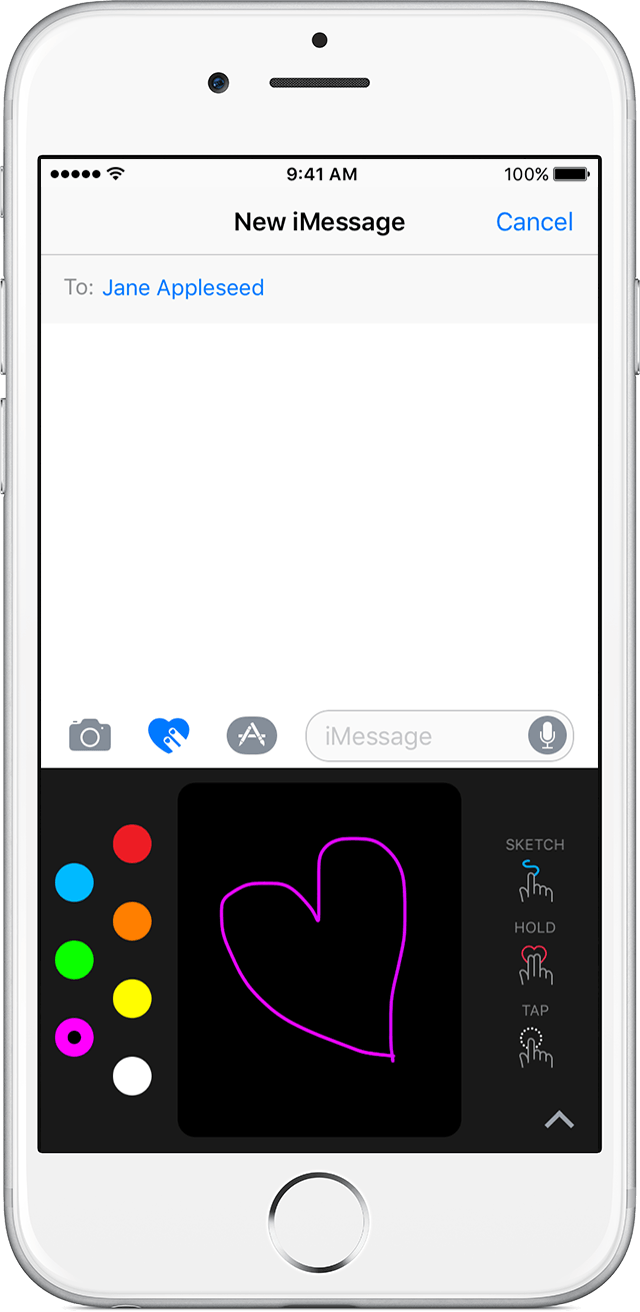
Send a sketch, tap, or heartbeat
- In Messages, tap
and enter a contact or go to an existing conversation.
- Tap
. If you don't see it, tap
to find it.
- Then choose the type of Digital Touch that you want to send.
- When you're ready to send, tap
.
Sketch
Tap
to change colors. Then move one finger to draw.
Send a handwritten message
You can personalize your messages by adding a note in your own handwriting. Your friends and family will see the message animate, as if it were being written in front of them. To send a handwritten note, follow these steps:
- Open Messages.
- Tap
- If you have an iPhone, turn it sideways. If you have an iPad, tap
on the keyboard.
- Write your message or select one of the options at the bottom of the screen.
- If you need to start over, tap Undo. If not, tap Done. Then tap
You need iOS 10 to send and receive an animated handwritten message. If you have iOS 9 or earlier, you'll receive a still image.
When I turn my iPhone it doesn't allow me the option for handwritten messages. I do not know what to do.
There is a squiggle mark in the bottom right of the keyboard but you gotta MAKE YOUR PHONE SIDEWAYS FIRST
After ios10 upgrade. Can't send new draw messages