Finder non-responsive after sleep

Hello,

I have been trying to fix this issue of my Finder becoming unresponsive after any one of the following happens:

  • It sleeps (clamshell closed or open)
  • Screensaver starts.
  • Power naps.
  • Hdd powers down.
  • I try to use the restart command from the apple menu - finder clears the desktop then becomes un responsive and I have to hare reboot.
  • sits idle for extended periods of time ( not sleeping, or power napping).


When It wakes up from any of these events finder is non responsive and I have to do a hard re-boot.


Solutions I have tries thus far;

  • Force Quit Finder - will not function.
  • hard restart - temporarily fixes the issue until one of the above stated events happen.
  • I have deleted my finder.plist file - It never made another file so not sure if thats an issue or not (file is no longer present on my disk).
  • I have turned off all sleep, power saving, and screensaver options( takes about an hour to become unresponsive).
  • cmd-shift-R and used the options there to check the drive for errors etc - no issues were found.


The only things I have not done yet are reinstall os and use the terminal commands that a lot of people say never to use.


If reinstalling the os is the only solution,

1. after I back up my system will I lose all of my files?

2. Will I have to reinstall all of my programs ( I use this mainly for School and have programs like Ableton Live, Pro Tools, Adobe Cloud programs) afterwards?

3. Will I be able to just restore from time machine and continue on? or will it re introduce the problem I am having?


I can tell you its just a minor annoyance, but it does make it hard to update when it requires a restart and finder won't respond.


System Info:

MacBook Pro (Retina, 15-inch, Mid 2015)

2.5 GHz Intel Core i7

16 GB 1600 MHz DDR3

AMD Radeon R9 M370X 2048 MB

10.11.6


Thanks In advance for helping.

MacBook Pro with Retina display, iOS 10, 10.11.6

Posted on Sep 18, 2016 12:40 PM

Reply
4 replies

Sep 19, 2016 6:45 PM in response to herosuperc

Hi herosuperc,
Welcome to the Apple Support Communities. I understand you are having issues with the Finder application becoming unresponsive. Your profile shows you have the latest version of the operating system, OS X El Capitan version 10.11.6, on your MacBook Pro. Were you experiencing these issues before the update?
The first thing I would suggest is to back up your computer, then try re-indexing the Finder application.
If you have not already done so, be sure to back up your computer with Time Machine.
Use Time Machine to back up or restore your Mac

Back up using Time Machine

After you set up Time Machine, it automatically makes hourly backups for the past 24 hours, daily backups for the past month, and weekly backups for all previous months. The oldest backups are deleted when your backup drive is full.

To back up now instead of waiting for the next automatic backup, choose Back Up Now from the Time Machine menu User uploaded file.

Rebuild the Spotlight index on your Mac

Use these steps to manually rebuild the Spotlight index for a folder or disk.

  1. Choose Apple  menu > System Preferences, then click Spotlight.
  2. Click the Privacy tab.
  3. Drag the folder or disk that you want to index again to the list of locations that Spotlight is prevented from searching. Click OK to confirm.
  4. Select the folder or disk you just added, then click the Remove (–) button to remove it from the list.
  5. Quit System Preferences. Spotlight will reindex the contents of the folder or disk.

If the issue still persists, create a new user account so see if the issue is with your user account or systemwide.
How to test an issueinanother user account on your Mac
herosuperc, Please reply back to this thread by after you have tried these initial troubleshooting steps. The next step would be to reinstall the OS X, which would not affect your data.
How to reinstall OS X

OS X can be installed over the same version or earlier version of OS X, without removing your data. You don’t need to remove or disable the existing system first.

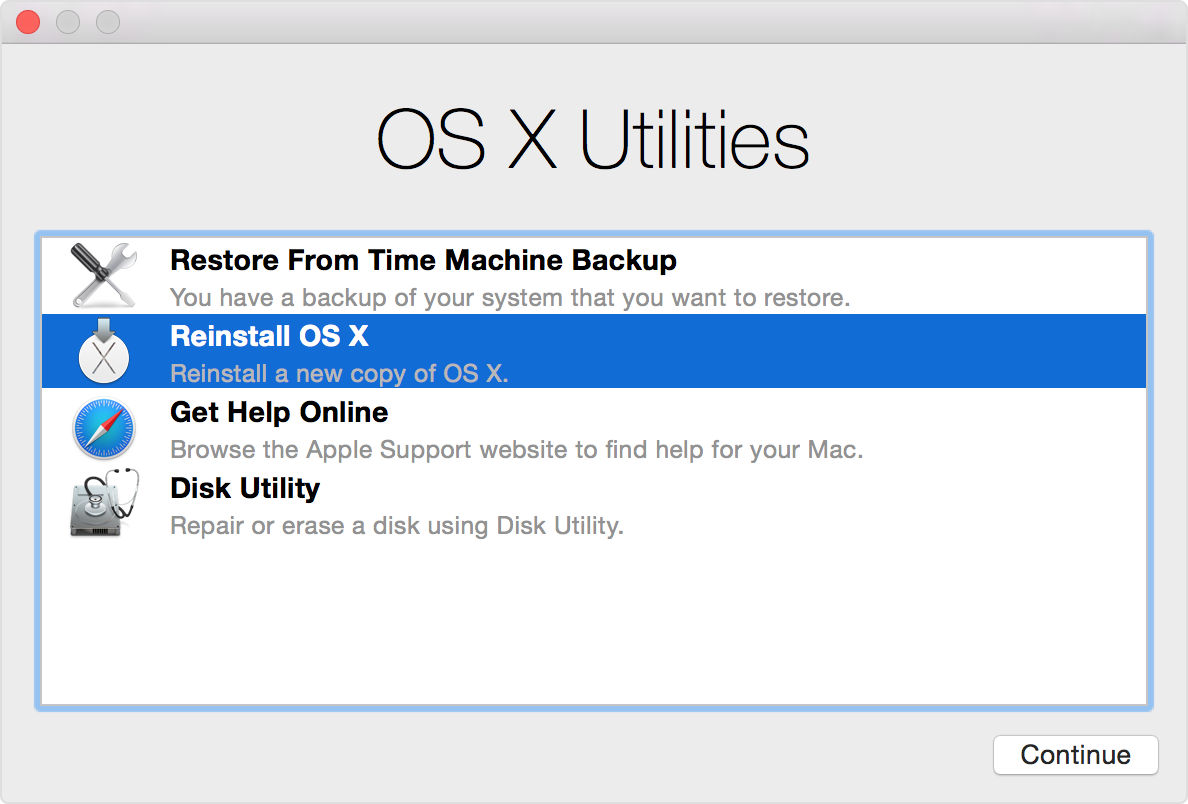
  1. Start up from OS X Recovery by holding Command-R immediately after turning on or restarting your Mac. Release the keys when you see the Apple logo. Startup is complete when you see the OS X Utilities window.
  2. Choose Reinstall OS X from the OS X Utilities window, then follow the onscreen instructions.

Take care

Sep 21, 2016 8:36 PM in response to judysings

To answer your initial question, I have been dealing with the Finder becoming non responsive for almost a year now.


  • Tried the first option reindexing. followed instruction to the letter. Did not resolve the problem.
  • Reinstalled mac os per instructions. did not resolve the problem.
  • Have tried to install Sierra. Will not let me restart due to the finder becoming unresponsive.
  • Have created another log in account with admin privileges to tis if it was my account or the machine. issue still existed on the new profile.

So what now?

Sep 22, 2016 10:57 AM in response to herosuperc

Hello herosuperc,

Thanks for sharing the results of your troubleshooting steps. If you have been dealing with this issue for a year, I can certainly understand your frustration. Since you do not find an issue with your hard drive, then an Erase and Install would be the final troubleshooting step. This would allow you to start fresh with factory settings.

Important: I highly recommend you create two backups, on two separate external drives. You might consider using Time Machine for one backup. For your second backup, drag important files like your Ableton, Pro Tools, etc. to an external drive to save all of those projects and media again.

I would not recommend restoring from a backup because we don't know if there is a corrupt file or incompatible software somewhere in the mix.

Speaking of which, check to see if your Pro Tools , Ableton, and other third-party software are compatible with OS X El Capitan. I would not install macOS Sierra until you have confirmed your existing applications and audio interfaces are compatible.

How to reinstall OS X

Begin by completing the other steps to prepare for selling or giving away your Mac. Then take these additional steps to reinstall OS X in a way that cleans your Mac of anything associated with you, your data, or your Apple ID.

  1. Start up from OS X Internet Recovery by holding down Option-Command-R immediately after turning on or restarting your Mac. Release the keys when you see the Apple logo. Startup is complete when you see the OS X Utilities window.
  2. Open Disk Utility from the OS X Utilities window, then use Disk Utility to erase your built-in hard disk using the OS X Extended (Journaled) format. Quit Disk Utility when done.
  3. Choose Reinstall OS X from the OS X Utilities window, then follow the onscreen instructions.
    This installs the OS X that came with your Mac when it was new. This version isn't associated with your Apple ID. The new owner can then use the Mac App Store to upgrade OS X with their Apple ID.

    User uploaded file

  4. When done, your Mac restarts to a setup assistant.

Take care,

Oct 3, 2016 9:31 AM in response to judysings

SO after some trial and error I found the issue. Avid's update and license manager software was the issue. (Pro Tools 12.5)


there was was a corrupted file that must have happened during an update. to fix it in installing the program won't fix it. And updating it will not fix it. You have to completely remove all Avid software from your system and start with s fresh installation. Everything is now working fine.

This thread has been closed by the system or the community team. You may vote for any posts you find helpful, or search the Community for additional answers.

Finder non-responsive after sleep

Welcome to Apple Support Community
A forum where Apple customers help each other with their products. Get started with your Apple Account.