Molax

Q: IOS update 10.0.2 Storage problem - Storage swallowed up by un-removable data

Hi I updated my Ipad and Iphone 6 today.  The ipad is fine, however the iphone has now had all its data swallowed up.  Basically when i did the updae and it backed up, it has stored over 7gb of data files, which i cannot access or remove.  I am now left with only 152mb of free data space.  I have i have tried the restart function on the phone to see if will correct itself, but no joy.  Please help.  I can't use simple apps or take photos as it tells me to free up space, i go there and my apps and photos are not taking up any space at all. 16GB phone.


Thanks Mo

Posted on Sep 24, 2016 7:38 PM

Close

Q: IOS update 10.0.2 Storage problem - Storage swallowed up by un-removable data

  • All replies
  • Helpful answers

  • by JovonaP.,

    JovonaP. JovonaP. Sep 26, 2016 6:49 AM in response to Molax
    Community Specialists
    Sep 26, 2016 6:49 AM in response to Molax

    Hello Molax,

    Thank you for using Apple Support Communities. It's my understanding that since updating to iOS 10, you're now unable to move data in order to make space on your iPhone. I know being able to analyze and manage your storage is very important. I want to make sure you're able to take photos and use simple apps again.

    First, I recommend connecting to iTunes on a Mac or PC. There you can get an additional breakdown of what is taking up space and remove content accordingly.

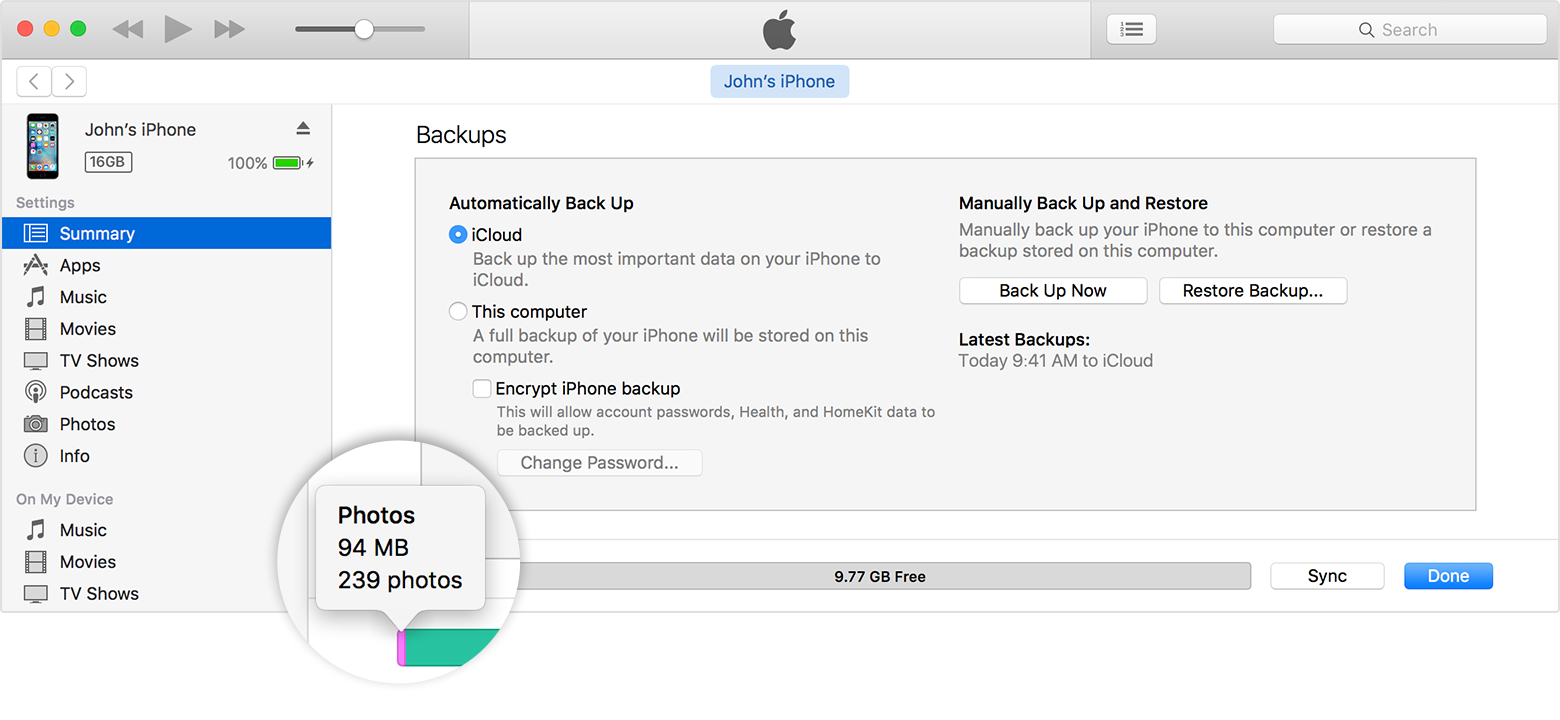
    Use iTunes to check the storage on your iOS device

    1. Open iTunes on your computer.
    2. Connect your device to your computer.
    3. In iTunes, select your device. You'll see a bar that shows how much storage your iOS content uses, divided by content type. 
    4. Move your mouse over a content type, like Other or Apps, to find more information:

    Check the storage on your iPhone, iPad, and iPod touch

    Have a great day!

  • by marcosarid1,

    marcosarid1 marcosarid1 Sep 29, 2016 7:46 PM in response to JovonaP.
    Level 1 (4 points)
    Sep 29, 2016 7:46 PM in response to JovonaP.

    I'm having the exact same problem.

    iOS 10.0.2 on an 64gb iPhone 6S Plus.


    I had over 8gbs of free storage when suddenly I'm facetiming and I get the pop-up alert telling me my storage is low.

    I haven't done anything else but updating it. It is extremely frustrating. How do I go from 8gbs to Zero bytes overnight?

    After I got the message I deleted garage band from my iPhone (which is a whole gb and little bit more) and guess what, just minutes after I deleted it I got the same storage message again.


    Now every time I look at the storage I get a new reading, 168mbs, Zero bytes, 224mbs. Still getting the low storage alert.


    I want my phone back. I didn't pay extra money to have the extra flash storage be taken away by an update.


    This has GOT to be fixed. JovonaP. what you're doing is call us dumb and telling us to just 'remove content' which if you read my post you'll find out it does extactly nothing to solve this issue.

  • by Molax,

    Molax Molax Sep 30, 2016 7:24 AM in response to marcosarid1
    Level 1 (4 points)
    iPhone
    Sep 30, 2016 7:24 AM in response to marcosarid1

    Hey, i managed to solve the problem by restoring the phone. Basically what it did was keep both versions on the phone, it didnt delete the old version. Go to itunes, back up your phone or if the phone is already backed up, prior to you deleting apps & click restore. It takes a bit of time to do, but it wipes off all the data, then adds the update, then you have the option to restore your phone from the old back up or start it off as a new phone.


    all the beat

  • by Molax,

    Molax Molax Sep 30, 2016 7:26 AM in response to JovonaP.
    Level 1 (4 points)
    iPhone
    Sep 30, 2016 7:26 AM in response to JovonaP.

    That was a very obvious response, it was itunes that showed me that all the space was taken up by data & not apps and photos. But I appreciate your time. restoring the phone solved the problem-  which was both pre-10.02 & rhe 10.02 sata stating on the phone. Thanks Mo

  • by sparthiban,

    sparthiban sparthiban Sep 30, 2016 7:48 AM in response to Molax
    Level 1 (4 points)
    Sep 30, 2016 7:48 AM in response to Molax

    i have the same problem of iOS 10 sucking magically all the storage space, please advise any workaround till apple fixes it?

  • by sparthiban,

    sparthiban sparthiban Sep 30, 2016 7:52 AM in response to Molax
    Level 1 (4 points)
    Sep 30, 2016 7:52 AM in response to Molax

    are you sure that restoring phone solved the problem? when i installed 10.0.1, i have noticed that my phone over all storage space has increased little and free space also little bit increased but with in day or two it was gone..again the same happened after the 10.0.2 update, i have disable photo stream etc..stayed with low space for couple more days and again i am running with less than 200 MB on my 16 GB phone which i used to have always 1+ GB free even with large number of photos but now only less number (under 20) and no videos ..so please advise

  • by Molax,

    Molax Molax Sep 30, 2016 7:54 AM in response to sparthiban
    Level 1 (4 points)
    iPhone
    Sep 30, 2016 7:54 AM in response to sparthiban

    Hey, restoring the phone in itunes is the only fix.  Back it up, then restore. It will give you the option at the end of the long process to put the data back on.  My phone is perfect now

  • by Molax,

    Molax Molax Sep 30, 2016 7:56 AM in response to sparthiban
    Level 1 (4 points)
    iPhone
    Sep 30, 2016 7:56 AM in response to sparthiban

    hey, it took me 5 days of **** with my phone to finally decide to restore it.  Its perfect now.  Basically you have 2 phones stored on your phone, you need it to go back to 1.  It wipes the phone clean & then only puts back the most recent update. Mo

  • by sparthiban,

    sparthiban sparthiban Sep 30, 2016 11:32 AM in response to Molax
    Level 1 (4 points)
    Sep 30, 2016 11:32 AM in response to Molax

    i am working on to restore but here is what iTunes summary shows however there is no space on the device!! weird Apple Programming...

    itunes Summary.png

  • by sparthiban,

    sparthiban sparthiban Sep 30, 2016 7:06 PM in response to sparthiban
    Level 1 (4 points)
    Sep 30, 2016 7:06 PM in response to sparthiban

    The time took restore was insane.. however after the restore i have reclaimed 3.5 GB so lets see how long this stays in..

  • by sparthiban,

    sparthiban sparthiban Oct 1, 2016 4:47 AM in response to sparthiban
    Level 1 (4 points)
    Oct 1, 2016 4:47 AM in response to sparthiban

    Slowly something is swallowing storage ,Overnight it got reduced down to 2.75GB from 3.5GB.