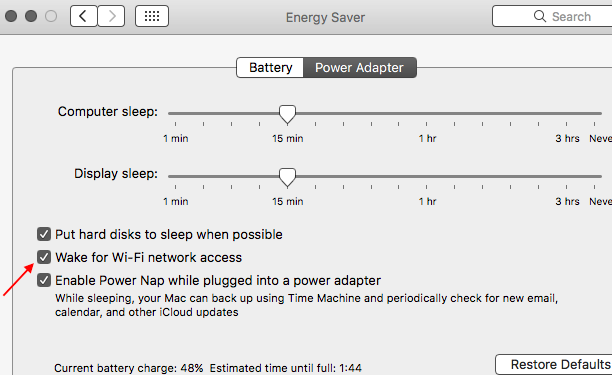
sierra "Wake for network access"

After upgrading to sierra, it looks like the feature "Wake for network access" in energy savings stopped working for me. I have Screen Sharing enabled on my iMac and used to be able to connect by Screen Sharing at any time, but after upgrading to sierra, this stopped working: when iMac is asleep, the attempts to initiate Screen Sharing from another mac are failed, but when it's awake, Screen Sharing works fine. Any ideas?


Thanks!

iMac, macOS Sierra (10.12)

Posted on Sep 28, 2016 2:26 PM

Reply
9 replies

Apr 26, 2017 10:03 AM in response to hmzppz

As per this article : macOS Sierra: Share your computer’s resources when it’s in sleep


  1. Choose Apple menu > System Preferences, then click Energy Saver.
  2. Select any of the available “Wake for…” options, for example, “Wake for Ethernet Network Access.” (Different options are available, depending on how you’re connected.)


When the “Wake for network access” checkbox is selected, your Mac wakes at the following times:

  • When a user at another computer accesses your computer’s shared resources.
  • At regular intervals so that your Mac can notify other computers on the network that its resources are available.User uploaded file

And display sleep slider should never be zero .

Also as per this article also : macOS Sierra: If you can’t share computer screens

Make sure neither Mac is in sleep mode. If necessary, adjust sleep settings using Energy Saver preferences (choose Apple menu > System Preferences, then click Energy Saver).

You can follow the other steps also in the article , it is not mentioned in your original post by which method are you connecting ( screen sharing ) two Macs on the same wifi network .

Read these articles : macOS Sierra: Set up and use screen sharing

: macOS Sierra: Share your screen using Back to My Mac

Apr 26, 2017 12:17 PM in response to tygb

I have followed all of these steps but still have the issue. I am running on the latest Sierra on a Mac Pro which is always connected to Ethernet and power. Having "Wake on network access" checked does not seem to help screen sharing.

In my case, it seems to be related to whether the screen itself is asleep. I have a Thunderbolt Display and when it goes to sleep I am unable to screen share. I am not sure why this would matter but when I was previously using a Dell monitor on El Capitan I did not have this problem. So it may be some interaction with the Thunderbolt Display and the display sleep mode.

May 23, 2017 1:53 AM in response to tygb

I am trying to access my iMac (where my Plex media server is installed) whilst it is in "Sleep" via a Plex Client on my iPad over WiFi. But your instructions don't look the same as my settings. My iMac is connected to the network via ethernet and also WiFi is switched on. But I only have the option Wake for network access not Wake for Wi-Fi network access. So if my iMac is in Sleep mode, I cannot use the Plex app on my iPad or iPhone 😟

May 23, 2017 2:47 AM in response to craigriches

Do you use third party apps , Anti - Virus , cleaners in your Mac ? in case if it is yes uninstall them .

Also file vault , firewall should not be enabled on two computers while sharing you screen , and read and permissions must not be altered in home folder , shared folder .

No changes must be done in date and time settings .

This thread has been closed by the system or the community team. You may vote for any posts you find helpful, or search the Community for additional answers.

sierra "Wake for network access"

Welcome to Apple Support Community
A forum where Apple customers help each other with their products. Get started with your Apple Account.