my iphone apps have no sound???
Why are there no sounds coming out of my iphone apps???
iPhone 4S
Why are there no sounds coming out of my iphone apps???
iPhone 4S
- Go to Settings > Sounds and drag the Ringer And Alerts slider to turn the volume up.
- If you hear sound from the speaker, follow the rest of these steps. If you can't hear sound from the speaker, contact Apple Support.
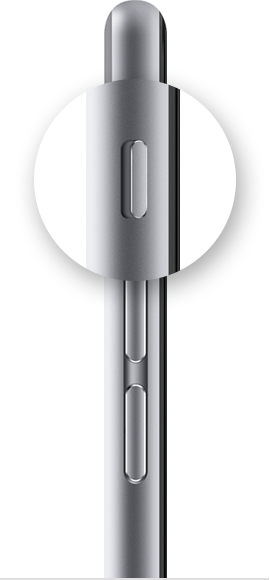
- If your device has a Ring/Silent switch, make sure it's set to ring. (If you can see orange, your device is set to silent.)
- Restart your device.
- Open an app that has music or sound effects. Adjust the volume with the volume buttons or the slider in Control Center.
- Go to Settings > Bluetooth and turn off Bluetooth. Then check the sound again.
- Connect a headset. If you can hear sound through the headset, remove it and clear any dust or debris from the headset port on your device.
- If your device is in a case, make sure that the case doesn't block the speaker.
- Use a brush to gently clear any debris from the speaker and Lightning connector (or 30-pin dock connector). The brush should have soft, clean, dry bristles.
- Update your device to the latest version of iOS.
If you follow these steps and still hear no sound or distorted sound, contact Apple Support.
- Go to Settings > Sounds and drag the Ringer And Alerts slider to turn the volume up.
- If you hear sound from the speaker, follow the rest of these steps. If you can't hear sound from the speaker, contact Apple Support.
- If your device has a Ring/Silent switch, make sure it's set to ring. (If you can see orange, your device is set to silent.)
- Restart your device.
- Open an app that has music or sound effects. Adjust the volume with the volume buttons or the slider in Control Center.
- Go to Settings > Bluetooth and turn off Bluetooth. Then check the sound again.
- Connect a headset. If you can hear sound through the headset, remove it and clear any dust or debris from the headset port on your device.
- If your device is in a case, make sure that the case doesn't block the speaker.
- Use a brush to gently clear any debris from the speaker and Lightning connector (or 30-pin dock connector). The brush should have soft, clean, dry bristles.
- Update your device to the latest version of iOS.
If you follow these steps and still hear no sound or distorted sound, contact Apple Support.
my iphone apps have no sound???