Hibernation problem after upgrading to MacOS Sierra

Hi

After upgrading my Macbook pro OS to MacOS Sierra,the hibernation got sucked and doesn't work any more.

before upgrading,I had El Capitan and the hibernate feature would work fine and just by closing the lid my laptop would get to hibernate mode after a few seconds.

Please help me soon and Thank you in advanced

Best regards,

Anushiravan

the output of pmset command is(pmset -g):

standbydelay 4200

standby 0

womp 1

sms 1

hibernatefile /var/vm/sleepimage

halfdim 1

networkoversleep 0

disksleep 10

sleep 10

autopoweroffdelay 14400

hibernatemode 25

autopoweroff 1

ttyskeepawake 1

displaysleep 10

acwake 0

lidwake 1

Hardware info:

Model Name: MacBook Pro

Model Identifier: MacBookPro9,2

Processor Name: Intel Core i7

Processor Speed: 2.9 GHz

Number of Processors: 1

Total Number of Cores: 2

L2 Cache (per Core): 256 KB

L3 Cache: 4 MB

Memory: 8 GB

Boot ROM Version: MBP91.00D3.B0D

SMC Version (system): 2.2f44

Serial Number (system): C1MHRAUMDTY4

Hardware UUID: 060841B9-A83E-5589-85B3-A8E8A83A02C4

Sudden Motion Sensor:

State: Enabled


P.S. I've also reset SMC and NVRAM,but this stubborn problem is still struggling with me.


MacBook Pro (13-inch Mid 2012), macOS Sierra (10.12)

Posted on Oct 15, 2016 11:16 AM

Reply
11 replies

Oct 16, 2016 4:13 PM in response to Anushiravan

Hello Anushiravan ,

It sounds like you may have tried some, but not all of the steps to troubleshoot the issue you are having with your MacBook Pro not going to sleep. Take a look at the two resources below for possible reasons and resolutions:

If your Mac doesn‘t sleep or wake when expected

How Power Nap works on your Mac​

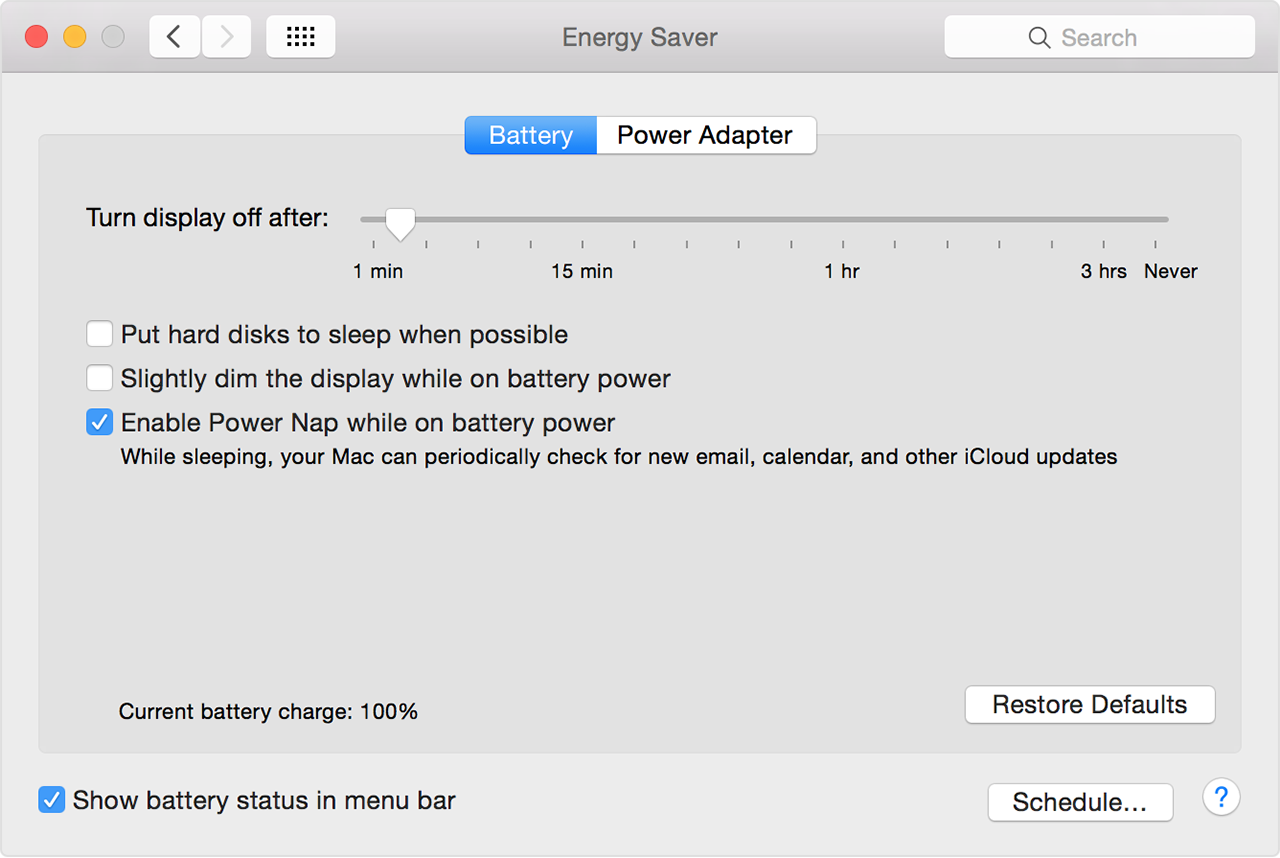
Turn Power Nap on or off

The Power Nap setting is in the Energy Saver pane of System Preferences.

Notebook computers
Choose Apple menu > System Preferences, then click Energy Saver.

  • Click the Battery tab, then use the "Enable Power Nap while on battery power" checkbox to control whether your Mac uses Power Nap while on battery power. The default setting is off.
  • Click the Power Adapter tab, then use the "Enable Power Nap while plugged into a power adapter" checkbox to control whether your Mac uses Power Nap while using AC power. The default setting is on.

User uploaded file


Take care.


Nov 3, 2016 3:12 AM in response to Lord-voldemort

Hi again

For testing purpose and to be assured of my Macbook Pro(13inch,Mid 2012) hardware compatibility with different MacOS

I've installed this Operating systems on MBP ,from scratch and all of them passed the hibernation mode.


1.Mac OS X Lion 10.7.5

2.El Captain 10.11.6


But Installing macOS Sierra 10.12 (16A323) and 10.12.1 didn't resolve anything and problem got back once more again.

I think there are some sort of incompatibilities between MacOS Sierra and My MBP.

Best Regards,

Anushiravan

Nov 3, 2016 3:49 PM in response to Anushiravan

I'm also having this issue. I've had it with two different MBPs (15" 2015 and 2016 models). One of them had hibernatemode 25 working just fine on El Capitan. When I upgraded to Sierra, it stopped working.


The other one I restored from a Time Machine backup, and it already had Sierra installed from the get go. It still doesn't work.


Power Nap is disabled on Battery power, which is when I try to hibernate it and it doesn't work.

Nov 9, 2016 5:02 PM in response to Anushiravan

I have the same issue.


MacBook Pro (13-inch, Mid 2012)

MacOS Sierra 10.12.1(16B2657)

# pmset -g

System-wide power settings:

Currently in use:

standbydelay 4200

standby 0

womp 0

halfdim 1

hibernatefile /var/vm/sleepimage

sms 1

networkoversleep 0

disksleep 10

sleep 10

autopoweroffdelay 14400

hibernatemode 25

autopoweroff 1

ttyskeepawake 1

displaysleep 10

acwake 0

lidwake 1

This thread has been closed by the system or the community team. You may vote for any posts you find helpful, or search the Community for additional answers.

Hibernation problem after upgrading to MacOS Sierra

Welcome to Apple Support Community
A forum where Apple customers help each other with their products. Get started with your Apple Account.