I can't upload photos to facebook from the photos app on iphone 7 plus

For some reason all of the sudden I can't upload photos to facebook from the photos app on my iPhone 7 plus (using the share sheet). It shows that the photo will be posted, but it doesn't happen. I have no problem posting to Instagram or twitter. The only way it seems to be fixed is if I turn off my iPhone. It doesn't seem to make a difference whether I'm on wifi or LTE. Anyone else having this issue and what's the fix?

iPhone 7 Plus, iOS 10.0.3

Posted on Oct 22, 2016 5:42 PM

Reply
1 reply

Oct 23, 2016 10:22 AM in response to ottoharsh

Hey ottoharsh,


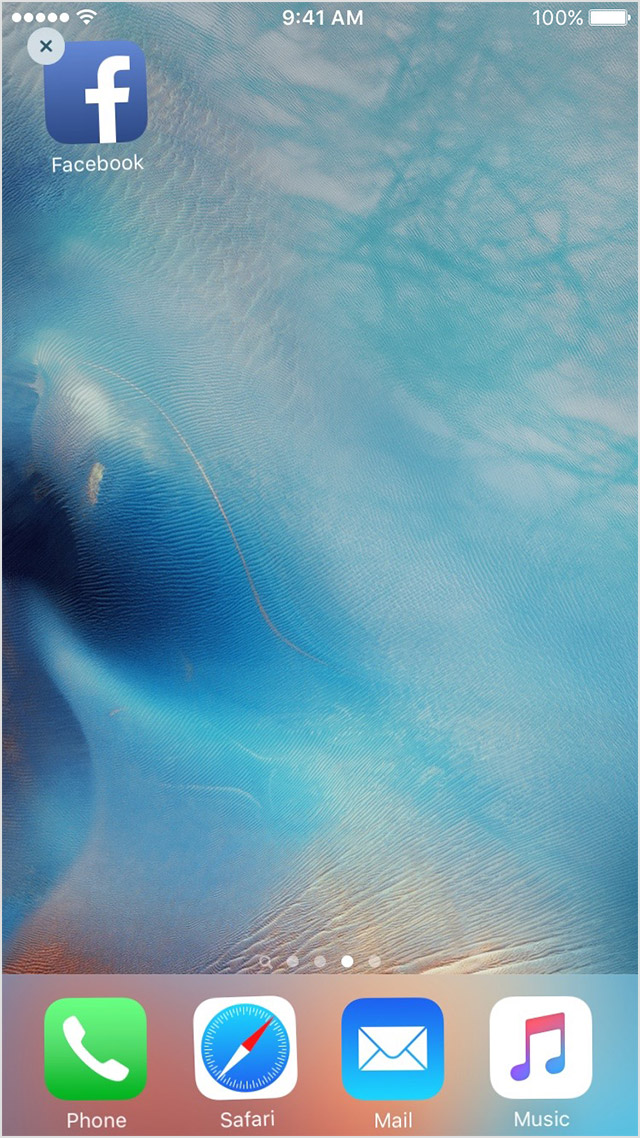
Thanks for using Apple Support Communities. It sounds like you're having issues with the Facebook app with photo uploads but this issue doesn't occur with other apps that have the same function. We want all of your apps to working properly and have some information that can help make that happen for you. If you've tried to force close the app or restart your iPhone 7 Plus but still get the same error, try removing the app and reinstalling from the steps below.

Delete and reinstall the app

  1. Tap and hold the app until it jiggles.
  2. Tap the User uploaded file on the app.
    User uploaded file
  3. Press the Home button.
  4. Go to the App Store and download the app again.
  5. Wait for the app to download, then open it from the Home screen.


If you see this issue again, contact the app developer for help:

  1. Find the app in the App Store.
  2. Tap the app, then tap Reviews.
  3. Underneath App Store Customer Reviews, tap App Support.

Cheers.

This thread has been closed by the system or the community team. You may vote for any posts you find helpful, or search the Community for additional answers.

I can't upload photos to facebook from the photos app on iphone 7 plus

Welcome to Apple Support Community
A forum where Apple customers help each other with their products. Get started with your Apple Account.