export numbers file to CSV

Hello all,


I'm pretty sure I've done this in the past but it just isn't working now. I received an excel spreadsheet file with several hundred emails in it. I want to import those emails into my address book application. I've opened the excel file in Numbers and exported it as a CSV file. Address Book won't import it saying that it's not a properly formatted CSV file. When I look at the CSV file, it appears to still be formatted in spreadsheet format. Any help would be appreciated.

Thanks.

Posted on Nov 14, 2016 3:53 PM

Reply
3 replies

Nov 14, 2016 6:45 PM in response to wunwspirit

Export from Numbers for Mac

  1. Make sure you have the file you want to export open in Numbers.
  2. Choose File > Export To, then select the format.
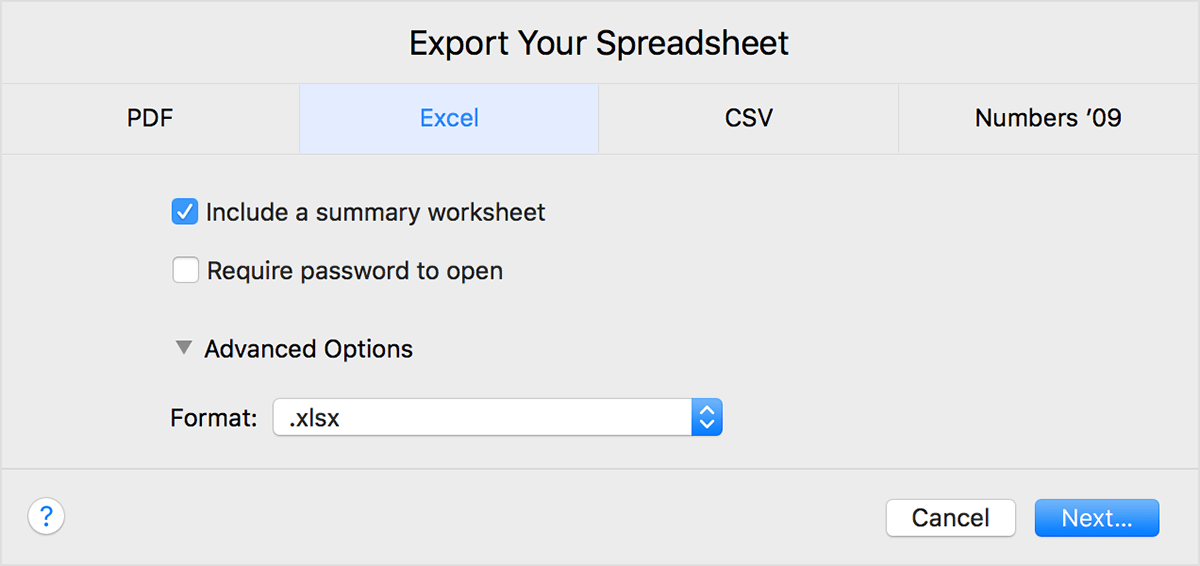
  3. From the Export Your Spreadsheet window, you can choose a different format or set up any additional options. For example, you can select Image Quality for a PDF, or save as an older file format of Excel. You can also password protect your file.
    User uploaded file
  4. Click Next.
  5. Enter a name for your file and select a folder to save it to.
  6. Click Export.

Make sure you save your file before closing. If you make any changes after exporting the file to a different format, they only appear in the Numbers file you are working in.

Import and export different file formats with Numbers - Apple Support

Dec 13, 2016 8:26 AM in response to BDAqua

Hi BDAqua,


Thanks for the info. Sorry for the delay in response. I'm thinking a little clarification of my workflow may help people steer me in the right direction. I am on a Mac Pro ( late 2008 ) and am running OS 10.6.8. I am opening a supplied .xlsx file (microsoft excel) with Numbers '08 ( please see the visual attached to view how the files look when open ). I then export as CSV. That exported CSV file seems to still be in 'table' format. I just want to convert the spreadsheet file into a properly formatted CSV file that can be imported into Apple's Address Book program. Any suggestions?

Thanks.

User uploaded file

Dec 13, 2016 1:02 PM in response to wunwspirit

Here is the solution that worked. The original spreadsheet file that I was given only had one column that contained a header name and data ( emails ). I needed to add two additional columns for 'First Name' and 'Last Name' fields. I saved that, exported it as CSV and was then able to import it into Address Book. I made a flow chart visual to help anyone searching the forums who might have a similar question...

User uploaded file

This thread has been closed by the system or the community team. You may vote for any posts you find helpful, or search the Community for additional answers.

export numbers file to CSV

Welcome to Apple Support Community
A forum where Apple customers help each other with their products. Get started with your Apple Account.