Samsung M3 not recognised

Hi


I'm using a Samsung M3 external hard drive. I've used it with my MacBook air for 3 years now.


This is the first time I've tried to use it after updating to Sierra, and my MacBook air isn't recognising it!


I have Windows installed via boot camp, tried it there, works perfectly so I know the hard drive/ cables are in working order.


I've uninstalled the driver and reinstalled again, no luck.


It appears in disk utility but greyed out. I've tried First aid and to manually mount to no avail.


HELP!!!!

Posted on Nov 17, 2016 12:54 PM

Reply
2 replies

Nov 19, 2016 10:36 AM in response to mario49

Hi Mario


No you misunderstood slightly. I've proved the USB connectivity of my MacIfBook by connecting the same device while running Windows via bootcamp on the same MacBook.


There have been further developments through.


If I disable the SeaGate driver, or uninstall it the hard drive can be recognised but in read only mode only.


I contacted seagate support and they sent me a alternative driver, which now works fine.


Here is the link:


http://www.seagate.com/in/en/support/downloads/item/ntfs-driver-for-mac-os-maste r-dl/

Nov 19, 2016 5:01 AM in response to RaymondBell1985

Hey RaymondBell1985,

If I understand correctly, since you have updated to macOS Sierra on your MacBook Air the external drive is not being recognized in the OS. You are able to see the drive listed in Disk Utility though. There are a couple thing we can check to make sure the device is visable. There are settings in Finder preferences that you can enable that allows the drive to be seen on the desktop and in the Finder sidebar. I would recommend you read these articles, use them to help troubleshoot the issue.​

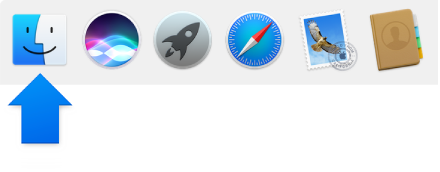
To view Finder preferences, click the Finder icon in the Dock, then choose Finder > Preferences.

User uploaded file

General

Show these items on the desktop

Select any items you want to see on the desktop.

macOS Sierra: Finder preferences
If it is still not showing up, it may be an issue with the connection to the MacBook Air. I see that you said it is visable on a different computer. It may be an issue with the connection on the Mac. One thing you can do is to check the Mac connections.

If your computer has more than one USB port User uploaded file, switch the device’s cable to another port.​

macOS Sierra: Check your device’s USB connection
Thank you for using Apple Support Communities. Have a good one.

This thread has been closed by the system or the community team. You may vote for any posts you find helpful, or search the Community for additional answers.

Samsung M3 not recognised

Welcome to Apple Support Community
A forum where Apple customers help each other with their products. Get started with your Apple Account.