Iphone charges very very slowly but no charging icon

I plug my iphone 5c 8gb with my authentic iphone charger and it will charge very very slowly, however it will not show that it is charging. By slow I mean 20% in around 24 hours. Is there anything I can do? I tried charging with a different adapted and there was no difference. So it must mean its my phone or my usb charger right?

iPhone 5c, iOS 9.3.2

Posted on Nov 30, 2016 7:56 AM

Reply
Question marked as Top-ranking reply

Posted on Dec 1, 2016 11:05 AM

Hello, ikkoops.

Welcome to Apple Support Communities.

I understand your iPhone 5c is charging very slowly and the battery indicator doesn't show the charging symbol (lightning bolt). You've done some great troubleshooting steps so far by trying a different adapter. I would take this a bit further and try using a different wall outlet or USB port on a computer if possible.

Make sure you create/update your backups: How to back up your iPhone, iPad, and iPod touch

Check out this article as well: If your iPhone, iPad, or iPod touch won‘t charge

If your device won’t charge or charges slowly

If you have very low battery and plug into power, a black screen or a black screen with a red battery might appear for a few minutes. Follow these steps and try again after each:

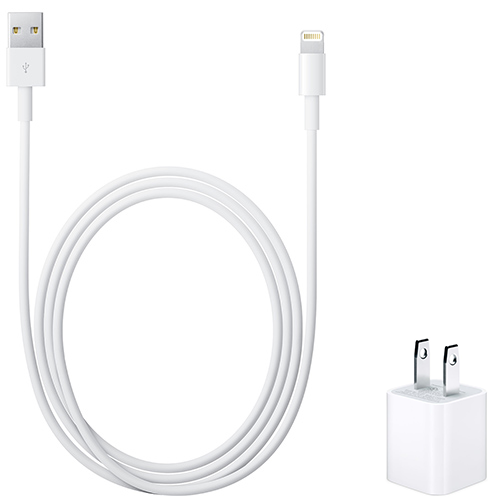
  1. Check your charging cable and USB adapter for signs of damage,* like breakage or bent prongs. Don't use damaged accessories.
    User uploaded file
  2. Use a wall power outlet and check for firm connections between your charging cable, USB wall adapter, and wall outlet, or try a different outlet.
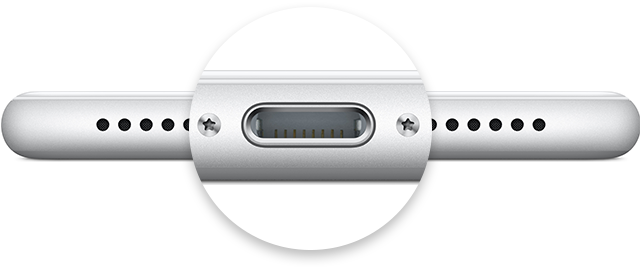
  3. Remove any debris from the charging port on the bottom of your device, then firmly plug your charging cable into your device. If the charging port is damaged, your device probably needs service.
    User uploaded file
  4. Let your device charge for a half hour (If your device is unresponsive afterward, learn what to do).
  5. Force restart your device: Press and hold the Sleep/Wake and Home buttons at the same time for at least 10 seconds, until you see the Apple logo. Then let your device charge for another half hour.
  6. If your device still won’t power on or charge, take your device, charging cable, and charging adapter to an Apple Retail Store or Apple Authorized Service Provider for evaluation. You can also contact Apple Support.
Let me know if this helps.

Thank you for using Apple Support Communities.

Cheers!
1 reply
Question marked as Top-ranking reply

Dec 1, 2016 11:05 AM in response to ikkoops

Hello, ikkoops.

Welcome to Apple Support Communities.

I understand your iPhone 5c is charging very slowly and the battery indicator doesn't show the charging symbol (lightning bolt). You've done some great troubleshooting steps so far by trying a different adapter. I would take this a bit further and try using a different wall outlet or USB port on a computer if possible.

Make sure you create/update your backups: How to back up your iPhone, iPad, and iPod touch

Check out this article as well: If your iPhone, iPad, or iPod touch won‘t charge

If your device won’t charge or charges slowly

If you have very low battery and plug into power, a black screen or a black screen with a red battery might appear for a few minutes. Follow these steps and try again after each:

  1. Check your charging cable and USB adapter for signs of damage,* like breakage or bent prongs. Don't use damaged accessories.
    User uploaded file
  2. Use a wall power outlet and check for firm connections between your charging cable, USB wall adapter, and wall outlet, or try a different outlet.
  3. Remove any debris from the charging port on the bottom of your device, then firmly plug your charging cable into your device. If the charging port is damaged, your device probably needs service.
    User uploaded file
  4. Let your device charge for a half hour (If your device is unresponsive afterward, learn what to do).
  5. Force restart your device: Press and hold the Sleep/Wake and Home buttons at the same time for at least 10 seconds, until you see the Apple logo. Then let your device charge for another half hour.
  6. If your device still won’t power on or charge, take your device, charging cable, and charging adapter to an Apple Retail Store or Apple Authorized Service Provider for evaluation. You can also contact Apple Support.
Let me know if this helps.

Thank you for using Apple Support Communities.

Cheers!

This thread has been closed by the system or the community team. You may vote for any posts you find helpful, or search the Community for additional answers.

Iphone charges very very slowly but no charging icon

Welcome to Apple Support Community
A forum where Apple customers help each other with their products. Get started with your Apple Account.