Voicemail Transcription

When is Apple going to get rid of and/or fix the voicemail transcription? It does not work at all 50% of the time, transcribes the message wrong 100% of the time, and I can't LISTEN to the message about 75% of the time. Makes it useless to even have voicemail. I want to delete it. I have the iPhone 7 Plus and had the same exact problem on the iPhone 6 Plus. It really causes a lot of problems.

iPhone 7 Plus, iOS 10.1.1

Posted on Dec 7, 2016 2:17 PM

Reply
5 replies

Mar 15, 2017 9:54 AM in response to JackStraw77

JackStraw77 wrote:


I have no idea why this problem is not being covered in the support communities. I guess everyone gets 30 seconds or less voicemails.


Or maybe the problem only occurs on your phone. I get longer voicemails, and I don't have a problem. Generally, the forum posts are a qualitative means of identifying widespread issues. This is clearly not widespread, and you may be the only one who experiences it.


Apple please give users an option to turn off transcriptions.

Posting in the user-to-user forum is not an effective way to communicate with Apple, as Apple employees don't make a habit of reading posts.


For a specific problem contact Apple support directly: https://getsupport.apple.com.


For general feedback, https://apple.com/feedback.

Mar 15, 2017 9:48 AM in response to teddygirl36

The reply from Apple is the standard gibberish. Voicemail transcription is a mess. If you get long messages of over 2 minutes and try to listen to them on your phone the transcriptions crash the Visual Voicemail. I had 8 messages left for me that were over 2 minutes and I could neither listen to them or delete them because they crashed after playing back about 10 seconds. The only resolution is calling my voicemail. Doing resets, turning the network settings on and off will not help. The only apparent workaround right now is setting your SIRI to Chinese. This effectively turns off the transcription. It will say not available. The problem with that is it also prevents you from using SIRI until you switch it back to English. Apple please give users an option to turn off transcriptions. You can't have something that crashes users voicemails. I have no idea why this problem is not being covered in the support communities. I guess everyone gets 30 seconds or less voicemails.


iPhone 7 plus, 10.2.01 OS, T-Mobile carrier

Mar 15, 2017 10:15 AM in response to Lawrence Finch

It's amazing Lawrence, that I have had the same problems with both my iPhone 6 when I had AT&T as a carrier and my iPhone 7 plus with T-Mobile as a carrier since Apple introduced "Transcriptions Beta". Multiple messages of 2 minutes or more crash after 10-15 seconds of playback unless you use the workaround of disabling the transcriptions by putting SIRI into Chinese so the phone won't transcribe them. Doing it after you got the messages won't help either. Once there is text and it is a long message it will crash. I also believe that only part of the message is transcribed and the phone tries to transcribe the balance while your listening to message. This causes the message itself to crash on playback. There is no setting on my phone that is causing this. I have 128gb of storage and I'm nowhere close to using all of it. It also has nothing to do with the phone's ram memory because a hard reboot won't solve the problem. As I said all I want Apple to do is offer an option to turn off the transcriptions. I like to use SIRI. Why do I have set it to Chinese to disable the transcriptions. I was lucky to find the solution by someone who posted it on a website.

Dec 8, 2016 2:36 PM in response to teddygirl36

Hi teddygirl36,


I understand that your voicemail transcription and playback of your voicemails are not working as expected. I would check to see if there are any carrier updates available from your cellular provider. Update your carrier settings on your iPhone or iPad


After updating (if available) please review the information in this link for further assistance if not resolved with the update. See a voicemail transcription on your iPhone

You can also apply the following steps to help you further troubleshoot this issue:

Visual Voicemail on your iPhone - Apple Support


Get help with Visual Voicemail

If you can't set up Visual Voicemail, make sure that your carrier supports this feature.

If you need help, try these steps. Check your Visual Voicemail after each step:

  1. Try to call someone to check your cellular network connection.
  2. Make sure that you set up your voicemail. To check, dial your phone number from your iPhone.
  3. Call your iPhone from another phone and try to leave yourself a voicemail.
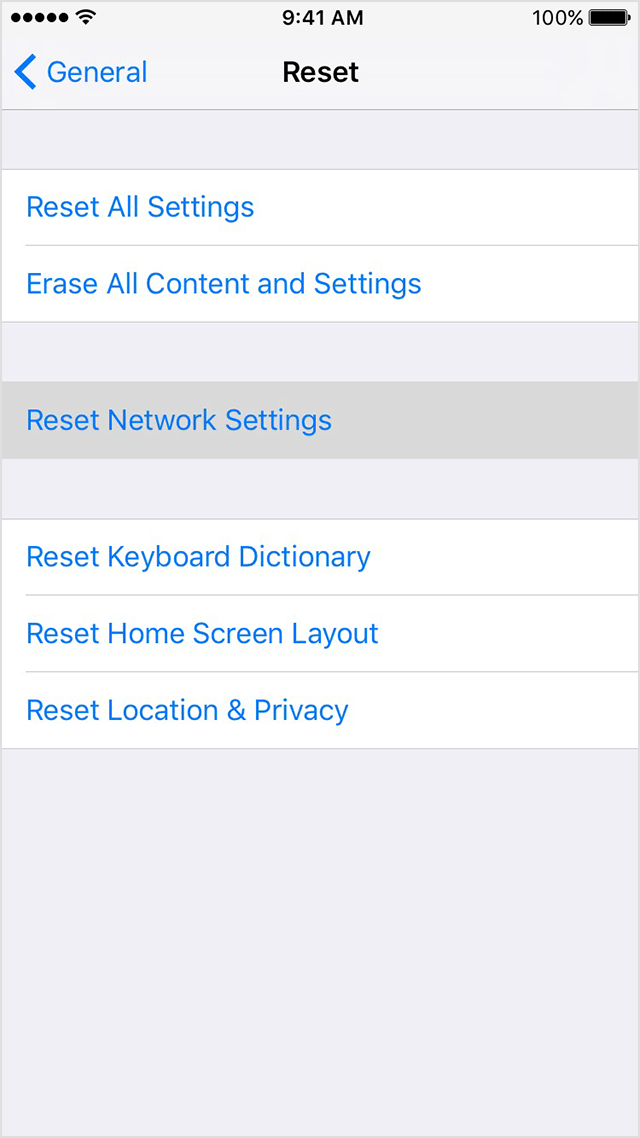
  4. Go to Settings > General > Reset and tap Reset Network Settings.
    User uploaded file
  5. Contact your carrier and make sure that you have the voicemail feature on your plan.


Thanks for using Apple Support Communities to post your question. Let us know if this works for you.


Happy Holidays.

This thread has been closed by the system or the community team. You may vote for any posts you find helpful, or search the Community for additional answers.

Voicemail Transcription

Welcome to Apple Support Community
A forum where Apple customers help each other with their products. Get started with your Apple Account.